
An AI chatbot is software that uses artificial intelligence to understand messages written in everyday language and reply to them. Businesses use AI chatbots on websites and messaging apps to answer customer questions from their own content and, increasingly, to complete tasks such as booking appointments or looking up orders.
AI chatbots vary in what they can do. Some answer FAQs in a chat widget, and others also look up orders, book appointments, and pass conversations to your team, so the right choice depends on what your customers need help with.
This guide explains what an AI chatbot is, how it handles a customer message, which types exist, where businesses use them, and how to evaluate one before you pick a platform.
TL;DR
- What Is an AI Chatbot? An AI chatbot is software that uses a language model to understands a customer's message in natural language and reply. Business chatbots answer from the company's own content and can also complete tasks.
- How Do AI Chatbots Work? A language model, a knowledge base, and connections to other systems handle each message in order: intent, knowledge retrieval, reply, optional action, then a resolution or a handoff to a person.
- Types of AI Chatbots: Chatbots differ by how they respond (menu-based, rule-based, intent-based, generative, or hybrid), by whether they only answer or also take actions, and by where they run.
- AI Chatbot Use Cases: Customer service, technical support, order tracking, lead generation, product recommendations, appointment booking, and internal help desks.
- How to Choose an AI Chatbot: Test knowledge accuracy, actions, handoff, channels, analytics, setup effort, data privacy, and the pricing unit against your own conversations.
What Is an AI Chatbot?
An AI chatbot, also called an AI-powered chatbot, is software that uses artificial intelligence, usually a large language model, to understand messages written in everyday language and reply in text or voice. Unlike a scripted chatbot, it can answer questions it was never explicitly programmed for.
Because a language model, an AI system trained on large amounts of text, interprets what the customer means, customers can ask in their own words, with typos or half a sentence, and still get a relevant answer.
On a business website, the answers come from the company's own content: help center articles, product pages, policy documents, and FAQs. The chatbot searches that content, called its knowledge base, and writes the reply from what it finds.
Many AI chatbots also act on a request. They collect details such as a name and email address, create support tickets, book appointments, look up orders, and pass the conversation to a human agent when they cannot resolve it. Knowledge, actions, and handoff decide how much a chatbot can do for a business.
AI Chatbot vs Traditional Chatbot
A traditional chatbot follows a script. It shows buttons or matches keywords to prewritten replies, so it only handles questions its builder anticipated, worded the way the builder expected.
An AI chatbot interprets the meaning of a message and writes a new reply each time, usually from the company's knowledge base. It handles questions phrased in unexpected ways and questions nobody scripted. The trade-off is control: a scripted chatbot always says exactly what you wrote, while an AI chatbot needs instructions, good source content, and testing to stay accurate. Many businesses combine the two, as the hybrid type below shows.
Read Next: We Examine How Chatbots Can Improve Your Customer Experience
How Do AI Chatbots Work?
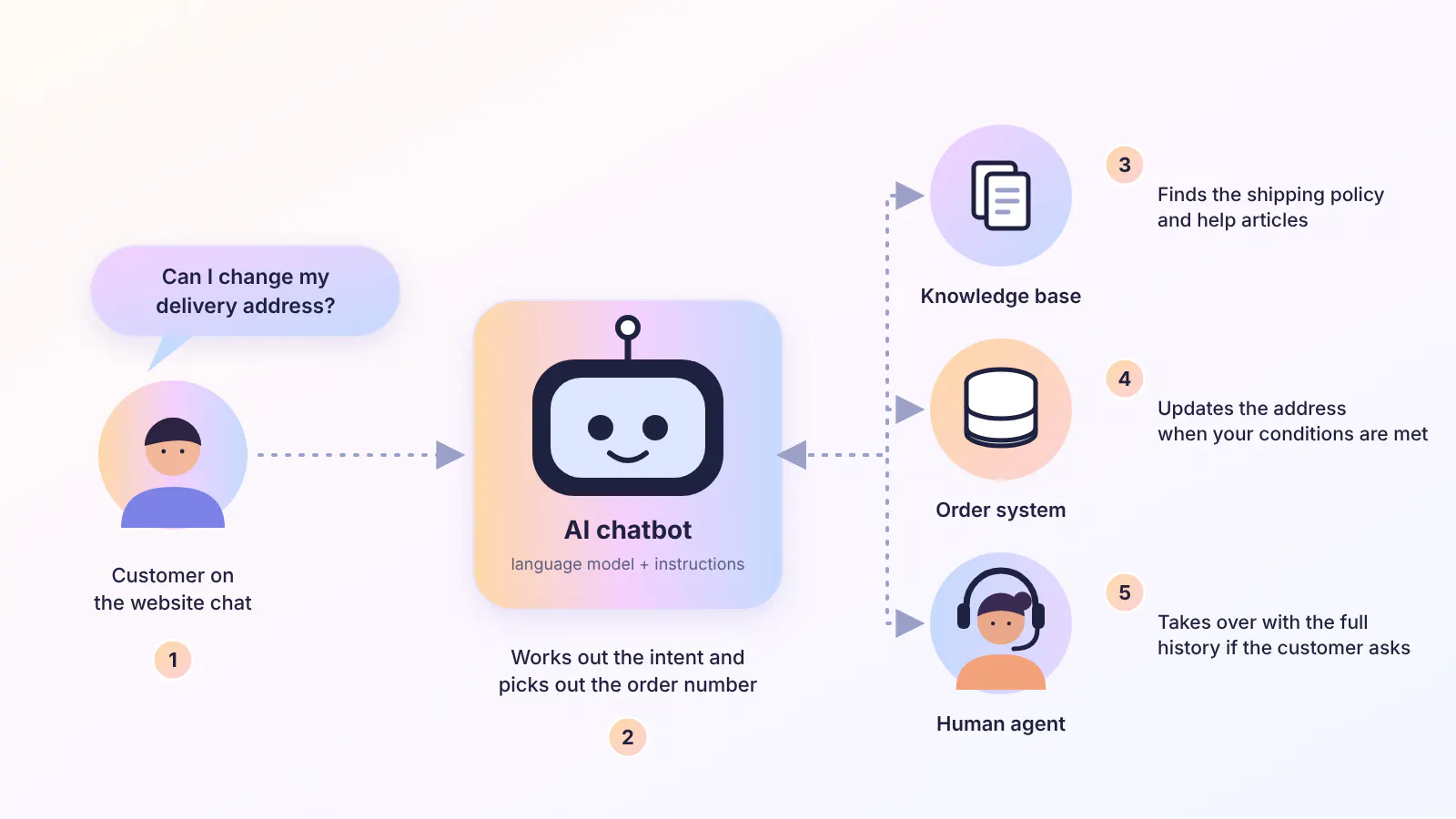
An AI chatbot consists of four major parts: a language model, a knowledge base, connections to other business systems, and rules that decide when a human agent takes over.
At the center, the language model handles the conversation. It reads the customer's message, works out what they want, and writes the reply in natural language. The knowledge base supplies the facts for that reply, and the connections let the chatbot carry out requests such as creating a ticket or updating an order.
Every message passes through these parts in the same order. Here's an example of how an AI chatbot responds to a typical message. In this case, the message is a request to change a delivery address.
- Receive. The customer sends the message through a chat widget on a website or a messaging app.
- Interpret. The chatbot works out the intent, which is a change of delivery address, and picks out details such as an order number.
- Retrieve. It searches its knowledge base for content on address changes, such as the shipping policy and help center articles.
- Generate. The language model writes a reply from the retrieved content, for example, the time window for changing an address and how to request it.
- Act. If the chatbot has access to the order system and the conditions you set are met, it updates the address. Without that access, it explains the steps.
- Hand off or close. When the customer asks for a person or the chatbot cannot answer, the conversation goes to a human agent with its history attached. Otherwise, the chatbot closes the conversation and logs it for review.
The Technology Behind Each Step
The steps above run on three pieces of technology. Knowing what each one does makes it easier to judge how a chatbot reaches its answers and why some chatbots answer better than others.
- Natural language processing (NLP): The techniques that let software work with human language. In a chatbot, NLP turns a message into an intent and pulls out details such as dates, order numbers, and product names.
- Large language model (LLM): The model behind the replies. It writes fluent answers based on patterns learned from its training text, but it only knows about your business if you give it your content.
- Retrieval-augmented generation (RAG): The method that supplies the content. The chatbot retrieves relevant passages from your knowledge base, passes them to the language model with the customer's question, and the model writes the answer from those passages.
Where AI Chatbot Answers Come From
A chatbot answers from two sources: what its language model learned in training and the content in your knowledge base. Accuracy on questions about your business depends on the second source.
From its training data, a language model learns language and general facts. That data holds nothing on your return window, plan limits, or opening hours, so a model without your content fills the gap with plausible text. Researchers call this hallucination.
Grounding answers in retrieved content reduces the problem. In a 2021 study by Facebook AI Research (now Meta), human evaluators found that the best retrieval-augmented models hallucinated in under 8% of responses, compared with 68% for the same base model without retrieval.
Retrieval only works on what the knowledge base contains. If a page is missing or out of date, the chatbot answers from what it finds, which gives the customer an incomplete or wrong answer.
Read Next: How to Implement a Knowledge Base Chatbot: Our Comprehensive Guide
Types of AI Chatbots
Chatbots differ in how they use the language model, the knowledge base, and the connections to other systems. Three questions sort those differences: how the chatbot produces a reply, what action it can execute for the customer, and where it runs.
Types of AI Chatbots by How They Respond
Menu-based and rule-based chatbots follow scripts and use no AI, so they are not AI chatbots on their own. They are listed first because hybrid chatbots combine them with AI answers.
- Menu-based chatbots: Present buttons and follow a fixed path. They fit a narrow task, such as picking a topic, and they stop working when a customer asks something outside the menu.
- Rule-based chatbots: Match keywords or phrases to scripted replies. They answer predictable questions with consistent wording and fail when customers phrase a question differently.
- Intent-based chatbots: Use NLP to classify what the customer wants and return the prepared answer for that intent. They handle varied wording, but only for the intents you defined.
- Generative AI chatbots: Use a language model to write each reply, usually from a knowledge base. They answer questions you never scripted, and they need instructions and testing to stay accurate.
- Hybrid chatbots: Combine a defined flow with AI answers, for example, a flow that collects an order number and then lets the AI answer follow-up questions. Teams use them when some steps need exact wording, and others need open answers.
Answer-Only vs Action-Taking AI Chatbots
Connections to other systems decide whether a chatbot can act on a request. Without them, the chatbot answers from its knowledge base: it can explain how to change a delivery address, but cannot change it.
With connections to a helpdesk, CRM, calendar, or order system, through built-in integrations or an API, a chatbot can create a ticket, book a meeting, update a contact, or look up an order during the conversation.
Customers already expect the second kind. In Gartner's 2026 survey of 3,566 customers, 58% of those who use GenAI said they had used it to complete a task on their behalf. Gartner's analyst noted that many company-provided chatbots are still designed mainly to answer questions.
AI Chatbot vs AI Agent
"AI agent" is the term many platforms now use for an AI chatbot that can plan and carry out tasks, not just answer questions. Vendors draw the line differently, but the difference usually comes down to how much the AI decides on its own.
An AI chatbot answers questions and runs the flows and actions you set up. An AI agent works toward an outcome: it decides which steps to take and which tools to call, in what order. For example, it might check an order, confirm the customer's details, and arrange a replacement within the limits you set.
For a business, the practical question is the same either way: which tasks the AI should complete, under what conditions, and when a person should take over.
AI Chatbots by Channel and Audience
Chatbots built on the same technology also differ in where they run and who uses them.
- Website chatbots: Sit in a chat widget on web pages and answer visitors who are browsing products, pricing, and help content.
- Messaging app chatbots: Answer in apps such as WhatsApp, Instagram, Messenger, and Telegram, so the conversation stays in the app the customer already uses.
- Voice chatbots: Take spoken requests and reply with speech, as in phone support and smart speakers.
- Internal chatbots: Answer employee questions about IT, HR, and company policies from internal documents.
Type | Best for | Key feature | Main limit |
|---|---|---|---|
Menu-based | Simple, fixed choices such as picking a topic | Button navigation | Cannot handle questions outside the menu |
Rule-based | Predictable FAQs | If-then matching on keywords | Fails when customers phrase a question differently |
Intent-based | Varied phrasing of known requests | NLP classifies the customer's intent | Covers only the intents you defined |
Generative | Open questions answered from a knowledge base | A language model writes each reply | Needs instructions and testing to stay accurate |
Hybrid | Flows that need exact wording plus open answers | Defined steps with AI answers | Takes more setup than a single approach |
Top 7 AI Chatbot Use Cases
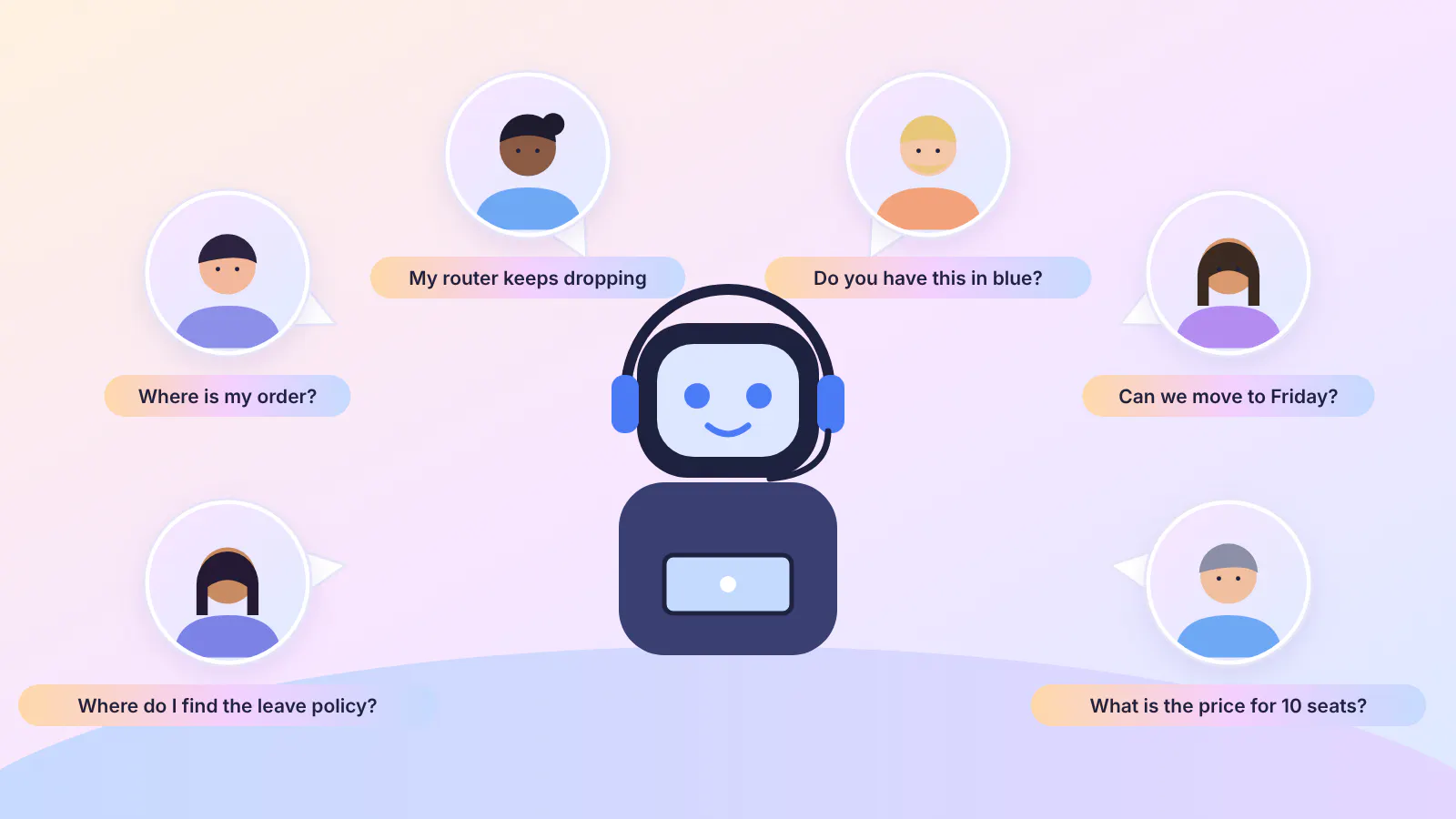
Chatbots take on work that comes in the same form again and again, such as questions about pricing and returns or the steps to book a meeting. Some jobs need only a knowledge base, while others also need actions or handoff, and that decides which type fits. Here are seven most common use cases of an AI chatbot.
#1) AI Customer Service Chatbots and FAQ Answers
Frequently asked questions are a natural first job for an AI customer service chatbot. It answers routine questions about shipping times, return policies, pricing, business hours, and product details straight from the knowledge base, at any hour. Fewer of these routine questions reach the support team, so agents spend their time on the conversations that need judgment.
#2) Technical Support and Troubleshooting
Troubleshooting follows a pattern: find out which device, which version, and which error message, then work through the fixes that match. A chatbot asks those questions in order, matches the answers to knowledge base articles, and walks the customer through the steps.
When the problem is still unsolved, the chatbot creates a ticket with the details it had already collected, so the agent picks up without repeating the questions. Agents see fewer basic issues and start each escalated ticket with the context in hand.
#3) Order Tracking and Status Updates
Order status questions come up constantly for any business that ships products, and the answers live in the order system, so a knowledge base alone cannot supply them. A chatbot connected to that system takes the order number, looks up the current status through an API, and replies with where the order stands and the delivery estimate when the system provides one. Customers get their answer in the chat, and agents stop looking up the same records by hand.
#4) Lead Generation and Qualification
Visitors on product and pricing pages often have a question and no easy way to ask it. A chatbot answers it, then asks a few qualifying questions about company size, use case, or timeline, and collects a name and email address. The lead goes to the CRM with the full conversation attached, so sales starts with what the visitor already asked.
#5) Product Recommendations and Purchase Help
Shoppers want to know about sizes, compatibility, and how one product differs from another before they buy. With the product catalog and store policies as its knowledge base, a chatbot answers those questions and links to the matching product pages. Shoppers reach decisions without waiting for a reply, and the team answers fewer pre-purchase emails.
#6) Appointment Booking
Agreeing on a time over email takes several messages. A chatbot with access to a calendar shows open slots in the conversation, books the one the customer picks, and sends the confirmation. Customers finish in one conversation, and the team stops trading messages about availability.
#7) Internal IT and HR Help Desk
Employees ask the same questions about password resets, leave policy, and expense rules. An internal chatbot answers them from policy documents, and with a ticketing integration, it opens an IT ticket when a problem needs a technician. IT and HR teams spend less time on routine requests and more on the ones that need a person.
Each use case relies on a different mix of knowledge, actions, and handoff.
Use case | Knowledge base | Actions and integrations | Human handoff |
|---|---|---|---|
Customer service and FAQs | Core source of answers | Optional ticket creation | Required for unresolved questions |
Technical support | Core source of answers | Ticket creation | Required for unresolved problems |
Order tracking | Shipping and return policies | Order system lookup through an API | For exceptions such as lost parcels |
Lead generation | Product and pricing information | Lead capture and CRM sync | When a prospect asks for sales |
Product recommendations | Catalog and store policies | Optional | For complex questions |
Appointment booking | Service details | Calendar booking | For rescheduling exceptions |
Internal help desk | HR and IT policy documents | Ticketing | For sensitive HR matters |
Read Next: We Explore 10 Chatbot Use Cases Across Various Industries
AI Chatbot Examples
Examples of AI chatbots fall into two groups: general-purpose assistants that people use for their own questions, and chatbots that businesses place in front of customers. The groups differ in where their answers come from.
General-Purpose AI Chatbots
Open questions on almost any topic go to assistants such as ChatGPT, Gemini, Claude, and Copilot, which answer from the data their models were trained on. Unless a user pastes them in, these assistants know nothing about a particular company's policies.
Business AI Chatbots on Websites and Messaging Apps
Businesses deploy AI chatbots on their website and messaging apps to answer customer questions from the company's own content and connect to its systems. The examples below show the pattern across four kinds of business.
- An online store answers order and return questions. The chatbot answers shipping and return questions from the store's policy pages and looks up order status in the order system, so customers get answers without emailing support.
- A software company handles how-to and troubleshooting questions. The chatbot answers from the help center and product docs, and it creates a ticket with the details it collected when a problem needs an engineer.
- A school answers family questions after hours. The chatbot uses the handbook and website as its knowledge base, so routine questions about dates, policies, and forms get an answer outside office hours.
- A services company qualifies leads on its website. The chatbot answers product questions, asks about company size and use case, and sends qualified leads to the CRM with the conversation attached.
Benefits and Limitations of AI Chatbots
AI chatbots save the most time where questions repeat, and they need the most care where answers have exceptions.
Benefits
- Answers at any hour: Customers get a reply outside business hours and across time zones without extra staff.
- Less repetitive work: Routine questions and tasks stop reaching agents, so the team spends its time on conversations that need judgment.
- Faster resolution: The chatbot replies in seconds, and customers can finish tasks such as bookings and order lookups in one conversation.
- Consistent answers: Every customer gets the same answer from the same source content.
Limitations
- Accuracy depends on your content: A missing or outdated page leads to a missing or outdated answer.
- Ongoing upkeep: The chatbot needs instructions, testing, and regular review after launch.
- Not every conversation fits: Complaints, policy exceptions, and sensitive issues still need a person.
- Usage-based costs: On most plans, a busier month costs more.
Most of these limitations can be managed during setup. The section on getting live below covers how.
How to Choose an AI Chatbot – 8 Criteria to Evaluate Before You Commit
Most chatbot platforms have similar features, so a feature list rarely settles the choice. How each handles your own conversations does. Each criteria below ends with a test you can run during a trial.
#1) Knowledge Sources and Accuracy Control
A chatbot is only as accurate as the content you give it. Look at which sources it can read, such as website pages, help center articles, documents, and FAQs, and whether you can fix a wrong answer once you spot one.
Test: Ask the Chatbot 20-30 questions from your support inbox, a few of them on topics your content does not cover. It should admit it does not know the answers to those questions.
#2) Actions and Integrations
If a chatbot cannot take actions, then order lookups, bookings, and ticket creation are still your team's responsibility. Find out which systems it connects to, whether it can call an API, and whether you can set conditions for when an action runs.
Test: Pick your three most common support tasks and run each one from the first message to the confirmation.
#3) Human Handoff With Context
Every AI chatbot faces customer conversations it cannot finish. Handoff passes those conversations to a human agent. In Gartner's 2026 survey, 87% of customers said it is essential to have a way to reach a human agent when a company uses GenAI for service. Look for a handoff that starts when a customer asks for a person or when the chatbot cannot answer, and sends the agent the conversation history and a summary.
Test: Ask for a person in the middle of a conversation and check that the agent does not make you repeat anything.
#4) Channels and Languages
Customers reach out through your website, WhatsApp, Instagram, and other channels, and the chatbot has to run on every one you use. Check that it covers your channels, that conversations from all of them land in one inbox, and which languages it answers in.
Test: Send the same question through each channel, and once in your customers' second most common language. Compare the answers.
#5) Testing and Analytics
You can only improve answers that you can see failing. Look for a testing area where you can change instructions or models before customers see the change, and for analytics on conversations, resolution, satisfaction, and the questions the chatbot could not answer.
Test: Find a conversation with a wrong answer and check that you can correct it from the same screen.
#6) Setup Effort
The amount of engineering a chatbot needs decides who can keep it running after launch. No-code platforms let support or marketing staff add sources, write instructions, and publish. Developer-built chatbots allow deeper custom behavior, but every change needs more implementation time.
Test: Hand the trial to the person who will run the chatbot and see whether they can publish a working version without engineering help.
#7) Data Privacy
Customer conversations and company documents pass through the platform, so ask whether the AI chatbot provider uses your content to train its models, how long uploaded documents are stored, and which data protection rules the platform follows, such as GDPR.
Test: Read the vendor's terms of service and data protection page for these answers before you upload anything.
#8) Pricing Model
Platforms have various pricing models. AI credits, conversations, resolutions, or seats, and the unit decides what you pay, because the same traffic costs a different amount under each.
Also, the AI model you pick changes how many customer messages the chatbot can answer.
Test: Estimate your monthly AI responses from your current conversation volume, multiply by the credits per response, and compare the total with what each plan includes. You should also find out how the platform bills you when the credits run out.
Read Next: Chatbot vs Live Chat: Which Should You Use for Customer Support?
Choosing an AI Chatbot by Situation
Find the situation closest to yours and start with its test. Start with what your first use case needs, and add the rest after real conversations show where the chatbot falls short.
Situation | What to check first | First test to run |
|---|---|---|
A support team with a help center | Knowledge base accuracy, handoff with a summary, ticket creation | Ask ten real questions, including three your content does not cover |
An online store | Order lookup through an API, product catalog as a knowledge source, messaging channels | Look up a real order from the chat |
A lead-generation website | Lead capture, CRM sync, qualifying questions, handoff to sales | Submit a test lead and confirm it reaches the CRM with the conversation |
A team with developers | API access, custom actions, choice of AI model | Run an action against your own API |
Getting an AI Chatbot Live and Best Practices
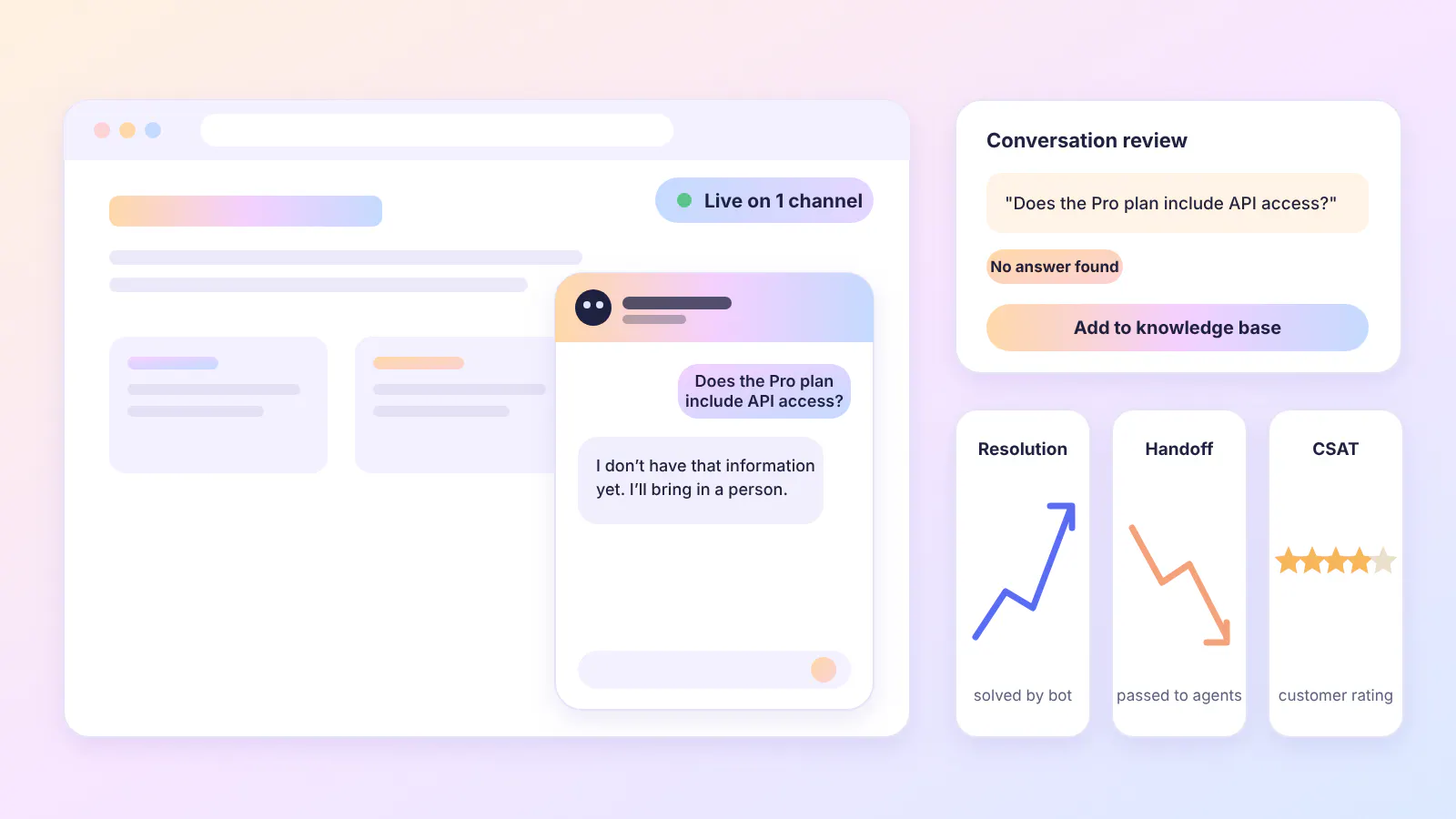
An AI chatbot gets better the more you review it after launch. The steps below make a loop, and you repeat steps four to six for as long as the chatbot is live.
- Add your knowledge sources, such as website pages, documents, and FAQs, and leave out pages that should not appear in answers.
- Write instructions that set the chatbot's role and tone, and tell it what to say when it has no answer.
- Connect actions and set conditions for when each one runs.
- Test with real customer questions, including ones your content does not cover.
- Publish on one channel first and read the early conversations before adding more.
- Review conversations, correct wrong answers, add content for questions the chatbot missed, and re-sync sources when your content changes.
Tip: Keep 10-15 test questions from step four and run them again after every change to instructions, models, or content. A fix for one answer can change others, and a saved set shows you.
Read Next: Here’s Our Guide on How to Create a Chatbot For Your Website
AI Chatbot Implementation: What Can Go Wrong and How to Prevent It
AI chatbots tend to fail in four typical ways, and each one can be prevented during setup.
- Wrong or invented answers: A chatbot can answer questions your knowledge base does not cover with something that it deems right, but is not. Instruct it to answer only from your content and write the reply it should give when it has no answer, such as offering to connect the customer with an agent.
- Outdated answers: The chatbot works from a copy of your content, so it keeps giving the old answer after policy or price changes on your website. Schedule regular re-syncs and run one after any major update.
- Actions at the wrong time: Actions can run when they should not, such as a refund for a customer who only asked about the refund policy. Put a condition on each action, such as a confirmed order number or an explicit request.
- No way to reach a person: Customers who ask for an agent can end up stuck with the chatbot. Add handoff rules for direct requests, and for questions the chatbot cannot answer, and pass the conversation history along so the customer does not have to repeat themselves.
Metrics to Track: Resolution Rate, Handoff Rate, and CSAT
Three numbers tell you whether the loop is working.
- Resolution rate: The share of conversations the chatbot finishes without a person. Read it next to CSAT, since a customer who gives up also ends a conversation without an agent.
- Handoff rate: The share of conversations that reach a human agent. A high rate on one topic points to missing content or a missing action for that topic.
- CSAT: The customer satisfaction score from a short survey at the end of a conversation. Compare scores for conversations the chatbot resolved with scores for handed-off conversations.
Read Next: Our Ultimate Guide to Chatbot Analytics (+ 5 Metrics That Matter)
How Chatling Helps With Building AI Chatbots
Chatling is a no-code platform for building AI chatbots and AI agents that answer from your content, complete tasks, and hand conversations to your team when required. It covers the three parts this guide keeps coming back to.
Knowledge: The AI answers from your knowledge base, which accepts website pages, sitemaps, URL lists, documents (PDF/DOCX/TXT), text, FAQs, and articles from Zendesk, Zoho, Notion, and other sources. Auto-sync refreshes those sources daily, weekly, or monthly, so answers stay current when your content changes.
Actions: Through integrations, the AI completes tasks during the conversation, such as showing open times and booking a meeting through Calendly and other platforms, saving leads to your CRM, or creating tickets in platforms like Zendesk.
Handoff: When a customer asks for a person or the AI can't resolve the question, the conversation moves to your team in live chat with the history attached.
Channels: The same AI runs on your website and in WhatsApp, Instagram, Messenger, Telegram and other channels.
For steps that need exact wording, such as collecting an order number before the AI answers, the visual builder lets you combine scripted steps with AI answers.
Chatling's free plan allows you to build, test, and deploy AI chatbots on your website and other channels. Learn more about Chatling's website chatbot.
Also Read:
- What Is Chatbot Design? Principles, Best Practices & Examples
- Chatbot Customer Service Automation for Enhanced Support Efficiency
- How to Integrate a Chatbot to Your Website: A Complete Guide
Frequently Asked Questions
Is ChatGPT an AI Chatbot?
Yes. ChatGPT is a general-purpose AI chatbot built on a large language model. It answers from the data it was trained on, so a business that needs answers about its own products and policies uses a chatbot that takes its own content as the knowledge base.
Do AI Chatbots Learn From Conversations?
Not automatically. A chatbot that answers from a knowledge base changes its answers when you update the knowledge base, edit its instructions, or correct individual answers. Reviewing conversations shows which of those changes to make.
How Much Do AI Chatbots Cost?
AI chatbot pricing depends on the billing unit and the volume of conversations. Platforms charge by AI credits, conversations, resolutions, or seats, and many include a free plan for testing. Chatling's paid plans start at $25 a month, and its free plan includes 200 AI credits a month.
Can AI Chatbots Replace Human Agents?
Not fully. AI chatbots take over repeat questions and routine tasks, and human agents handle cases that need judgment, exceptions to policy, and customers who ask for a person. A chatbot, therefore, needs a handoff to a human team.
Do You Need to Code to Build an AI Chatbot?
No. No-code platforms let you build a chatbot in a visual builder or a settings dashboard by adding content sources, writing instructions, and publishing a widget to your site. Developers become necessary when you need custom integrations beyond the built-in ones.
What Makes AI Chatbot Conversations Feel Natural and Useful?
Four things shape it: clear instructions, plain-language content, memory of the conversation so far, and a quick handoff. Instructions set the chatbot's tone and reply length, so it sounds like your business and keeps answers short. Content written in plain language gives it accurate material to answer from. Following the whole conversation lets it handle follow-up questions without asking the customer to repeat anything, and handoff to a person covers the questions it cannot answer.
Is an AI chatbot worth it for a small business?
Yes, if your business gets many repetitive questions. An AI chatbot can handle routine support, answer product questions, and collect leads while your team handles more complex requests.
What is the best AI chatbot for a website?
The best AI chatbot depends on your business needs. Chatling is a good option if you want a chatbot that answers from your own content, automates support tasks, and hands conversations to human agents when needed.
What should I look for in an AI chatbot platform?
Look at how well the chatbot handles your actual customer conversations. Check its knowledge sources and accuracy, ability to take actions, human handoff, supported channels and languages, testing and analytics, setup effort, data privacy, and pricing model.