
Customers today expect quick answers, help at any time of the day, and solutions that don't require them to explain the same problem to multiple representatives. Traditional chatbots help automate some of this work, but they have their limits.
AI customer support agents take automation further. They can understand natural language requests, retrieve information from business knowledge sources, decide how to respond, troubleshoot issues, submit support requests, and complete other tasks through configured integrations.
A study by Gartner predicts that by 2029, agentic AI will resolve 80% of customer service issues without ever involving a human agent.
We'll explain what AI customer support agents are, how they work, what they can do, and how businesses use them.
- What AI support agents are: AI agents understand customer requests, retrieve business information, and perform tasks using connected tools.
- How they work: They understand intent, retrieve information, decide next steps, execute actions, and respond.
- What they can do: They answer questions, troubleshoot problems, retrieve customer data, create tickets, and automate routine tasks.
- Key benefits: Businesses use AI agents to provide faster support, reduce repetitive work, improve consistency, and manage growing volumes.
- Common use cases: They handle order tracking, technical support, billing inquiries, appointment bookings, and customer account assistance.
What Is an AI Customer Support Agent?
Unlike a traditional chatbot that follows a predefined conversation flow, an AI agent can interpret open-ended questions and decide what to do next based on the customer's intent, conversation context, instructions, and available resources.
For example, imagine a customer contacts an online store and asks, "My order was supposed to arrive yesterday. Can you check what's happening?"
A basic chatbot might respond with a link to the store's order tracking page. An AI customer support agent connected to the store's order system can ask for the order number, retrieve the latest delivery status, and explain what it finds. If the shipment is delayed and the customer needs further assistance, it can collect the relevant details and create a support ticket through a configured integration.
The difference isn't simply that one system gives better answers. It's that an AI agent can move a customer request towards a resolution by performing tasks, not just providing information.
An AI agent typically combines several components:
- Large language models (LLMs): Help the agent understand natural language, interpret requests, and generate relevant responses.
- Instructions: Define the agent's role, goals, tone, business rules, and boundaries.
- Knowledge sources: Provide information about the business, its products, services, and policies.
- Tools and integrations: Allow the agent to retrieve information, update records, create tickets, and perform other configured tasks.
- Human handoff: Allows the agent to transfer conversations to a human representative when needed.
Together, these components allow an AI customer service agent to handle different requests without requiring a separate conversation flow for every possible customer question.
How Do AI Customer Support Agents Work?
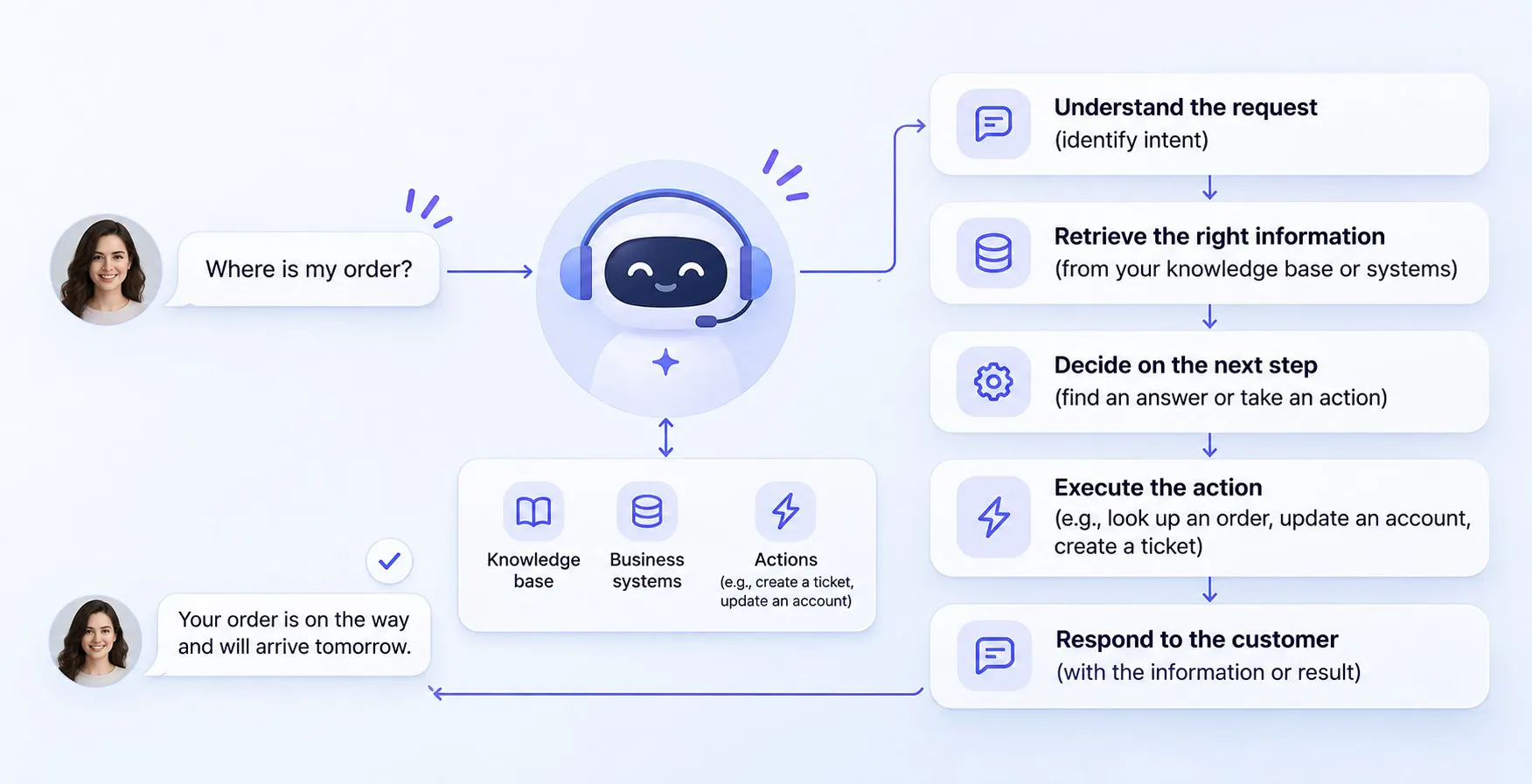
AI customer support agents combine language models, business knowledge, instructions, and external tools to understand customer requests and determine how to handle them.
The exact architecture varies between platforms, but most agents follow a similar process: understand the request, retrieve relevant information, decide what to do, execute the required action, and communicate the result.
Here's how each stage works.
1. Understand the customer's request
The process starts when a customer sends a message. The AI agent uses natural language processing and a large language model to interpret what the customer is asking.
It looks beyond individual words to understand the intent behind the message, identify important details, and consider the conversation that’s already happened.
For example, a customer might say:
"My subscription renewed yesterday, but I thought I'd cancelled it last week. Can you help?"
The agent needs to recognize several things:
- The customer is asking about a subscription renewal.
- They believe they cancelled the subscription before the renewal date.
- They may need information about their account and billing history.
- They want help resolving a potential billing issue.
The customer doesn't need to select a billing category or follow a predefined menu. They can explain the situation in their own words.
The agent can also ask follow-up questions when it needs more information. If it needs an account email or subscription ID to retrieve a record, it can request those details before continuing.
2. Retrieve relevant business information
Once the agent understands the request, it needs reliable information to formulate an appropriate response or determine the next step.
This is where a knowledge base comes in.
A knowledge base contains information that the business wants its AI agent to use when answering customers. It can include:
- Help center articles and FAQs.
- Product and service information.
- Shipping, return, and refund policies.
- Troubleshooting guides.
- Account and subscription information.
- Internal support documents and procedures.
The agent searches these sources for information relevant to the customer's question and uses the results to generate its response.
Many AI systems use a technique called retrieval-augmented generation (RAG) to support this process. Rather than relying entirely on information learned during model training, the system retrieves relevant information from an external knowledge source and uses it to generate an answer.
For example, if a customer asks whether a damaged product is eligible for a replacement, the agent can retrieve the company's warranty policy and explain the conditions that apply.
This is important because general AI knowledge isn't a substitute for business-specific information. The agent needs access to the company's actual policies and product details to provide useful support.
3. Decide how to respond or what action to take
After understanding the request and retrieving relevant information, the agent determines the appropriate next step.
Depending on the request, it might:
- Answer a question using the knowledge base.
- Ask the customer for missing information.
- Retrieve customer-specific information through an API.
- Create a support ticket.
- Send an email confirmation.
- Book an appointment.
- Transfer the conversation to a human representative.
If the required action isn't available, the agent shouldn't pretend it has completed the request. It should explain what it can do and direct the customer towards the appropriate next step.
This ability to determine which tool or action is appropriate is a key part of agentic AI in customer service.
4. Execute the required action
This is where AI agents move beyond generating responses.
An AI agent can use tools to interact with external systems and perform tasks during a conversation. These tools are often called AI actions and workflows.
For example, an agent might use:
- An HTTP request to retrieve information from an external API.
- A CRM integration to create or update a customer record.
- A help desk integration to create a support ticket.
- An email action to send a confirmation.
- A booking integration to display available appointment times.
Let's say a customer asks to book a product consultation. The agent can collect their name and email address, display a booking widget, and allow them to select an available time without leaving the conversation.
The important distinction is that the agent needs access to the relevant tool and permission to perform the task. An AI model cannot update a customer account or check an order simply because someone asks it to.
5. Respond or handoff the conversation to a human
After retrieving information or completing an action, the agent communicates the result to the customer.
If it has successfully retrieved an order status, it can explain the delivery update. If it has created a support ticket, it can confirm that the request has been submitted.
But not every customer request should be handled entirely by AI.
If the issue requires human judgment, falls outside the agent's capabilities, or meets a configured escalation condition, the agent can transfer the conversation to a support representative.
This combination of automated assistance and human support allows businesses to automate routine interactions without removing people from situations where they are needed.
What Can an AI Customer Support Agent Do?
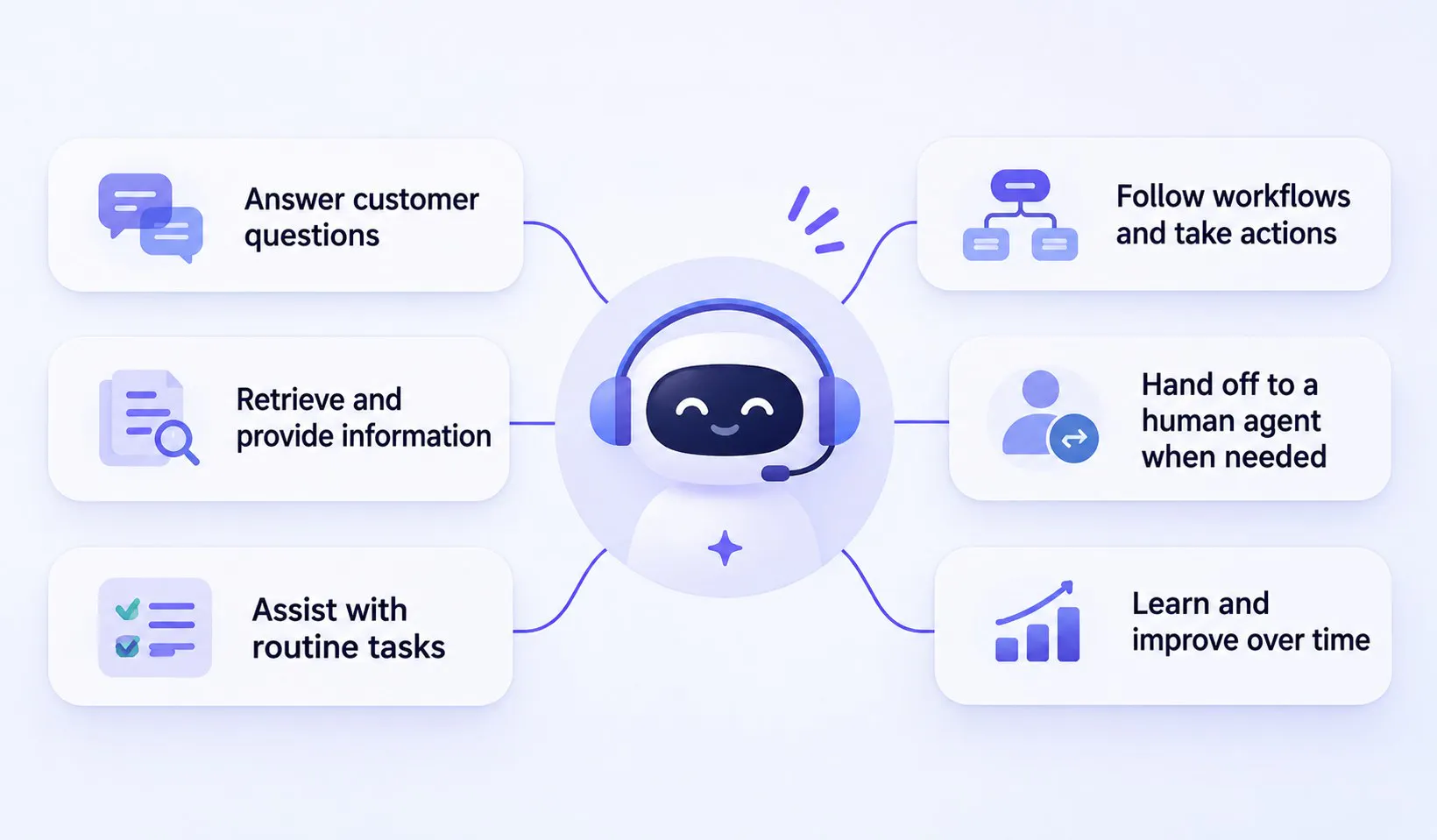
AI customer support agents can handle a wider range of tasks than traditional automated chat systems. Their capabilities depend on the AI model, business information, instructions, available integrations, and actions configured by the company.
Answer customer questions
Answering common customer questions is one of the most straightforward applications of an AI support agent.
Customers can ask questions in natural language and receive answers based on the business's knowledge sources.
For example, an agent can:
- Explain product features and specifications.
- Answer questions about pricing and plans.
- Share shipping and delivery policies.
- Explain return, refund, and warranty conditions.
- Provide information about subscriptions and services.
- Find relevant help articles and troubleshooting instructions.
Unlike a basic FAQ bot, an AI agent can handle variations of the same question and respond to follow-up messages using the conversation context.
Troubleshoot customer problems
Customers often contact support because something isn't working as expected. AI agents can help with common issues by asking questions, retrieving relevant troubleshooting information, and guiding customers through available solutions.
For example, a software company's AI agent could help a customer who can't log in.
It might:
- Ask whether the customer sees an error message.
- Retrieve the relevant login troubleshooting instructions.
- Guide the customer through password reset steps.
- Explain what to do if the problem continues.
- Create a support ticket or hand the conversation to a human representative if the issue remains unresolved.
This allows customers to work through common problems without waiting for a support representative.
Retrieve customer and account information
An AI agent can retrieve customer-specific information when it has access to the relevant systems.
Depending on the available integrations, it may be able to:
- Check an order's delivery status.
- Retrieve subscription details.
- Look up account information.
- Check usage or service details.
- Find existing support tickets.
- Retrieve information from a CRM or database.
For example, a SaaS customer might ask how much of their monthly usage allowance remains. If the agent has access to the relevant account data through an API, it can retrieve the current figure and explain it.
Without that connection, the agent can only provide general information about how usage limits work.
Create and manage support tickets
AI agents can collect the information needed for a support request and use configured help desk integrations to create tickets.
Instead of asking customers to fill out a separate form, an agent can collect details during the conversation, such as:
- Customer name and email address.
- Order or account number.
- Description of the issue.
- Relevant error messages.
- Previous troubleshooting attempts.
It can then submit the information through a supported integration, such as a help desk or external API.
Some integrations also allow agents to create or update customer records. This helps connect customer conversations with the systems support teams already use.
Automate routine support tasks
Not every customer interaction requires a detailed answer. Some requests involve straightforward tasks that can be handled through configured actions.
An AI agent can:
- Collect customer details through a form.
- Save lead information.
- Send transactional or follow-up emails.
- Display buttons for relevant next steps.
- Book appointments through a connected booking tool.
- Retrieve or update information through external APIs.
- Work with CRM and spreadsheet data through supported integrations.
For example, a customer asking to schedule a product demo can provide their contact details and select an available appointment time during the conversation.
The agent handles the information collection and booking steps, while the sales or support team receives the details they need.
Qualify requests and collect customer information
Sometimes an agent needs more information before it can provide useful help.
It can ask follow-up questions, collect required details, and use that information in later steps.
A customer asking about a software issue might need to provide their account email, device type, and the error message they are seeing.
An agent can collect these details before initiating a support request. This reduces the amount of back-and-forth needed when a human representative takes over.
The same capability can also support lead capture, appointment requests, and other customer-facing workflows.
Generate and qualify leads
AI customer support agents can turn website visitors into potential customers by engaging them in conversations and identifying their needs. They can ask qualifying questions, collect contact details through lead forms, and pass the information to a sales team for follow-up.
For example, a visitor exploring a SaaS product might ask whether it supports a particular integration. The AI agent can answer the question, ask about the visitor’s business needs, collect their email address, and capture their interest for the sales team.
Handoff conversations to human support
AI agents don't need to handle every request themselves. They can recognize when a conversation should be passed to a person based on configured instructions and escalation rules.
A business might configure its agent to transfer conversations when a customer explicitly requests a human representative, the agent cannot find reliable information, or the issue needs human judgement.
The AI agent can gather relevant information before transferring the conversation. This gives the support team a clearer picture of the issue and helps them take over without starting from scratch.
Benefits of AI Customer Support Agents
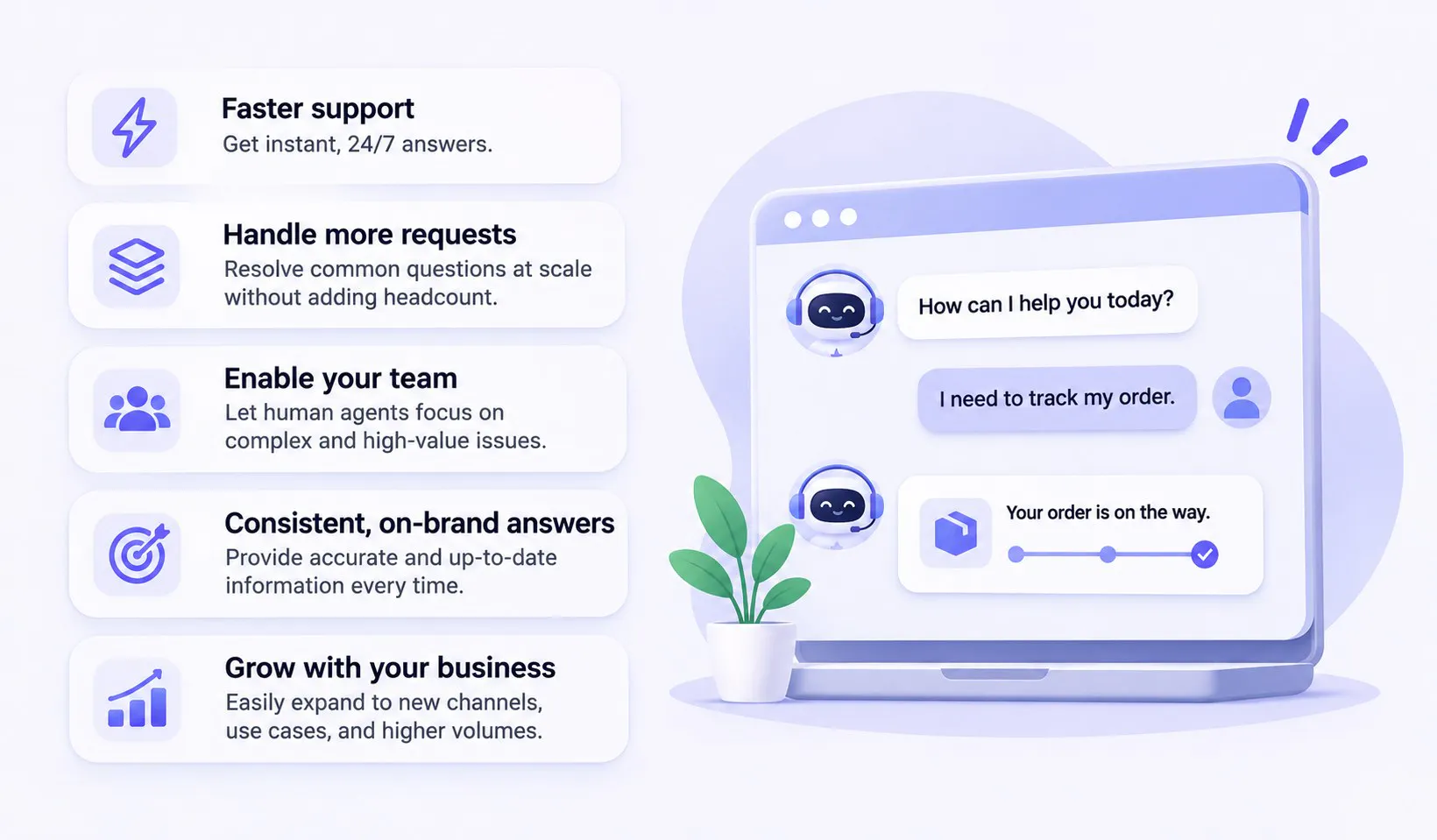
AI customer support agents can improve how businesses manage customer interactions by combining instant responses, information retrieval, task automation, and human handoff.
1. Provide faster customer support
Customers don't want to wait in a queue to find out a company's return policy or check a basic account detail.
AI agents can respond to supported requests as soon as customers send them. They can also retrieve information and perform configured tasks during the same interaction.
This reduces waiting time for routine requests and gives support teams more room to focus on issues that need closer attention.
2. Offer support outside business hours
Customer questions don't arrive only during office hours. Someone might need help with an order late at night, while another customer might be trying to troubleshoot a software issue over the weekend.
AI customer support agents can handle supported conversations at any time, even when the human support team is unavailable.
3. Reduce repetitive support work
Support teams spend a significant amount of time answering questions that come up repeatedly.
These might include:
- Where can I find my invoice?
- What is your return policy?
- How do I reset my password?
- When will my order arrive?
- How do I change my subscription?
Handling each of these questions manually takes time, even when the answer is straightforward.
An AI agent can handle supported requests using business knowledge and configured actions. This reduces the number of repetitive interactions that need to reach human representatives.
As a result, support teams can spend more time investigating complex issues, helping frustrated customers, and resolving cases that require their experience.
4. Improve the customer experience
A good customer support experience isn't just about receiving a quick response. Customers also want accurate information, clear next steps, and a solution that addresses their actual problem.
AI agents can make support easier by allowing customers to ask questions naturally, receive relevant answers, and complete supported tasks within the same conversation.
5. Scale support without increasing workload at the same rate
As a business grows, customer support volume often grows with it.
Hiring more representatives can help, but it also increases staffing and training requirements. An AI agent offers another way to manage growing volumes by handling supported requests automatically.
It can manage multiple conversations and respond to common questions without requiring a human representative for every interaction.
This doesn't mean businesses can operate without support teams. Instead, AI helps them handle more routine interactions while keeping human representatives available for cases that need them.
6. Deliver more consistent answers
When multiple representatives answer the same questions, differences in wording and interpretation can lead to inconsistent customer experiences.
An AI agent can use a shared set of approved business information and instructions to keep responses aligned with company policies.
For example, if a company updates its return policy, it can update the relevant knowledge source so the agent uses the revised information in future conversations.
The same knowledge can also support customers across different channels, helping maintain consistency between website chat and messaging platforms.
7. Give human representatives better context
Human handoff can be frustrating when customers have to repeat information they've already shared with an AI agent.
A well-configured handoff process prevents this.
Before transferring a conversation, the AI agent can collect relevant details and pass the conversation history, an AI-generated summary, and context to the support team.
The representative can see what the customer asked, what information was retrieved, and what steps were already attempted.
This makes it easier to continue the conversation and reduces the need for customers to explain their issue again.
AI Customer Support Agent Use Cases
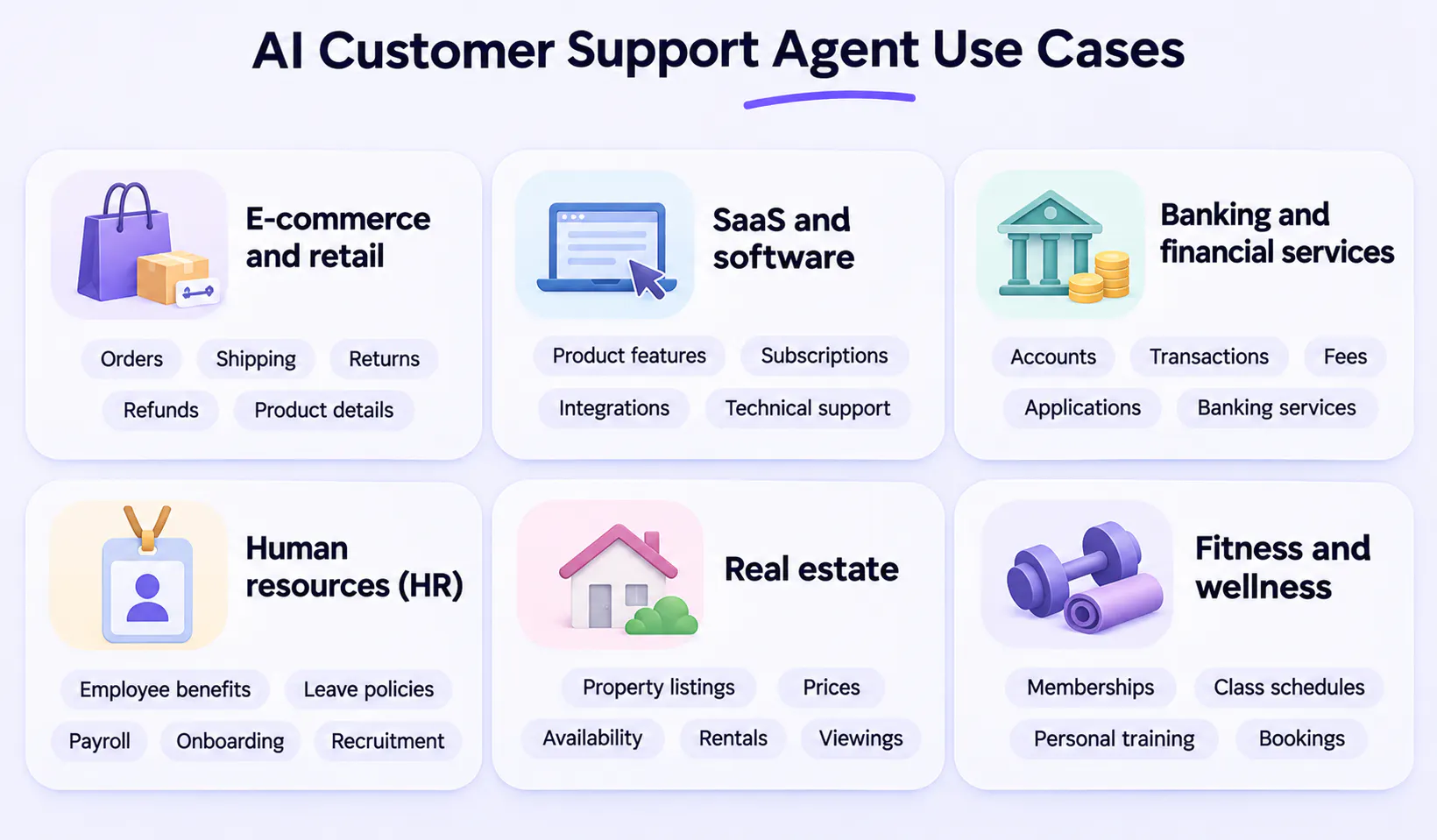
AI customer support agents can support businesses across different industries. Their applications range from answering common questions to retrieving customer information, automating routine tasks, and routing requests to the right team.
Industry | Common customer requests | How AI agents help |
|---|---|---|
E-commerce and retail | Orders, shipping, returns, refunds, product details, warranties. | Track orders and deliveries; explain return and refund policies; answer product questions; collect return or warranty details; escalate order problems. |
SaaS and software | Product features, subscriptions, integrations, login issues, technical support. | Explain features and plans; guide users through setup; troubleshoot common issues; retrieve account information; collect technical details and create support tickets. |
Banking and financial services | Accounts, transactions, fees, applications, banking services. | Explain banking services and policies; answer questions about fees; share application requirements; retrieve permitted account information; route disputes to human representatives. |
Human resources (HR) | Employee benefits, leave policies, payroll, onboarding, recruitment. | Answer questions about HR policies; explain leave and attendance procedures; share onboarding instructions; retrieve permitted employee information; collect and route HR requests. |
Real estate | Property listings, prices, availability, rentals, viewings. | Share property details and prices; answer questions about listings; check availability through connected systems; qualify potential buyers and renters; schedule property viewings. |
Fitness and wellness | Memberships, class schedules, personal training, bookings, cancellations. | Explain membership plans and pricing; share class schedules and facility details; answer service-related questions; collect membership inquiries; assist with supported bookings and cancellations. |
What Are the Limitations and Challenges of AI Customer Support Agents?
AI customer support agents can automate many interactions. However, their performance depends on the quality of the information they receive, the instructions they follow, the tools they can access, and the way businesses manage escalation.
Understanding these limitations helps businesses set realistic expectations and avoid poor customer experiences.
- Incorrect or incomplete answers: AI agents can misunderstand questions or provide inaccurate information when knowledge sources are outdated, incomplete, or unclear. Businesses need to maintain accurate information, review incorrect responses, and test the agent against different customer scenarios.
- Limited access to customer information and systems: An AI agent can only retrieve information from systems it can access. Checking an order, retrieving account details, or updating a subscription requires the right integrations, API connections, and permissions.
- Complex issues requiring human judgment: Sensitive complaints, policy exceptions, billing disputes, and high-value customer concerns may require human involvement. AI agents can collect details, explain policies, and route conversations, but shouldn't make decisions beyond their configured authority.
- Integration and setup requirements: AI agents need relevant knowledge sources, clear instructions, configured actions, and connections to external systems to complete support tasks. Without the required integrations, an agent might explain how to complete a task but won't necessarily be able to do it.
- Privacy and data security: Customer conversations can contain personal and sensitive information. Businesses need to restrict access to customer data, configure PII handling, set rules for restricted topics, apply appropriate access controls, and follow relevant privacy regulations.
- Ongoing monitoring and improvement: AI agents need regular reviews as products, policies, and customer questions change. Businesses should identify knowledge gaps, review conversations, test actions, and monitor performance to make sure customers are getting their issues resolved.
- Measuring actual resolution: A high ticket deflection rate doesn't necessarily mean customers' problems are being solved. Businesses should track resolution rate, deflection rate, response time, customer satisfaction, escalation rate, and knowledge gaps to understand where the agent is helping and where it needs improvement.
Make Customer Support More Helpful With Chatling
Customer support is moving beyond automated replies. Businesses can now use AI agents to understand customer requests, retrieve relevant information, perform configured tasks, and work alongside human support teams.
But successful support automation depends on accurate business knowledge, clear instructions, useful integrations, and a reliable way to hand conversations over when human support is needed.
Chatling brings these capabilities together in one platform. Its AI Agents use your business knowledge to answer customer questions, while configurable AI Actions and workflows allow them to collect information, interact with external APIs, create support tickets, send emails, and book appointments.
You can deploy agents on your website, WhatsApp, and Instagram, test their behavior in the Playground, and use analytics to identify areas for improvement.
When a conversation needs human assistance, Chatling's Live Chat and Human Handoff capabilities help your team take over with the conversation context and an AI-generated summary.