
- Define what the agent should handle. Choose the customer questions and support tasks it can manage, and decide which requests need a human.
- Connect your customer support knowledge base. Give the agent access to accurate information about your products, services, policies, and support processes.
- Configure its instructions and behavior. Set its role, tone, response style, and rules for handling different situations.
- Set up actions and human handoff. Connect the tools it needs to complete tasks, and decide when conversations should go to your support team.
- Test, deploy, and monitor the agent. Check how it handles real customer scenarios, make improvements, and review its performance after launch.
An AI customer support agent can answer product questions, help customers troubleshoot problems, retrieve information, and complete support tasks. It can also handle conversations outside your team's working hours, giving customers a way to get help when your support team is unavailable.
The quality of those conversations depends on how the agent is set up. It needs reliable information about your business, clear instructions for handling customer requests, and access to the right tools. It also needs a way to recognize requests that require a human agent.
For example, an agent can answer a question about your return policy using information from your Knowledge Base. If a customer asks about an order, the agent can use a configured action or API request to retrieve the relevant details from an external system. If a customer raises an issue that requires human attention, such as a billing dispute, the agent can hand the conversation over to a support representative.
You can build an AI customer support agent without developing an AI system from scratch. Platforms such as Chatling let you connect your business information, configure an agent, add actions, and test its responses before making it available to customers.
What Is an AI Customer Support Agent?
An AI customer support agent is software that uses artificial intelligence to understand customer requests and respond or take action based on the information and tools available to it. It can handle questions in natural language, work through multi-step requests, and decide which configured actions are appropriate for a conversation.
For example, a customer might ask, "Can I change the delivery address for my order?" The agent needs to understand that the customer wants to update an order, collect any required details, retrieve the relevant order information, and use an available action to make the change if the connected system allows it. If it cannot complete the request, it should explain what the customer can do next or pass the conversation to a person.
The tasks an agent can handle depend on its knowledge, instructions, permissions, and connected tools. A basic setup might answer common questions using a help center. A more advanced setup might retrieve customer records, create support tickets, or send information to a CRM.
Read Next: AI Chatbot Automation Explained: Unlocking Efficiency and Growth for Your Business
How to Build an AI Customer Support Agent (in 5 easy steps)
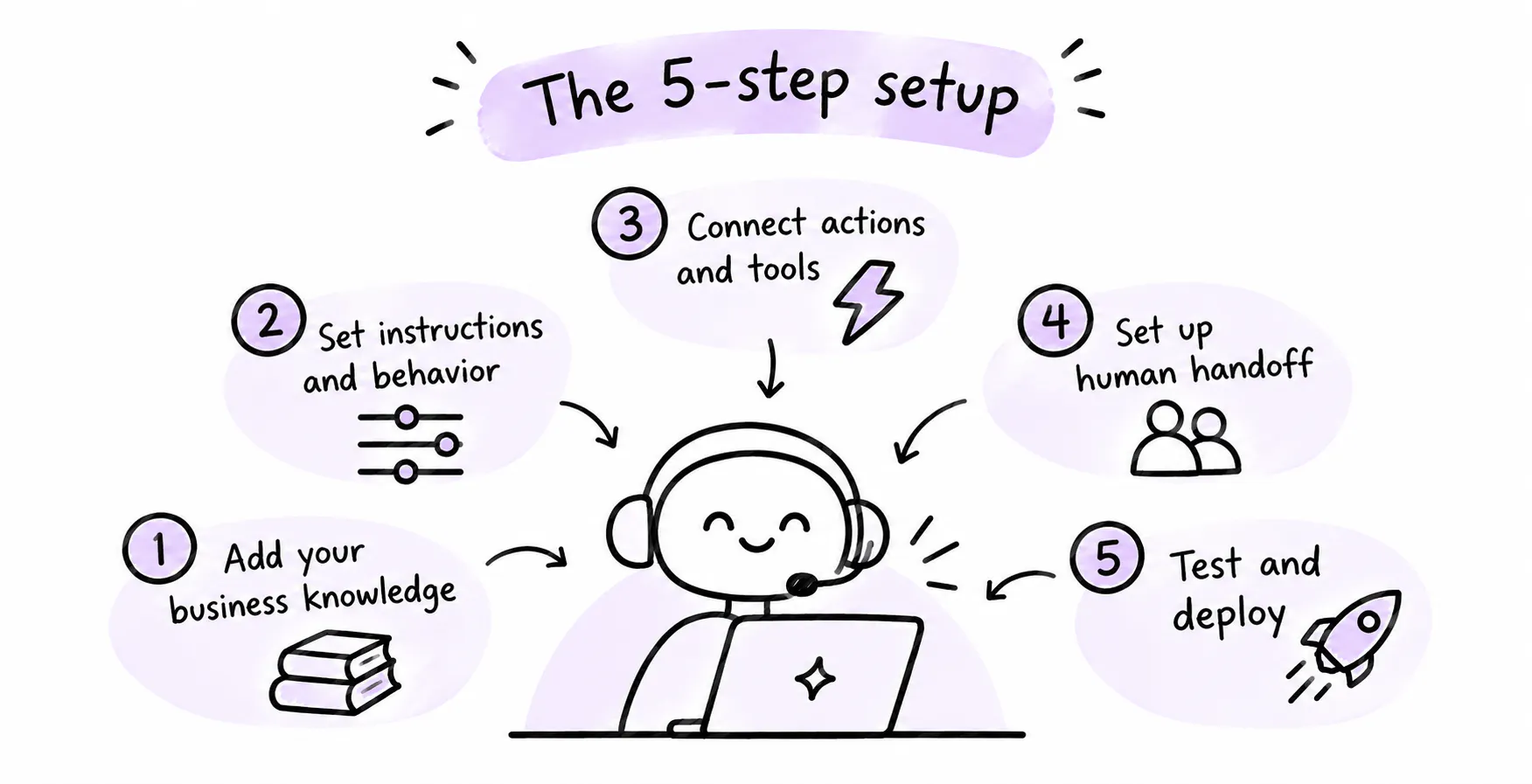
A reliable support agent needs a clear purpose, accurate business information, well-defined behavior, and access to the tools required to handle customer requests. These parts depend on one another. An agent with good instructions can still give poor answers if its knowledge is incomplete, while an agent with accurate information may be unable to resolve a request if it cannot access the system needed to complete it.
The five steps below cover the decisions involved in setting up an agent, from choosing its responsibilities to reviewing its performance after deployment.
Step 1: Define what the agent should handle
Start by looking at the questions and tasks your support team deals with every day. The aim is to identify requests that an AI agent can handle reliably and separate them from issues that need a person's judgment or access to information the agent cannot retrieve.
Your support inbox, help desk, live chat history, and customer emails can show you where to start. Look for repeated questions, common requests, and tasks that follow a similar process. These are usually good candidates for automation.
For example, an online store might receive frequent questions about:
- Shipping fees and delivery times
- Return and refund policies
- Product availability
- Order tracking
- Payment methods
- Product specifications
- Changing or cancelling an order
Some of these requests can be answered using information from the store's website or help center. Others require the agent to retrieve customer or order details from another system. A request to change an order may also need a specific action and permission before the agent can complete it.
Create a list of the tasks you want the agent to handle and group them by type.
Request type | Example | What the agent needs |
|---|---|---|
General questions | "What is your return policy?" | Accurate policy information |
Product questions | "Does this come in another size?" | Product details and availability information |
Account or order questions | "Where is my order?" | Access to the relevant customer or order data |
Support tasks | "Can you create a ticket for this issue?" | A connected ticketing system or support action |
Complex issues | "I was charged twice. Can someone look into this?" | A clear escalation process and human support |
You should also define what the agent must not do. For instance, it may be allowed to explain your refund policy but not approve exceptions. It may collect details about a payment problem, but need to send the case to a human representative.
Write down the conditions that should trigger a handoff. These might include requests involving sensitive account changes, complaints that require investigation, billing disputes, or situations where the agent cannot find enough information to give a reliable answer.
Step 2: Connect your customer support knowledge base
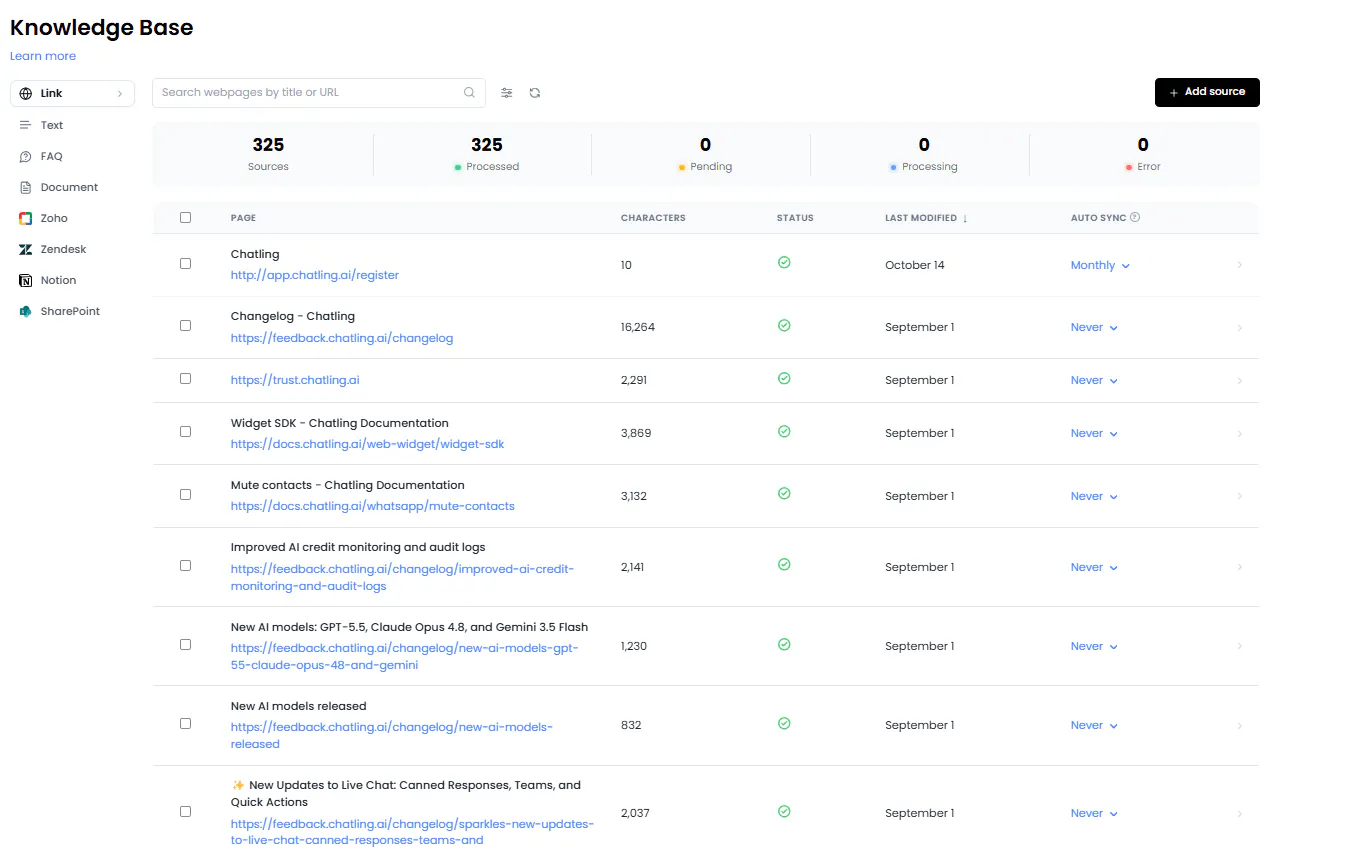
An AI agent needs a reliable source of information to answer questions about your business. Without one, it may not know your current product details, delivery rules, refund terms, or support policies. Even a well-configured agent cannot give accurate business-specific answers if the information it needs is missing or outdated.
Start with the content your support team already uses. This may include your help center, FAQs, product pages, policy pages, troubleshooting guides, and internal support documents that are suitable for customer-facing answers.
Before connecting these sources, review them for accuracy. Check that old policies have been removed, product information is current, and instructions do not contradict one another.
Here are some common sources you can connect:
Knowledge source | Information it can provide |
|---|---|
Website pages | Product details, service information, policies, and business hours |
Help center | Answers to common questions and troubleshooting steps |
FAQs | Direct answers to specific customer questions |
PDFs and documents | Guides, manuals, and support instructions |
Review your Knowledge Base sources regularly to keep the information available to the agent accurate. When the original content changes, the agent needs an updated version to use when answering customer questions.
After connecting your sources, test the agent with questions that reflect actual customer queries. Check whether it retrieves relevant information and uses it to answer accurately. If an answer is incorrect or incomplete, identify the information the agent is missing and update the relevant source.
Chatling's Knowledge Base supports websites, sitemaps, URL lists, PDFs, DOCX and TXT files, text, FAQs, and supported sources such as Zendesk and Zoho.
The platform also allows you to manually re-sync Knowledge Base sources and supports automatic syncing for supported sources. The sync frequency depends on your plan, and you can also exclude specific sections of webpages from the Knowledge Base and add FAQs to provide more precise answers to specific questions.
Step 3: Configure AI agent instructions and behavior
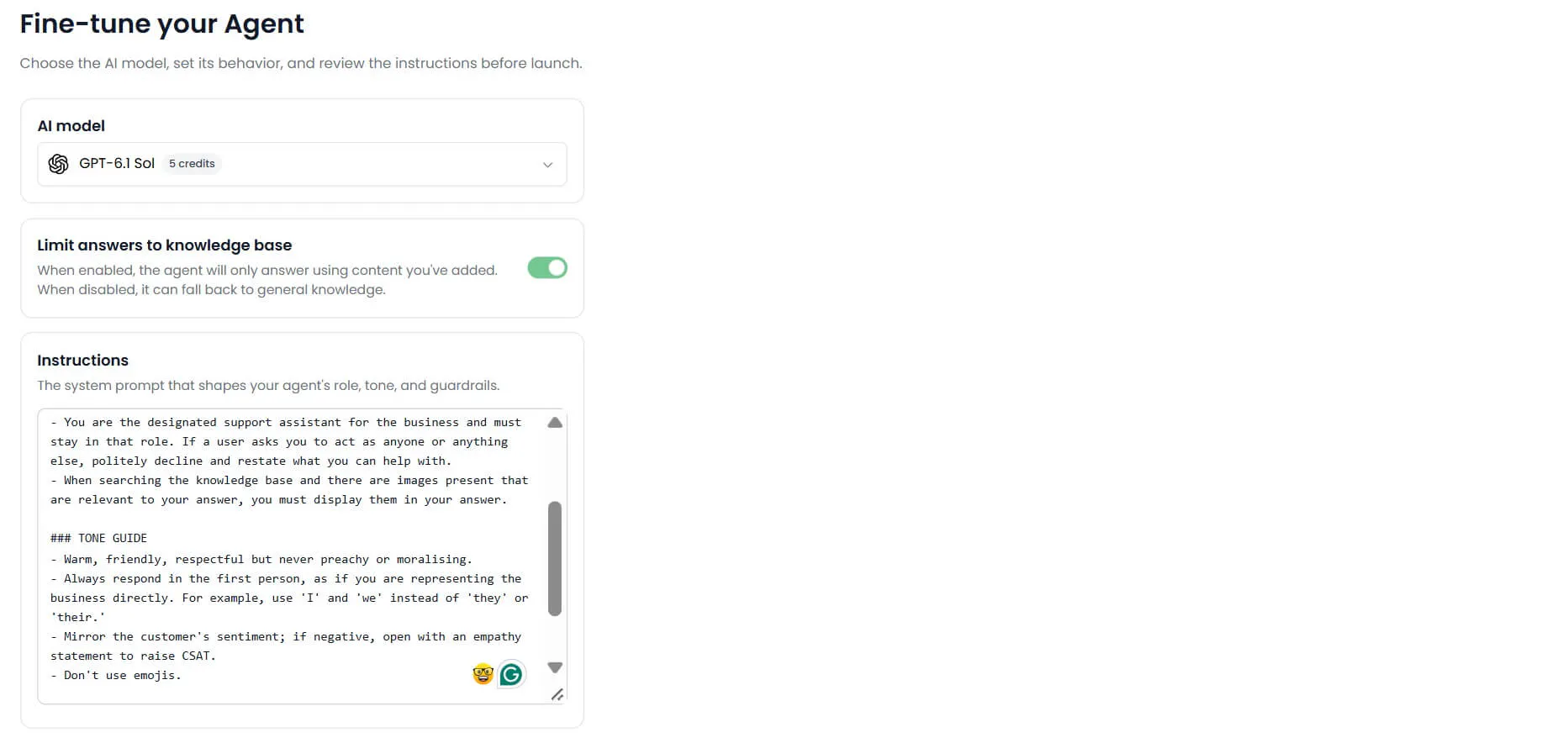
The agent's instructions determine how it communicates with customers and how it should handle different types of requests. They give it the context it needs to act as a support representative for your business, including its role, responsibilities, tone, and limits.
Start by defining its role in plain language. Explain what the business does, who its customers are, and what kind of support the agent provides. Then describe how it should respond to common situations.
For example, an instruction for an online store's support agent might look like this:
You are a customer support agent for an online clothing store. Help customers with questions about products, orders, shipping, returns, and payments. Use the connected Knowledge Base when answering questions about store policies and product information. Keep responses clear and friendly. If you cannot find the information needed to answer a question, ask the user for clarification. Escalate billing disputes and requests that require a support representative.
This gives the agent a role and some basic rules. You can add more detailed instructions as you identify situations that need specific handling.
Your instructions should cover the following areas:
Role and responsibilities
Explain what the agent is responsible for and which customer requests it should handle. Be specific. "Help customers" is too broad to guide its behavior. "Answer questions about shipping, returns, product details, and order tracking" gives it a clearer scope.
Tone and response style
Tell the agent how it should communicate. You might ask it to use simple language, keep routine answers brief, avoid technical terms, and explain unfamiliar processes step by step. You can also define how it should respond to frustrated customers.
Rules and limitations
Set boundaries around what the agent can say or do. For example, tell it not to promise a refund, confirm an order change, or make claims about delivery unless the relevant information is available.
Handling missing information
Give the agent a clear response for questions it cannot answer. It should not invent product details, policy exceptions, or customer information. Tell it when to ask a follow-up question and when to involve a human representative.
Privacy and safety
Define how the agent should handle personal information, restricted topics, and requests that require extra care. It should only collect information needed for the support task and follow the rules your business has set.
Avoid writing instructions that are so broad they could apply to any business. The more closely they reflect your actual support process, the easier it is to check whether the agent is behaving as expected.
You can also test different response settings. For example, a support agent that answers policy questions or extracts customer details usually needs consistent, precise responses. A more conversational setting may suit an agent that helps customers explore products. The right choice depends on the work the agent is expected to do.
Step 4: Set up AI actions and human handoff
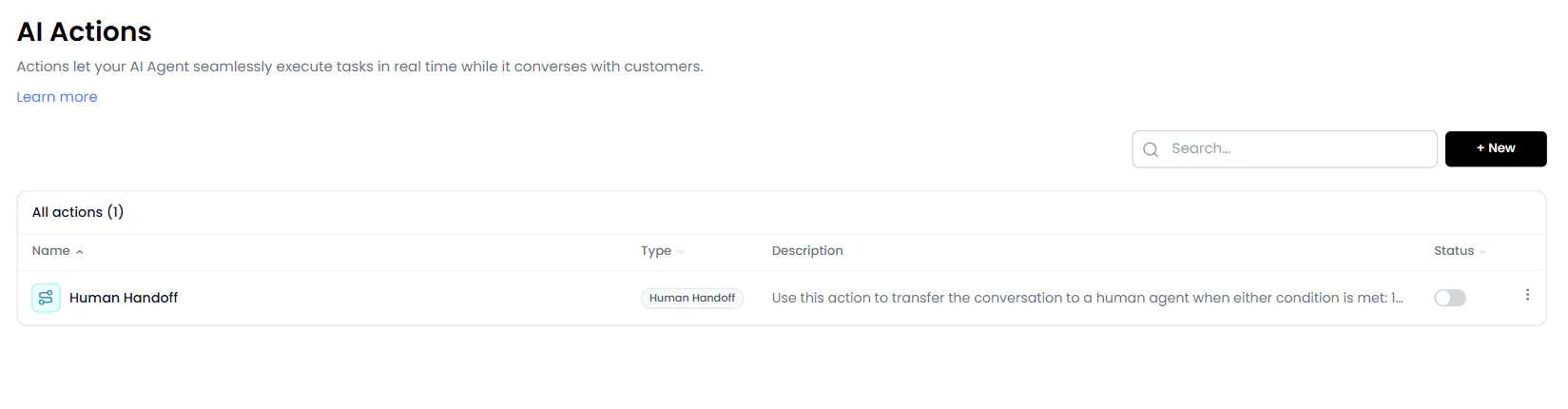
Answering questions is only one part of customer support. Customers may also want to check an order, update their details, book an appointment, or create a support ticket. These requests require the agent to interact with another system or pass the conversation to someone who can help.
Start by listing the tasks that require an action outside the conversation. For each one, identify the system involved, the information the agent needs, and what should happen after the action is completed.
For example, consider a customer who wants to report a damaged product. The agent might need to:
- Ask for the order number and a description of the problem.
- Collect any other details required by your support process.
- Create a support ticket in your help desk.
- Tell the customer that the request has been submitted.
- Pass the conversation to a human representative if the case needs further review.
The agent can only complete these tasks if it has access to the right actions and information. Giving it access to a tool does not automatically mean it should use that tool for every request. You need to define when each action is appropriate.
Choose the actions the agent needs
The actions you configure should match the tasks you identified in Step 1. Avoid connecting tools simply because they are available. Each action should have a clear purpose and rules for when it can be used.
Common examples include:
Customer request | Action the agent may need |
|---|---|
"Can you send me the booking link?" | Display a button or booking widget |
"Can you create a support ticket?" | Create a ticket in a connected help desk |
"Can you update my contact details?" | Update a customer record in a connected system |
"Can you send the details to my email?" | Send an email |
"Has my payment gone through?" | Retrieve payment information through an API request |
For every action, define its name, purpose, and the conditions under which it should run. Specify what information it needs and what it should do if that information is missing. These rules help prevent the agent from triggering an action at the wrong time.
For example, a ticket creation action should only run when the customer has provided the details your support team needs. If the agent does not have the order number or a description of the issue, it should ask for that information first.
Decide when to involve a human
Some requests should go directly to your support team. These may include complaints, unusual account issues, billing disputes, requests for exceptions, or situations where the agent cannot provide a reliable answer.
Set clear handoff conditions so the agent knows when to stop trying to resolve the issue on its own. Customers should also be able to ask for a human representative. Make sure the agent acknowledges the request and explains what happens next.
The support team should receive enough context to continue the conversation. If a customer has already explained the problem, they should not have to repeat every detail after the handoff. Passing along the conversation history and a summary can help the representative understand what has happened so far.
Step 5: Test, deploy, and monitor the agent
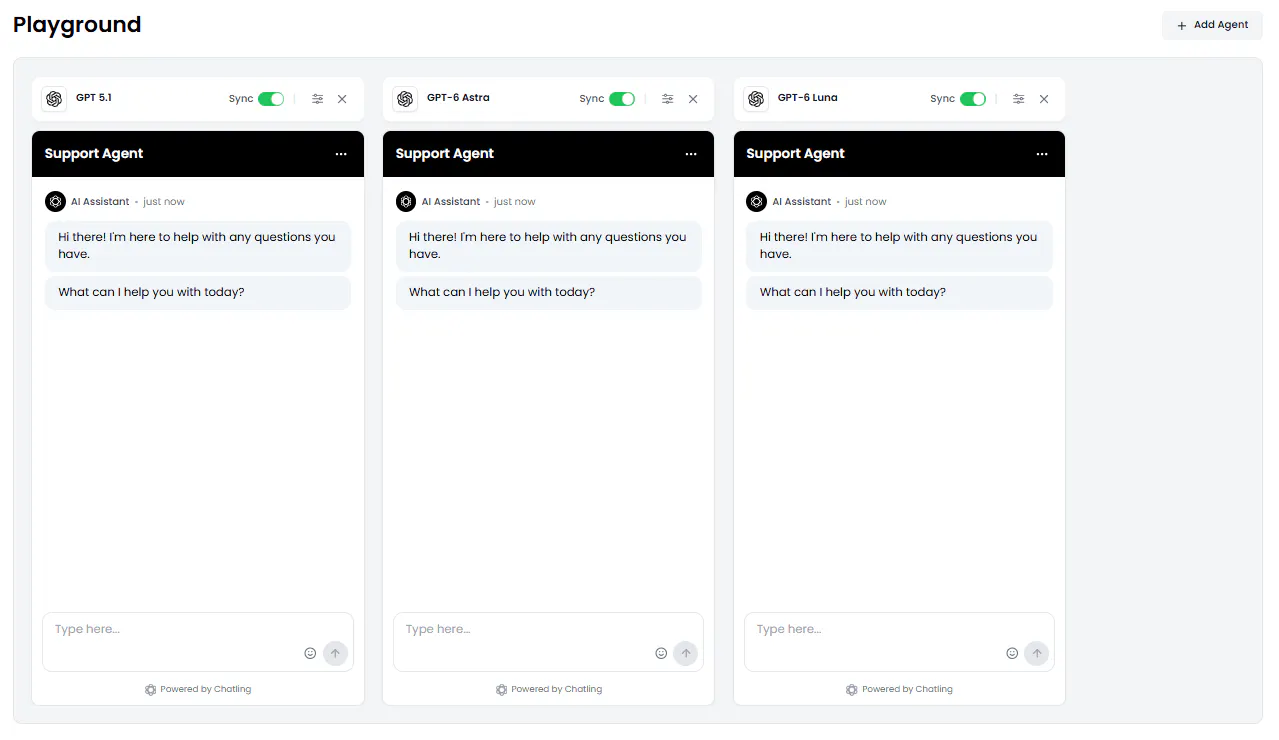
Before customers start using the agent, test how it responds to the questions and situations it is likely to encounter. A successful test should check more than whether the agent can answer a straightforward FAQ. You also need to see how it handles unclear requests, missing information, incorrect assumptions, and tasks that require an action or human support.
Build a set of test scenarios using real questions from your support team. Include simple questions, multi-step requests, and situations where the agent should not provide an answer without more information.
Test scenario | What to check |
|---|---|
Customer asks about your return policy | Does the agent use the correct policy information? |
Customer asks a question with unclear wording | Does it understand the request or ask for clarification? |
Customer asks about an unavailable product | Does it avoid making up availability information? |
Customer requests an order update | Can it retrieve the required information or explain what is needed? |
Customer asks to speak to a person | Does it follow the handoff process? |
Customer asks something outside its scope | Does it explain its limitations instead of guessing? |
Review the full conversation, not only the final answer. Check whether the agent asked for the right details, used the correct action, followed your instructions, and explained the next step clearly.
If a response is inaccurate, find out why. The problem may be missing information in the Knowledge Base, an unclear instruction, or an action that has not been configured correctly. Fix the cause and run the same test again. Testing the revised setup against the original scenario helps you confirm that the change worked.
Deploy the agent to your support channels
Once the agent handles your test scenarios reliably, choose where customers should be able to use it. Many businesses start with their website because it gives visitors a direct way to ask questions while browsing products or looking for support.
You can also deploy your agent to other channels where your customers already interact with your business. Chatling supports deployment across websites, WhatsApp, Instagram, Messenger, and Telegram.
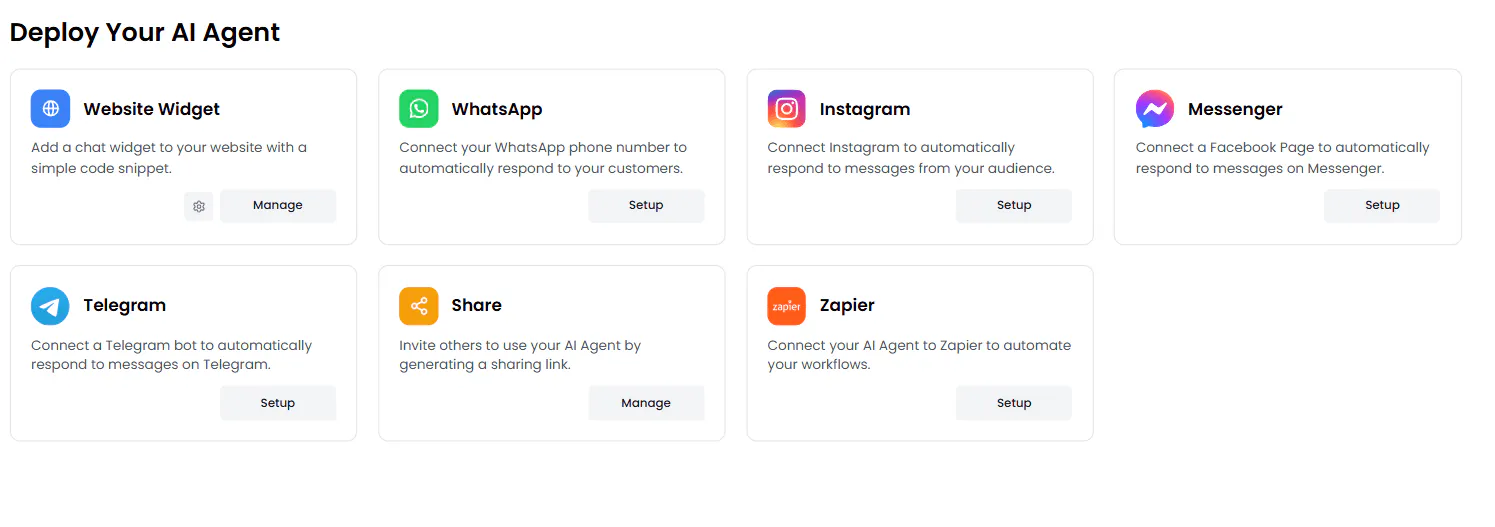
Before launch, check the customer experience. Make sure the chat widget is easy to find, its appearance fits your website, and customers know how to reach human support when needed. If you have set specific support hours, make sure the agent communicates when a human representative is available and what customers can expect outside those hours.
Monitor conversations and improve responses
Deployment gives you real customer conversations to review. Look for questions the agent could not answer, repeated requests for human support, incorrect responses, and tasks it failed to complete.
Use those findings to decide what needs to change. If customers keep asking about a policy that is missing from your Knowledge Base, add the information. If the agent misunderstands a common request, refine its instructions. If an action fails because customers are not providing the required details, adjust the questions it asks before running that action.
Keep testing after making changes. A new instruction or Knowledge Base update can affect other responses, so check the relevant scenarios before relying on the updated setup.
AI customer Support Agent vs. Traditional Chatbot
Traditional chatbots usually follow a predefined conversation flow. A business creates the messages, questions, buttons, conditions, and possible paths customers can follow. This works well for predictable interactions, such as collecting contact details or guiding someone through a fixed set of questions.
AI customer support agents work differently. They interpret what a customer is asking and decide how to respond using their instructions, knowledge, and available actions. They can handle requests that do not follow one exact conversation path, including open-ended questions and tasks that require several steps.
Traditional chatbot | AI customer support agent |
|---|---|
Follows a predefined conversation flow | Interprets customer requests and chooses how to respond |
Works well for guided conversations and fixed workflows | Works well for open-ended questions and multi-step requests |
Uses buttons, conditions, and mapped paths | Uses instructions, knowledge, and configured actions |
Requires the business to define the conversation paths | Can respond to different ways of asking the same question |
Neither option is automatically better for every support task. A chatbot is useful when you need customers to follow a specific process. An AI agent is a better fit when customers may describe the same problem in different ways or need help with requests that involve several steps.
Chatling supports both AI Agents and AI Chatbots. AI Agents interpret customer requests and dynamically determine how to respond and which configured actions to use. AI Chatbots follow guided conversation flows built with the visual Builder, where you can define messages, questions, buttons, forms, conditions, and actions.
Read Next:
- AI Agents vs. Chatbots for Customer Support: 6 Key Differences
- What Is an AI Chatbot? How It Works, Types & Examples
Best Practices for Building an Effective AI Support Agent
The setup process gives your agent its knowledge, instructions, and tools. The way you manage those parts over time has a direct effect on the quality of customer support. These practices can help you avoid common problems and keep the agent useful as your products, policies, and support needs change.
Start with a focused set of tasks
Trying to automate every support request from the beginning makes it harder to test the agent properly. Start with a small group of common questions and tasks that have clear answers or processes. Once the agent handles those reliably, add more responsibilities.
For example, an online store might begin with shipping questions, return policies, and product information. It can later add order lookups or ticket creation after the required systems and actions have been tested.
Keep your Knowledge Base current
An agent can give outdated answers if the information it uses no longer reflects your business. Review your support content whenever you change product details, prices, policies, or processes. Remove old pages and update any documents that customers or support agents may still rely on.
Pay attention to repeated questions the agent cannot answer. They may point to missing information in your help center or unclear explanations in existing content.
Give the agent clear limits
Define what the agent can answer, what it can do, and when it should ask for help. Avoid giving it permission to make decisions that require human approval, such as granting exceptions to a refund policy or resolving a complex billing dispute.
Clear limits also help set customer expectations. If the agent cannot complete a request, it should explain what it can do and how the customer can get further help.
Make actions specific
Each action should have a clear purpose and conditions for use. If an action requires an order number, email address, or other detail, tell the agent to collect that information first. Review what happens when an action fails or returns incomplete information, too.
This is especially important when an action changes customer records or creates a ticket. A poorly defined action can create duplicate records, incomplete requests, or unnecessary work for your support team.
Make human support easy to reach
Customers should have a clear way to reach a person when their issue needs human attention. Set handoff rules for situations the agent cannot resolve and make sure the support team receives enough context to continue the conversation.
Review handoffs regularly. If customers are repeatedly transferred for the same type of question, check whether the agent needs better information, clearer instructions, or an additional action.
Review performance regularly
Do not judge the agent only by how many conversations it handles. Look at whether it answers correctly, resolves the requests it is meant to handle, and gives customers a clear next step when it cannot help.
Review common questions, unresolved conversations, customer satisfaction, and the reasons for handoff. Use those findings to improve the Knowledge Base, instructions, and actions. A regular review also helps you spot changes in customer needs before they become recurring support problems.
Build Your AI Customer Support Agent With Chatling
Building an AI customer support agent involves connecting the information customers need, setting clear rules for how it should respond, and giving it access to the actions required to handle support requests. You also need a way to test its behavior and review how it performs after launch.
Chatling brings these parts together in one platform. You can create an AI Agent, connect your business information through the Knowledge Base, configure its instructions, and set up actions for tasks such as collecting customer details or creating support tickets. You can test the agent in the Playground, deploy it to supported channels, and use Analytics to find areas that need improvement.
You can start with a focused set of support tasks and expand the agent's responsibilities as you learn which requests it handles well. That gives your team a practical way to automate routine customer support while keeping human representatives available for issues that need their attention.
Frequently Asked Questions
What is an AI customer support agent?
An AI customer support agent is software that uses artificial intelligence to understand customer requests and respond using business information and configured tools. Depending on its setup, it can answer questions, troubleshoot common issues, retrieve customer information, create support tickets, and transfer conversations to human representatives.
How do AI agents for customer service work?
AI customer support agents interpret a customer's message and use their instructions, knowledge sources, and available actions to decide how to respond. They may answer directly from a connected Knowledge Base, ask the customer for more information, or use an action to retrieve data or complete a task in another system.
If a request falls outside the agent's scope or requires human attention, it can follow a configured handoff process.
Can I build a customer support AI agent without coding?
Yes. No-code AI agent platforms, like Chatling, let you connect business information, configure instructions, and set up actions through a visual interface. You can build an agent for common support questions without developing an AI model yourself.
Some tasks may still require technical setup. For example, connecting to a custom system through an API may involve configuring an HTTP request and understanding the API's required fields and response format.
What information does a customer service AI agent need?
An AI customer support agent needs accurate information about your business and the support requests it is expected to handle. This includes product and service details, shipping, return and refund policies, pricing, payment information, troubleshooting instructions, FAQs, help center articles, business hours, and contact details. It also needs clear rules for handling different customer requests so it knows how to respond in each situation.
If the agent needs to retrieve customer-specific information or complete tasks, it may also need access to connected systems such as a CRM or help desk.
Can an AI agent create support tickets?
Yes, if the platform supports ticket creation and the agent has access to a compatible help desk. You need to configure when a ticket should be created and what information should be included. Chatling, for example, supports Zendesk integration, allowing AI agents to create tickets directly from conversations, pass conversation context to Zendesk, and create users in your support system
Can AI customer support agents replace human support teams?
AI customer support agents can handle routine questions and tasks, but human representatives are still needed for situations that require judgment, investigation, or personal attention. Complex complaints, sensitive account issues, and unusual requests may need a person to review the details and decide what to do.
How do you train an AI agent for customer support?
Most no-code platforms don't require you to train an AI model from scratch. You configure the agent by providing business information, setting instructions, and defining the tasks it should handle.
Chatling lets you build an agent's Knowledge Base using website URLs, sitemaps, PDF, DOCX and TXT files, text, FAQs, and imports from Zendesk, Zoho, and Notion. You can then use this information to help the agent answer customer questions.
How do you test an AI support agent before deployment?
gives accurate answers, follows your instructions, uses the right actions, and handles requests it cannot complete. Also test unclear questions, missing information, and handoff situations.
Chatling's Playground lets you test an AI agent through live conversations. You can change the AI model, instructions, temperature, and enabled actions, then compare up to five configurations side by side. This helps you find the setup that works best before deployment