
Despite AI agents helping businesses automate a huge chunk of their customer support operations, certain types of requests still require human attention.
A customer might ask to speak with an agent, have a problem the AI cannot resolve, or need help with something that requires human judgment.
Human handoff transfers a conversation from an AI agent or chatbot to a human support agent. The human agent can review the conversation history and available context before replying, so the customer doesn't have to explain the issue all over again.
This guide covers when to hand a conversation over, how human handoff works, how to set it up for AI agents and chatbots, and how support teams can manage conversations after the transfer.
- Human handoff transfers a conversation from an AI agent or chatbot to a human support agent.
- Common reasons for a handoff include a direct request for human support, an unresolved issue, a question the AI cannot answer, or a request that needs human judgment.
- A handoff can be triggered by customer requests, configured rules, intents, conditions, or an AI agent's configured behavior.
- AI agents use their instructions, actions, and behavior for human handoff. AI chatbots can use intents, conditions, and a dedicated Human Handoff block.
- Human agents can receive the conversation history, an AI-generated summary, actions already taken, the reason for the handoff, priority, and customer sentiment.
- Office hours, reply-time expectations, and email follow-ups help businesses handle handoffs when an agent cannot respond immediately.
What Is Human Handoff in AI?
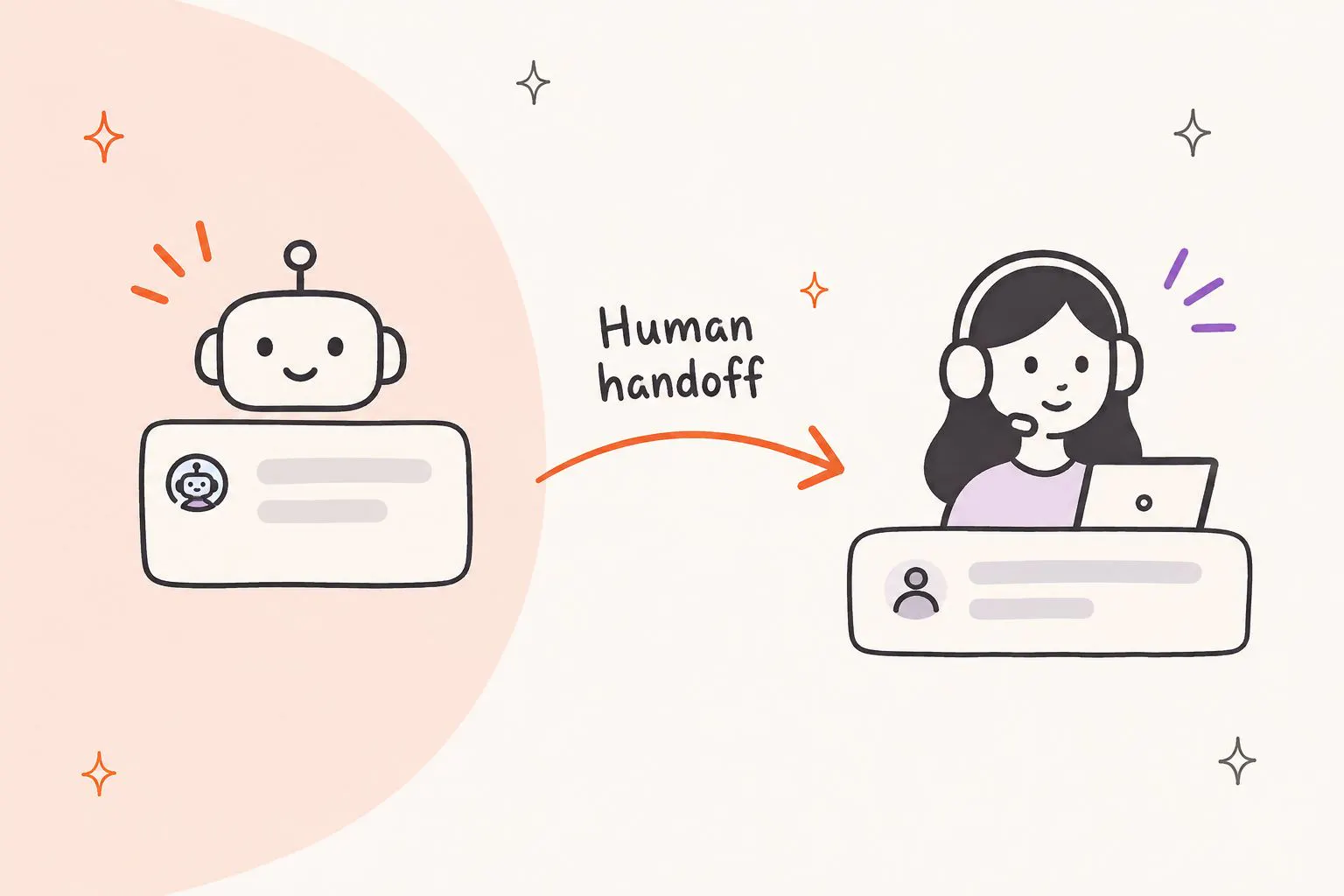
Human handoff is a feature that transfers an active conversation from an AI agent or chatbot to a human support agent. It gives customers a way to get personal assistance when AI cannot resolve their request or when they prefer to speak with someone directly.
For example, an AI agent might answer questions about a company's refund policy. But if a customer disputes a charge or requests an exception, a support representative may need to review the details and decide what to do. The AI can hand the conversation over instead of continuing to repeat the general policy.
Human handoff is also called AI-to-human handoff or live chat support. These terms describe the same basic process: AI handles the conversation first, then a person takes over when human support is needed.
How Is Human Handoff Different from Human Takeover?
Human handoff and human takeover both involve a human agent joining a conversation, but they start in different ways.
With human handoff, the AI transfers the conversation based on a customer request, configured rules, an intent, or a trigger condition. With manual human takeover, a support agent steps into an active conversation themselves, even if the AI hasn't triggered a handoff.
For example, an agent might notice that a customer is struggling with a chatbot and take over the conversation directly. They don't have to wait for an automatic handoff to happen.
When Should an AI Agent Hand a Conversation Over to a Human?
An AI agent should hand over a conversation when a person needs to review the request, investigate a problem, make a decision, or take an action that the AI cannot perform. The following situations are common reasons to involve human support.
1. The Customer Asks to Speak to a Human
If a customer asks for a person, the AI should recognize the request and provide a way to reach human support. Customers shouldn't have to repeat themselves or keep answering chatbot questions after they've made their preference clear.
A customer can request to speak to a human agent in various ways. These can be:
- "I want to speak to a human."
- "Can I talk to a real person?"
- "Connect me with a support agent."
- "I need to contact customer support."
- "Can someone from your team help me?"
Businesses can configure their AI to recognize these phrases and initiate a handoff. This is especially useful when customers have already tried self-service and want direct assistance.
2. The AI Cannot Answer the Question Reliably
An AI agent may not have the information needed to answer a customer's question. The answer might be missing from its Knowledge Base, outside its configured instructions, or dependent on information it cannot access.
The AI shouldn't guess or present an uncertain answer as fact. If it cannot provide a reliable response, it should hand the conversation to someone who can investigate.
For example, a customer might ask whether they qualify for an exception to a company policy. If the available information doesn't cover that situation, a support agent can review the request and confirm the options.
3. The Customer's Problem Remains Unresolved
Your AI agent can do everything right but the problem can still remain unresolved if the issue lies somewhere else.
For example, a customer might follow the AI's troubleshooting instructions without fixing the issue. Repeating the same suggestions won't help, especially if the customer has already tried them.
A handoff makes sense when the available troubleshooting steps haven't worked and the problem needs further investigation. The human agent should receive details of the steps already attempted, so they can continue from there.
4. The Request Requires Human Judgment or Approval
Some requests involve sensitive decisions that shouldn't be left to an AI agent. These might include exceptions to company policies, special requests, disputes, or situations that require approval from a designated employee.
The AI can collect the relevant details and explain the usual process. A human should take over when someone needs to review the circumstances and make the final decision.
For example, a customer might ask for a refund outside the company's standard refund period. The AI can explain the policy, but a support representative may need to review the request before deciding whether an exception is possible.
5. The Customer Has a Sensitive or Complex Issue
Billing disputes, account access problems, and complaints can involve details that need careful review. A human agent may be better equipped to understand the circumstances and decide how to respond.
Businesses should define which situations require human involvement. A simple question about a payment date might be easy for AI to answer, while a disputed charge may need someone to review the account.
6. The AI Cannot Perform the Required Action
AI agents can perform tasks through their configured actions, but they cannot automatically access every system or complete every type of request. If a customer needs something the AI isn't configured to do, a human agent may need to take over.
For example, a customer might request a change that requires access to an internal system that the AI cannot use. The AI should explain that a support agent needs to help rather than promise to make a change it cannot perform.
How Does AI-to-Human Handoff Work?
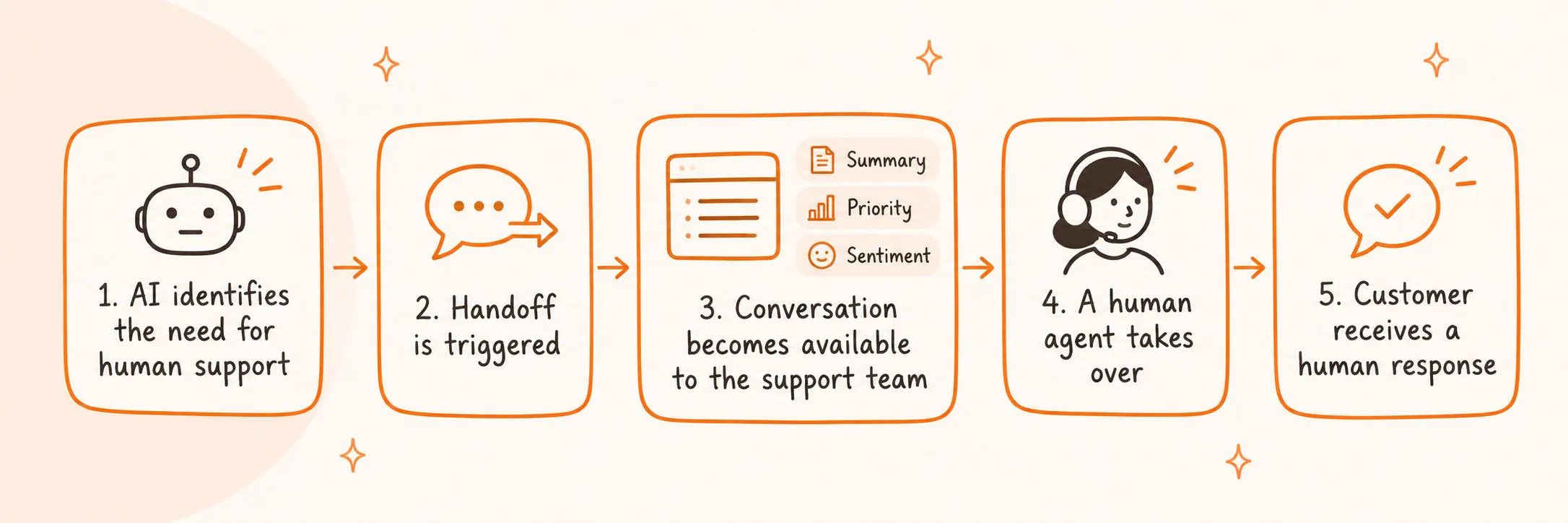
The exact process depends on how a business configures its AI and support tools. In general, the AI identifies that a person is needed, transfers the conversation, and makes the relevant context available to the support team.
1. The AI Identifies the Need for Human Support
A handoff can start in several ways. A customer might directly ask for a human, a configured rule or condition might be met, or the AI's instructions and behavior might indicate that a person needs to take over.
For example, a business might configure its AI to hand over conversations when customers request a support representative or when the AI cannot resolve a request using its available information and actions.
2. The Handoff Is Triggered
Once the handoff condition is met, the conversation is transferred to human support. This might happen through configured behavior or rules, or through a Human Handoff block in a chatbot flow.
The customer can receive a confirmation message explaining that the conversation is being transferred. This makes it clear that the request has moved to the support team.
3. The Conversation Becomes Available to the Support Team
The conversation appears in the team's conversation workspace. Human agents can review the message history and available context, including an AI-generated summary, priority, and customer sentiment.
The summary helps the agent understand the customer's request and why the AI handed it over. The full conversation history is available when the agent needs more detail.
4. A Human Agent Takes Over
The agent reviews the conversation and checks what the AI has already done. They can then reply to the customer and continue helping with the original request.
The customer doesn't need to start a new conversation or repeat details they've already shared.
5. The Customer Receives a Human Response
The agent responds to the customer once they are ready to take over. If nobody is available to reply immediately, the business should communicate its support hours and expected reply time.
This is particularly important for customers who might otherwise assume that an agent will respond as soon as the handoff happens.
What Information Should an AI Pass to a Human Agent?
A conversation transfer is only useful if the human agent can understand what happened before they joined. The agent needs the original request, the steps already taken, and the reason the AI handed the conversation over.
Here are the details that help a human agent pick up where the AI left off.
Conversation History
The human agent should be able to review the messages exchanged between the customer and the AI. This includes the original question, the customer's answers, and details shared during the conversation.
Without the message history, the agent may have to ask the customer to explain the issue again.
AI-Generated Conversation Summary
A summary gives the agent a quick overview without requiring them to read every message first. It can cover:
- What the customer asked.
- What the AI already did.
- What steps were attempted.
- Why the conversation was handed over.
- The conversation's priority and customer sentiment.
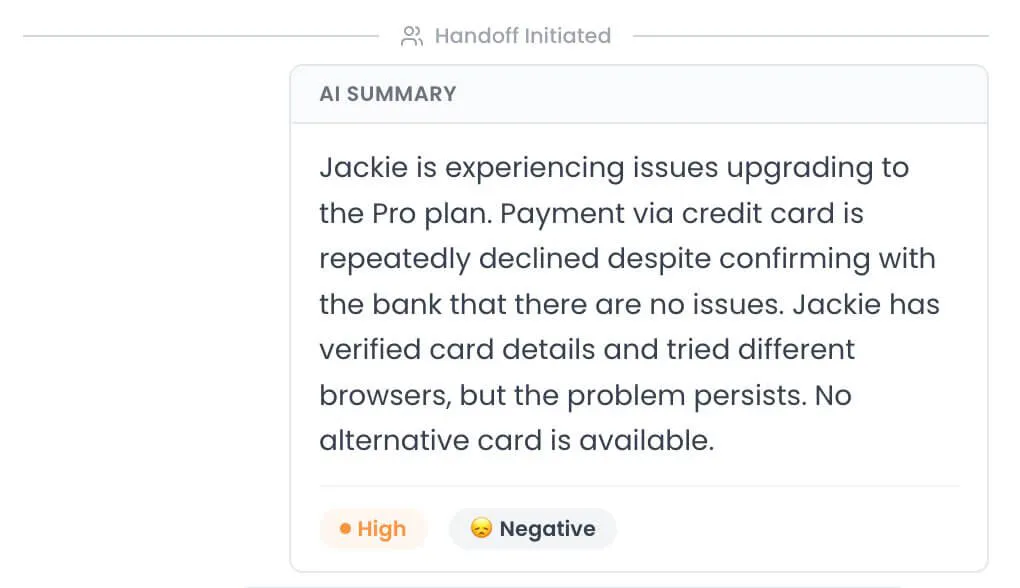
The agent can use the summary to understand the main issue, then refer to the full message history if they need more detail.
Actions Already Taken
The agent should know what the AI has done and which steps it has attempted. This matters for troubleshooting, account questions, and requests that involve several steps.
For example, if the AI has already provided three troubleshooting instructions, the agent should be able to see which steps the customer tried and whether they worked.
Reason for the Handoff
The reason for the transfer tells the agent why human involvement is needed. The customer may have asked to speak to a person, the AI may not have been able to answer, or the request may need further investigation.
This helps the agent focus on the customer's actual problem instead of trying to work out why the conversation was transferred.
Priority and Customer Sentiment
Priority helps the team decide which conversations need attention first. Customer sentiment gives the agent additional context about how the customer feels about the interaction.
For example, a conversation marked as high priority may need attention sooner than a routine product question. Sentiment can also help an agent understand when a customer appears frustrated or dissatisfied.
Other Available Customer Context
Other details collected during the conversation may also help the human agent. The aim is to give the support team the information it needs to continue helping without making the customer repeat themselves.
How to Set Up Human Handoff for AI Agents
Setting up human handoff involves deciding when the AI should involve a person, what it should do before transferring the conversation, and what information the support team needs to take over.
Follow these steps to configure the handoff process:
1. Enable the Human Handoff action
Start by checking whether your AI agent has a dedicated human handoff action. In Chatling, this action is created automatically for every AI Agent but is disabled by default. You need to enable it before the agent can transfer conversations automatically.
2. Define when the AI should hand off a conversation
Give the AI clear instructions about the situations that require human support. These can include:
- Customer requests: When someone asks to speak with a human agent.
- Unresolved issues: When the AI has tried to help but hasn't resolved the problem.
- Specific support topics: When a customer raises a billing issue, complaint, or another topic that requires human assistance.
- Limits of the AI: When the request falls outside the AI's available information or capabilities.
Also, explain what the AI should do before initiating the handoff. For example, you might want it to try resolving a technical issue first, then transfer the conversation if the suggested steps don't work.
Example of human handoff instructions:
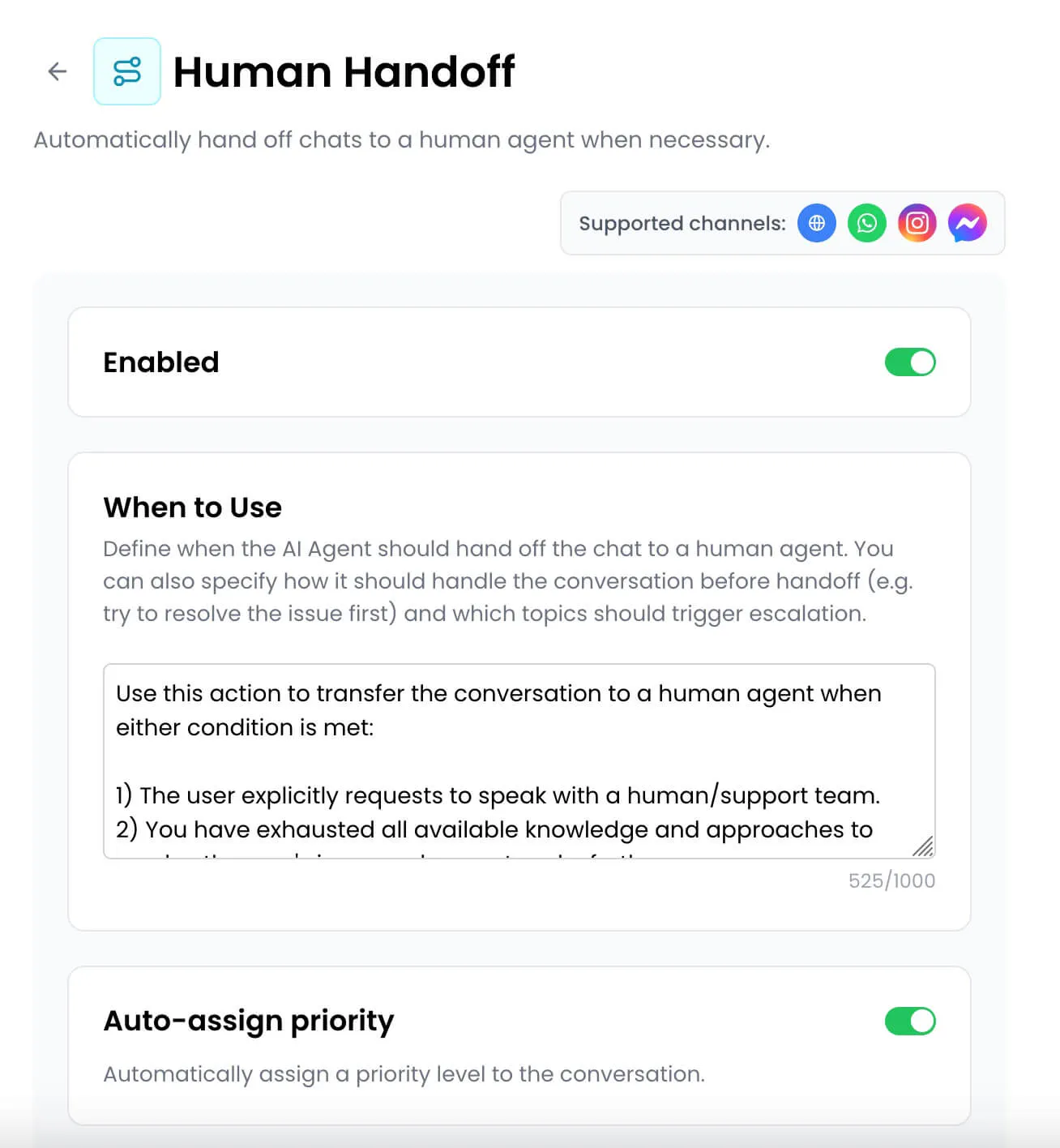
Adapt these instructions to your support policies and the types of requests your team handles. The AI Agent can then use its configured behavior and available actions to hand conversations to human support. The resulting conversation appears in the Conversations interface with relevant context and a summary.
3. Explain how the AI should communicate the handoff
Customers should know when their conversation is being transferred and what happens next. Include instructions for how the AI should notify them when it initiates a handoff.
The message should make the transfer clear without promising an immediate response from a human agent. The AI should also adapt its wording to the customer's language and the situation.
4. Set automatic conversation priority
If your platform supports automatic priority assignment, configure it to help the AI identify conversations that need attention first. Chatling can automatically assign a priority level when an AI Agent hands off a conversation, based on its context and urgency.
This gives support teams another way to identify which requests need attention sooner.
5. Pass conversation context to the human agent
The human agent should have enough information to understand the issue before replying. Chatling’s AI agents handoff the conversation with the conversation history, an AI-generated summary, relevant customer context, and sentiment information so your team is up to speed and can jump right in to help the customer.
The summary should explain what the customer needs, what the AI has already done, and why the conversation was transferred. This helps the human agent understand the customer's situation, avoid asking them to repeat details, and continue from where the AI left off.
What Happens After Handoff?
Once the AI transfers the conversation, it becomes available to the human support team.
In Chatling, the conversation is flagged as “Needs agent intervention” in the Conversations page, and an AI-generated summary is created for the agent.
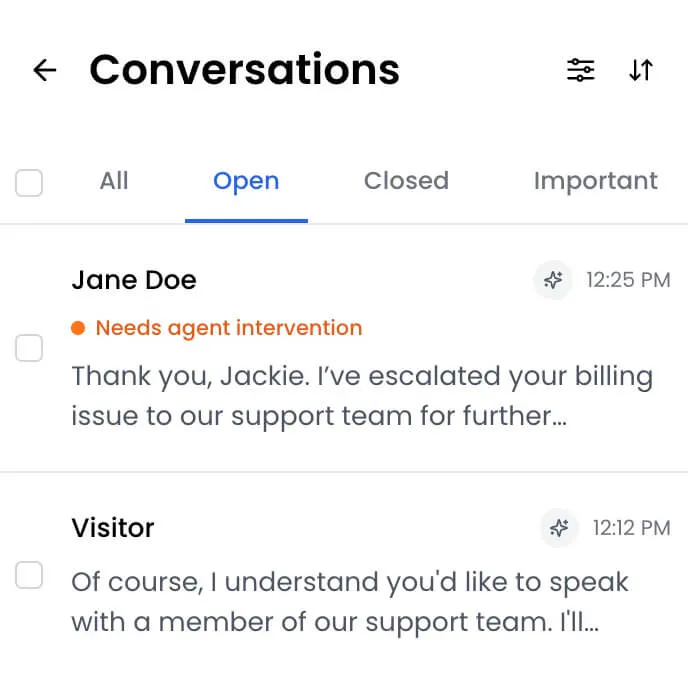
If team notifications are enabled, the relevant team members are notified so someone can pick up the conversation and reply directly.
How to Set Up Human Handoff for AI Chatbots
AI Chatbots follow flows created in the Builder. You can add a Human Handoff block to a flow and use intents or conditions to determine when the conversation should reach it.
A practical setup involves the following steps.
1. Create a human-support intent
Create an intent that identifies when a customer wants to speak with a person. Give it a clear name and description, then add matching phrases that customers might use.
For example:
- "I want to speak to a human."
- "Can I talk to an agent?"
- "I need customer support."
- "Connect me with someone."
- "I want to talk to a real person."
The intent helps the chatbot recognize requests for human support and trigger the relevant flow.
2. Connect the intent to the handoff flow
Configure the intent to trigger a flow that contains the Human Handoff block. When the chatbot recognizes a matching customer request, it can direct the conversation to that flow.
You can also use conditions to send conversations to the handoff block based on information collected during the interaction.
3. Add the Human Handoff block
Place the Human Handoff block in the relevant part of the chatbot flow. This block transfers the conversation from the chatbot to human support.
4. Configure the Handoff Settings
The Human Handoff block supports three settings:
- Auto-assigned priority: Set a priority for the conversation when it is handed over.
- Handoff confirmation message: Display a message telling the customer that their conversation is being transferred.
- Agent routing: Configure where the conversation should be directed.
These settings help the support team receive the conversation with the relevant priority and routing information, while the confirmation message tells the customer what is happening.
5. Publish Your Chatbot
After configuring the flow, check that the handoff path works as expected and publish the chatbot changes. The published version makes the updated flow available to customers.
Read Next: Chatbot vs Live Chat: Which Should You Use for Customer Support?
What Happens When a Human Agent Is Unavailable?
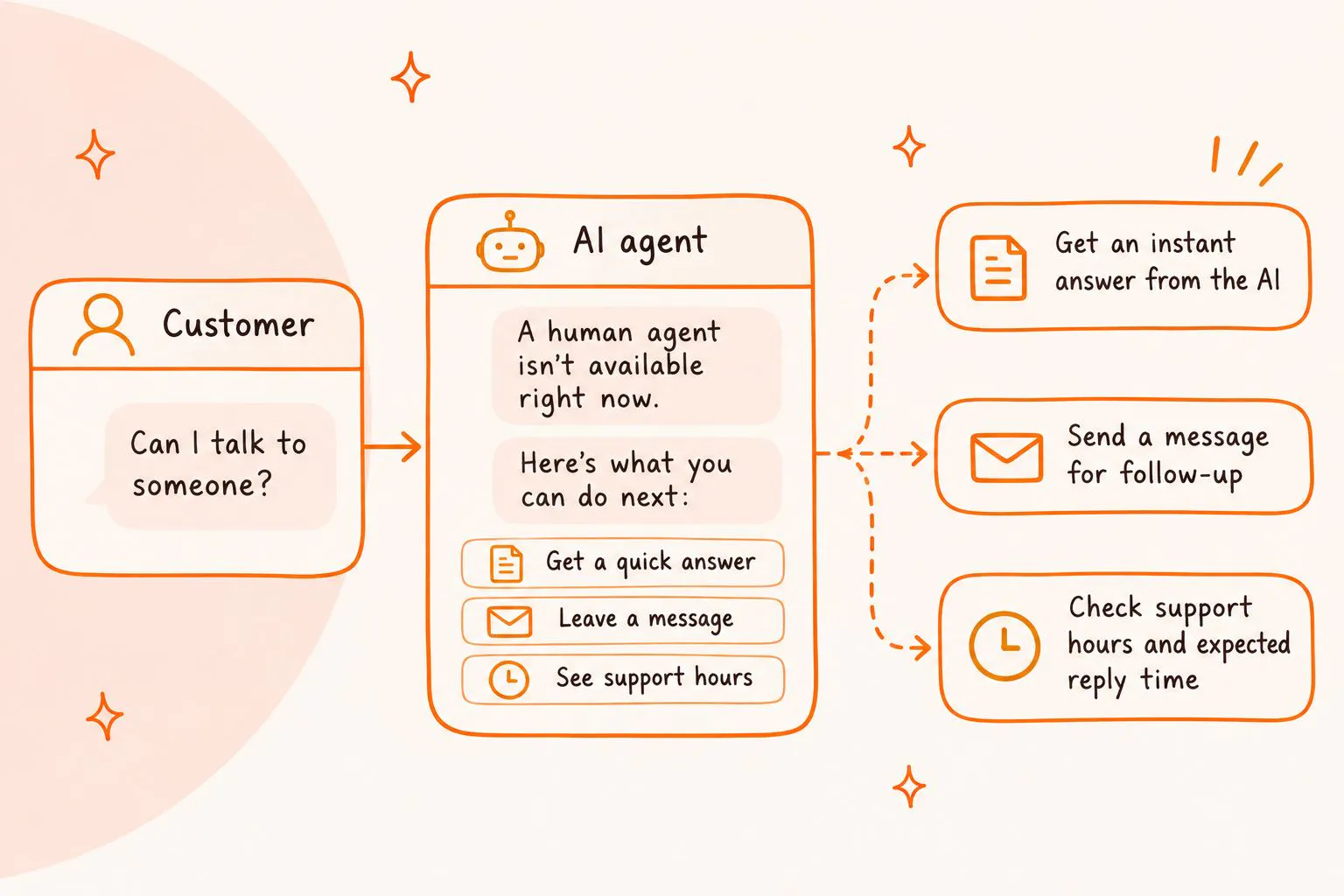
A customer might request human support outside business hours or leave the website before an agent has replied. Businesses should account for these situations when setting up live chat and make sure customers know when and how they'll receive a response.
What to set up | Why it matters | How it works |
|---|---|---|
Live chat office hours | Customers need to know when human support is available. | Display your team's support hours clearly so customers know when to expect an agent to be online. |
Expected reply times | Customers shouldn't assume an agent will respond immediately after a handoff. | Tell customers when they can expect a response. Avoid promising an immediate reply unless your team can consistently provide one. |
Email follow-ups | Customers may leave the website while waiting for an agent. | Chatling's web widget can require an email address before a customer starts messaging or show an email reminder. If a customer leaves before an agent replies, the response can be sent to their email. |
Best Practices for a Smooth AI Human Handoff
A good handoff should make the transfer easy for the customer and give the support team enough information to continue. These practices help businesses avoid unnecessary transfers and handle requests that need human attention.
- Make it easy for customers to reach a human: Configure the AI to recognize common requests for human support. If someone explicitly asks for a person, don't make them go through repeated questions or keep offering automated answers. Transfer the conversation.
- Define clear handoff conditions: Give your AI clear instructions about when to transfer a conversation. Set rules for situations such as billing disputes, policy exceptions, and unresolved technical problems.
- Avoid unnecessary handoffs: The AI should handle routine questions it can answer accurately using its Knowledge Base or configured actions. Review transferred conversations to identify gaps in its information or instructions that cause avoidable handoffs.
- Preserve conversation history and context: Give human agents access to the conversation history and a useful summary. Include what the customer asked, what the AI did, which steps were attempted, and why the conversation was transferred.
- Route conversations to the right team: Direct requests to the agents best equipped to handle them. Use details such as channel, language, priority, customer sentiment, and variables to organize incoming conversations.
- Tell customers what happens next: Show a clear confirmation message when a conversation is transferred. If an agent isn't available immediately, communicate the team's office hours, expected reply time, or email follow-up process.
- Review handed-off conversations and improve the setup: Look at why conversations were transferred, what customers asked, and which steps the AI attempted. Use these reviews to find missing Knowledge Base information, unclear instructions, or actions the AI needs.
Make Human Handoff Part of Your AI Support Experience
AI can handle many customer questions and support tasks, but customers still need access to human assistance when a request requires personal attention. A clear handoff process gives them that option without making them repeat their issue or start a new conversation.
Chatling supports human handoff for both AI Agents and AI Chatbots. AI Agents use their configured actions and behavior to hand conversations to human support, while AI Chatbots can use intents, conditions, and the Human Handoff block. Support teams can then manage conversations through Live Chat, review AI summaries, assign conversations, configure routing, and use Copilot to help prepare replies.
Get started today and build AI Agents and Chatbots with human handoff using Chatling.
Frequently Asked Questions
What Is Human Handoff in an AI Chatbot?
Human handoff is the process of transferring a conversation from an AI chatbot to a human support agent. It gives customers personal assistance when the chatbot cannot resolve their request or when they ask to speak with a person.
When Should an AI Agent Hand a Conversation Over to a Human?
An AI agent should hand over a conversation when a customer requests human support, the AI cannot provide a reliable answer, a problem remains unresolved, or the request requires human judgment or an action the AI cannot perform.
Can Customers Request a Human Agent from an AI Chatbot?
Yes. A chatbot can use a human-support intent to recognize phrases such as "I want to speak to a human" or "Can I talk to an agent?" The intent can trigger a flow containing a Human Handoff block.
What Is the Difference Between Human Handoff and Live Chat?
Human handoff is the process of transferring a conversation from AI to a human agent. Live chat is the workspace where human agents can view conversations, reply to customers, take over conversations, assign requests, and manage support interactions.
Can an AI Agent Hand Off a Conversation Automatically?
Yes. Human handoff can happen automatically through configured rules and behavior. It can also be triggered when a customer requests a person or when a supported intent or condition is met. The exact setup depends on the AI platform.
Can a Human Agent Take Over a Conversation Before the AI Hands It Off?
Yes. In Chatling, agents can manually take over conversations even when an automatic handoff hasn't occurred. This gives support teams control over when they join an active conversation.