What Is Conversational AI for Customer Service?
By Rumaisa Viqas · Last updated 26 Nov 2026 · 18 min read
Summarize with
 Perplexity
 ChatGPT
 Claude

Quick summary
- Conversational AI lets customers ask questions in their own words and get answers through natural, back-and-forth conversations.
- It uses technologies such as natural language processing and large language models to understand messages and generate relevant responses.
- Businesses use it to answer questions, troubleshoot problems, guide customers, and collect information.
- Its performance depends on the quality of the information it uses, how it is configured, and how well it handles requests it cannot resolve.
- A good implementation starts with common customer questions, gives customers access to human support, and improves through regular testing.
Customers don't want to wait hours or search through help pages for a simple answer. They want to ask a question and get a useful answer without all the extra steps.
A study by the Capgemini Research Institute found that 56% consider prompt responses important, but only 40% say they receive them often or always.
The gap between what customers expect and what they experience is one reason businesses are looking at conversational AI.
Adding a chatbot to your website isn't enough to make that experience work well. You need accurate information, sensible conversation rules, and a clear way to bring in a human when needed.
This guide explains how conversational AI works in customer service, where businesses use it, and what to consider before introducing it.
What Is Conversational AI for Customer Service?

Conversational AI is technology that allows people to communicate with an artificial intelligence software using everyday language. Instead of relying entirely on buttons, menus, or exact commands, customers can type or speak a question as they normally would.
In customer service, it gives people a way to ask about products, policies, orders, or problems through a conversation. The system interprets the message, looks for relevant information, and responds. If the customer asks another question, it can use the earlier messages to understand what they're referring to.
The technology behind these conversations can include a few different components:
- Natural language processing (NLP): NLP helps a system work out what a person means when they write or say something. It can identify important details, recognize the intent behind a message, and handle different ways of expressing the same request.
- Machine learning (ML): Machine learning allows software to identify patterns in data and use them to make predictions or decisions. In conversational systems, it can help classify messages, recognize common requests, and improve language understanding. Its role depends on the system: some use trained models to interpret messages, while others rely more heavily on large language models.
- Large language models (LLMs): LLMs are trained on large amounts of text and can understand and generate language. They help conversational AI respond to questions that don't follow a fixed script, explain information in different ways, and handle follow-up questions. They can also produce incorrect answers, so customer service systems need to connect them to reliable business information and set clear limits on what they should answer.
- Knowledge retrieval: When a customer asks about a company policy or product, the system needs to find the right information. Knowledge retrieval searches connected sources, such as help articles, FAQs, product pages, and documentation, and brings relevant details into the conversation. This helps keep answers tied to the business's actual information rather than relying only on a model's general training.
- Conversation context: Context helps the system follow what has already been discussed. If a customer asks about a return and then says, "What if I've opened the box?", the system should understand that the second question relates to the same return. Without context, customers may have to repeat details or explain the issue from the beginning.
Not every conversational AI system uses the same combination of technologies. A basic solution may rely on predefined rules and language recognition. More advanced systems may use LLMs to handle open-ended questions and generate responses based on information retrieved from a business's own content.
Conversational AI vs. Traditional Chatbots

Traditional rule-based chatbots follow conversation paths created in advance. They might ask customers to select a department, choose a topic, or enter information into a form. This works well when the interaction is predictable, but it becomes limiting when customers ask something outside the options provided.
Conversational AI can interpret a wider range of questions and respond to what the customer actually says. The difference is easiest to see when you compare how the two handle the same interaction.
Aspect | Traditional rule-based chatbot | Conversational AI |
|---|---|---|
Understanding | Matches keywords or predefined options | Interprets intent and natural language |
Responses | Uses scripted replies | Can generate responses using the request and available information |
Conversation flow | Follows predefined paths | Can handle more open-ended conversations |
Follow-up questions | May lose context or require customers to repeat details | Can use earlier messages to understand follow-ups |
Unexpected requests | May show a fallback message or return to the menu | May ask for clarification, retrieve information, or route the request to a person |
Modern chatbots can include AI-generated responses, and conversational AI systems can still use buttons, rules, and structured flows. What matters is how the system understands and responds to a customer's message.
Read Next:
- AI Agents vs. Chatbots for Customer Support: 6 Key Differences
- What Is an AI Chatbot? How It Works, Types & Examples
Conversational AI vs. Generative AI
Conversational AI is about how people interact with software through natural language. Generative AI is a technology that creates new content, including text, images, and code.
A conversational AI system may use a generative AI model to write its replies. For example, a customer might ask, "Can I return a jacket if I've removed the tags?" The system can find the relevant return policy and use a language model to explain the conditions in a natural way.
Generative AI makes it easier to handle questions that don't fit a fixed script. But a fluent response isn't necessarily a correct one. The system still needs reliable information and clear instructions about what it can answer.
How Does Conversational AI Work in Customer Service?
When a customer sends a message, the system needs to understand the request, find the right information, and decide how to respond. It also needs to keep track of the conversation so the customer can ask follow-up questions naturally.
A typical interaction looks like this:
- It interprets the message. The system works out what the customer is asking and identifies important details. It should recognize that "Where's my package?" and "Can you check my delivery?" may be requests for the same information.
- It looks for an answer. The system searches the information sources available to it, such as help articles, product details, FAQs, and company policies. If it has access to connected tools, it may also retrieve information from another system.
- It considers earlier messages. The system uses the conversation history to understand references and follow-up questions. A customer shouldn't have to repeat the product name or issue every time they ask something related.
- It prepares a response. It uses the customer's request and the information it found to produce an answer. The response should address the question directly and avoid adding details that aren't supported by the available information.
- It continues the conversation. The customer can ask another question, provide more details, or follow a suggested next step. The system uses the new message to decide what information or response is needed.
- It transfers the conversation when necessary. If the system cannot answer reliably or the issue needs human attention, it can pass the conversation to a support agent.
How Businesses Use Conversational AI in Customer Service

Businesses can use conversational AI to automate their customer support. It can help customers find information, work through common problems, execute actions and workflows to complete tasks, and provide the details a support team needs to handle a request.
What the system can actually do depends on how it is set up. A tool connected to a help center may answer questions about company policies. One connected to a CRM or support platform may also retrieve customer records, update information, or create tickets.
Use case | How conversational AI helps | Example |
|---|---|---|
Answering customer questions | Finds information in business content and explains it in natural language | Explains shipping fees, return conditions, or subscription plans |
Troubleshooting | Walks customers through documented steps | Guides a customer through resetting a password |
Product and service guidance | Helps customers compare options based on their requirements | Suggests a suitable plan based on the customer's needs |
Order and account inquiries | Retrieves relevant information from connected systems | Checks an order's delivery status |
Appointment scheduling | Collects details and helps customers book a suitable time | Helps a customer schedule a consultation |
Customer information collection | Asks for details needed to handle a request | Collects an order number and email address before passing a case to support |
Human support routing | Sends conversations to the right team when a person is needed | Transfers a billing dispute to the billing team |
Why Conversational AI Matters for Customer Experience
A customer doesn't care which language model or technology is behind a support conversation. They care about getting an answer that makes sense, finding help without unnecessary effort, and knowing what to do next.
Conversational AI can help with that in a few ways:
- Customers get answers sooner: Common questions don't have to wait in a support queue. Customers can ask about delivery, pricing, or company policies and get an answer as soon as the system finds the relevant information.
- Customers can explain things in their own words: They don't have to guess which menu option matches their problem or use specific keywords. They can describe what happened and let the system interpret the request.
- They don't have to repeat themselves as often: A system that keeps track of conversation context can use details from earlier messages when answering follow-up questions.
- Answers can reflect the customer's situation: When the system has access to relevant customer details, such as an order number or account information, it can provide a more useful response than a generic explanation.
- Information stays consistent across channels: When different channels use the same approved business information, customers are less likely to receive conflicting answers about policies, products, or services.
- Customers can get help outside business hours: The system can handle supported questions when the service team is offline. Requests that need a person can be collected and passed on for follow-up.
- Human agents get more context: When a conversation needs to be transferred, the support team can receive the message history and a summary of what the customer has already asked or tried.
How to Implement Conversational AI in Customer Service
Choosing a platform is only one part of the process. You also need to decide which customer interactions to start with, prepare the information the system will use, and work out how it should respond when it cannot resolve a request.
These steps can help you plan an implementation without trying to automate everything at once.
1. Identify Customer Needs and Support Goals
Start with the questions your support team already receives. Look through recent conversations, support tickets, emails, and customer feedback. Which questions come up every day? Which ones take up time but usually have a straightforward answer?
Group these requests by topic. You might find that customers regularly ask about delivery times, refunds, account access, product details, or appointment availability. These patterns will help you decide where conversational AI could make a useful difference.
Then set a clear goal. You might want to reduce the time customers wait for answers, resolve more routine questions without an agent, or collect better information before a support handoff. Decide how you'll measure the result before launching the system.
2. Choose the Right Conversational AI Solution
Different solutions suit different types of customer interactions. A business that needs a simple menu may not need an AI agent, while a business that receives varied questions may find a fixed chatbot too restrictive.
Solution | Best suited for | How it works |
|---|---|---|
Rule-based chatbots | Simple, predictable interactions | Follow predefined menus, questions, and conversation paths |
AI chatbots | FAQs and guided customer interactions | Combine structured flows with AI-generated responses and configured actions |
AI agents | Open-ended requests and multi-step tasks | Interpret customer requests and decide how to respond or which configured actions to use |
A rule-based chatbot can work well when customers mainly need to select an option or submit a form. An AI chatbot is useful when you want a guided experience but also need more flexible answers. AI agents are better suited to requests that vary from one customer to another or require several steps.
Read Next: AI Customer Support Agents: How They Work, Benefits, and Use Cases
3. Connect Accurate and Relevant Knowledge Sources
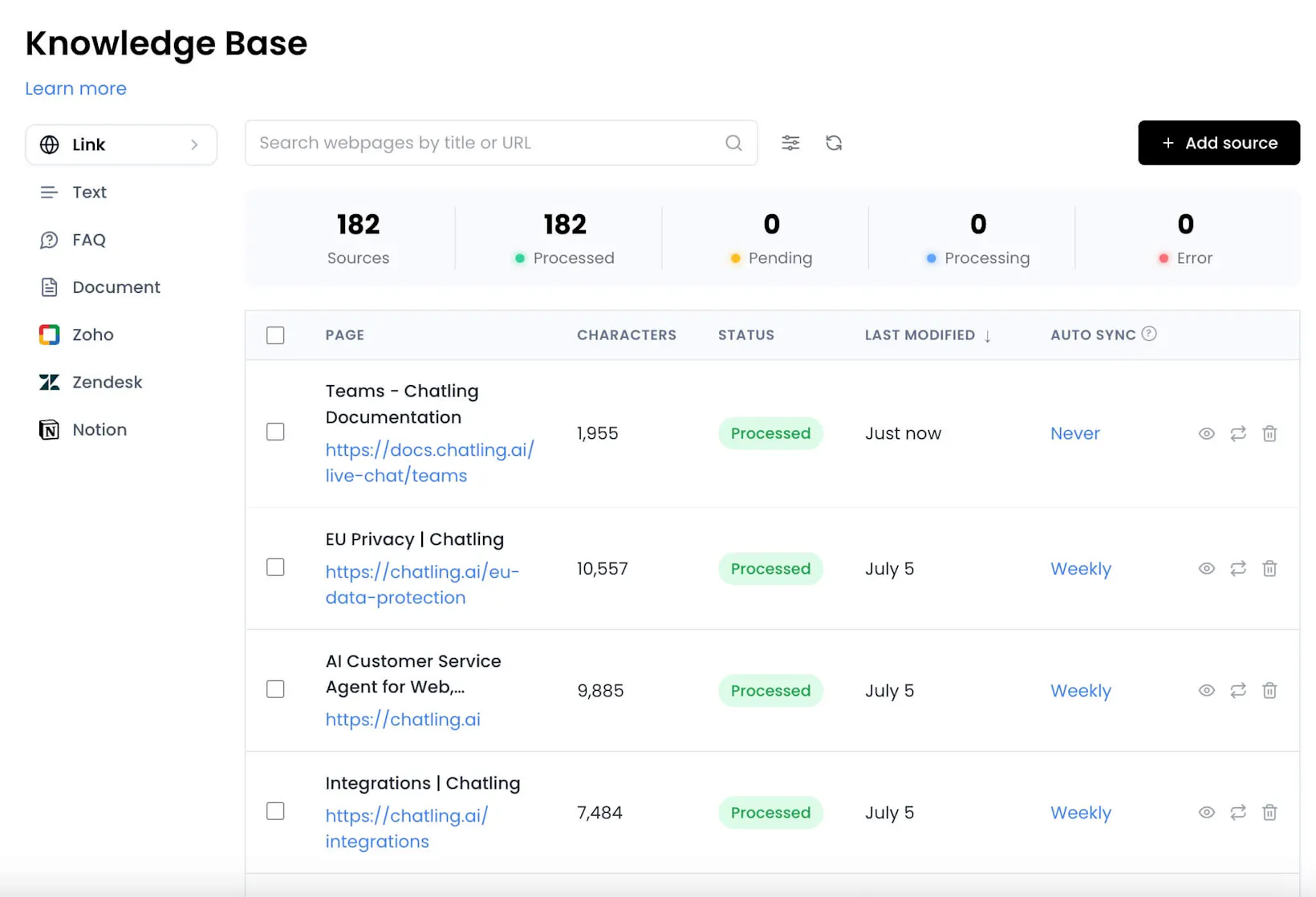
Conversational AI needs access to your business information to answer customers. That might include your website, help center, product pages, FAQs, return policies, or troubleshooting guides.
Before connecting these sources, check that the information is current and consistent. If one page says returns are accepted within 30 days and another says 14 days, the system may retrieve conflicting details. It won't know which policy your business intends to follow unless you resolve the issue.
Many modern systems use a method called retrieval-augmented generation (RAG). It searches connected content for information related to a customer's question and gives that information to the language model before it generates a response.
For example, if a customer asks whether a sale item can be returned, the system can retrieve the relevant section of your returns policy. The model then uses that information to explain the conditions. This gives it a better basis for answering than relying on general knowledge alone.
4. Configure AI Tone and Conversational Behavior

The system should sound like it belongs to your business, but that doesn't mean every reply needs to be full of brand language. Customers usually want a clear answer more than a carefully written introduction.
Set instructions for the way it should communicate:
- Brand voice: Decide whether the tone should be friendly, professional, informal, or more direct.
- Language: Specify which languages it should support and how it should respond when a customer changes languages.
- Response length: Keep simple answers brief, but allow more detail when customers need instructions or explanations.
- Conversation boundaries: Define the topics it can handle and the situations where it should not provide an answer.
- Follow-up behavior: Tell it to use the conversation history and ask for missing details only when they are needed.
Think about what it should do when it doesn't have enough information. It should ask a relevant question or explain that it cannot confirm the answer. It shouldn't make up a policy just to keep the conversation going.
5. Connect Customer Service Tools and Channels

A conversational AI system becomes more useful when it can work with the tools your support team already uses. Integrations can give it access to customer information or let it pass details to another system.
For example, a support platform integration may allow it to create a ticket when a customer needs help from an agent. A CRM connection can help it retrieve or update customer records. A scheduling tool can support appointment bookings.
Next, decide where customers should be able to contact it. Common options include:
- Website chat
- Facebook Messenger
- Telegram
Start with the channels your customers already use most often. You can add others later, once you've tested the experience and know how well the system handles incoming conversations.
6. Make Human Support Easy to Access

Some customer requests need more than an automated response. A billing dispute, a complaint, or an unusual account issue may require someone who can review the situation and make a decision. Customers should also be able to ask for human support directly.
Set clear rules for when a conversation should be transferred. These might include requests the system cannot answer, sensitive issues, repeated misunderstandings, or situations that require an agent's approval.
Pay attention to what happens during the handoff. The human agent should receive the conversation history and a summary of the issue, including any steps the system has already suggested.
Otherwise, the customer may have to explain everything again, which defeats much of the benefit of having a conversation in the first place.
Read Next: How Does AI-to-Human Handoff Work in Customer Service?
7. Test and Improve the Customer Experience

Before launch, test the system with questions customers actually ask. Try different ways of wording the same request, add follow-up questions, and include messages that are vague or missing important details. Also test situations where the system should refuse to guess or transfer the conversation to a person.
Once it's live, keep a check on real conversations. Look for questions it misunderstood, answers that missed important details, and cases where customers had to ask the same thing more than once. Use those findings to update your knowledge sources and instructions.
Pay particular attention to:
- Whether answers are accurate and relevant
- Whether follow-up questions make sense in context
- How it responds to unfamiliar or unclear requests
- Whether human handoffs include the right information
- What customers say about the experience
Keep testing as your business changes. New products, updated policies, and changes to your support process can all affect the answers customers receive.
Conversational AI Best Practices for Customer Service
Conversational AI can seem technically impressive, but still provide an unsatisfactory customer service experience. The details of how it communicates, what information it can access, and when it steps aside all matter.
- Tell customers when they're interacting with AI: Make it clear that the first response is automated. Customers should know when they're speaking to a system and when a human agent has joined the conversation.
- Use everyday language: Avoid internal terms and technical explanations that customers may not understand. If someone asks how to reset a password, give them the steps rather than an explanation of your authentication process.
- Don't ask for details you already have: If a customer has provided an order number earlier in the conversation, don't ask for it again unless you need to confirm it.
- Keep the conversation focused: Answer the question first. Ask for more information only when it affects the answer or the next step.
- Make human support easy to find: Don't trap customers in repeated automated replies when they need a person.
- Be honest about completed actions: Don't say a refund has been issued or an appointment has been booked unless the connected system confirms that it happened.
- Limit access to customer information: Give the system access only to the data and tools it needs. Collect personal details only when they're relevant to the request.
- Review business information regularly: Update product details, pricing, policies, and support instructions when they change.
How to Measure Conversational AI Performance
After launch, look beyond the number of conversations the system handles. A high conversation count doesn't tell you whether customers got the right answer or had a good experience.
Track a mix of support and customer experience metrics:
Metric | What it measures | Why it matters |
|---|---|---|
Resolution rate | The share of conversations successfully resolved | Shows whether customers are getting the help they need |
Customer satisfaction (CSAT) | How customers rate their experience | Helps identify whether the interactions are useful |
First response time | How long customers wait for the first response | Shows whether the system is improving access to support |
Escalation rate | The share of conversations transferred to human agents | Helps identify which requests need human support |
Conversation abandonment rate | The share of conversations customers leave before completion | Can point to confusing or unhelpful interactions |
Unanswered questions | Questions the system cannot answer | Highlights gaps in knowledge or configuration |
Repeat contact rate | How often customers contact support again about the same issue | Helps show whether the first interaction solved the problem |
Look at these metrics together. A low escalation rate might seem like a good result, but it could also mean customers aren't reaching a person when they need one. Compare resolution rates with satisfaction and repeat contacts to get a clearer picture of how well the system is working.
Improve Every Customer Conversation With Chatling
Chatling lets you build AI Agents and AI Chatbots for customer support. Connect your website, documents, FAQs, and other knowledge sources so customers can get answers based on your business information. You can also configure AI Actions for tasks such as collecting customer details, creating support tickets, and booking appointments.
Deploy conversational AI on your website, WhatsApp, Messenger, Telegram, and Instagram. When a conversation needs human attention, your team can take over through Chatling's live chat tools, with access to the conversation history and AI-generated summaries. You can also test agent configurations in the Playground and review conversations through Analytics.
Give customers a direct way to get help, while your team stays available for the conversations that need a person. Get started with Chatling.