
Chatbot design is the process of planning how a chatbot looks, communicates, responds to users, and guides conversations toward a useful outcome. It covers the interface customers interact with, the conversation itself, the information the chatbot uses, and what happens when a customer needs something the chatbot cannot handle.
For customer support, a good chatbot design should make it easy for customers to get an answer, complete a task, or reach a human. That means giving the chatbot a clear purpose, designing useful conversation flows, handling unexpected questions, and testing how it responds before customers rely on it.
TL;DR
- Start with the customer problem, not the chatbot: Look at repetitive support questions, sales requests, product questions, and manual tasks to find work the chatbot can actually take on.
- Turn the problem into a specific outcome: "Improve customer support" is too broad. "Answer shipping and return questions and route unresolved cases to support" gives you something you can design and measure.
- Map customer intents before writing messages: Group different ways of asking for the same thing, then decide what information, response, or action each intent requires.
- Use the right level of structure: Fixed flows work well for predictable journeys such as qualification and FAQs. AI Agents are better suited to open-ended questions, dynamic support, and multi-step tasks where the exact path is difficult to predict.
- Design every question, message, and UI element around a purpose: If a question does not affect what happens next, it probably does not belong in the conversation.
- Design for the difficult conversations too: Plan what happens when customers are unclear, provide incorrect information, ask something outside scope, change their mind, or request human support.
- Test the complete journey and improve it after launch: Test different ways of expressing the same intent, then use real conversations, unanswered questions, handoffs, and drop-offs to find what needs to change.
What Is Chatbot Design?
Chatbot design is the planning behind the entire interaction between a customer and a chatbot. It determines what the chatbot is responsible for, what customers can ask it to do, how it handles those requests, what information it uses, what actions it can take, and what happens when it cannot complete the request.
That means chatbot design goes well beyond the chat window itself. You can have an excellent chatbot interface design and it could still work poorly if it asks unnecessary questions, sends customers down the wrong path, gives them information without helping them act on it, or has no useful response when something falls outside its expected flow.
Chatbot design area | What you need to decide | Example |
|---|---|---|
Scope | Which customer problems the chatbot will handle and where its responsibility ends | Instead of "handle customer support," define the scope as "answer product questions, track orders, explain delivery status, help customers start returns, and escalate unresolved delivery problems." |
Customer intents | What customers are trying to accomplish, regardless of the exact words they use | "Where's my package?", "Track order 48291," and "When will my delivery arrive?" may all represent the same order-tracking intent. |
Conversation design | How the dialogue should progress from the customer's initial request to the result | A customer asking to return an order may first need to identify the order, then receive the applicable next step, rather than being asked for every piece of personal information upfront. |
Flow design | How answers, conditions, decisions, and failures change the conversation | A tracking request may branch differently when an order is found, when it cannot be found, or when the order is marked delivered but the customer says it never arrived. |
AI behavior | How an AI chatbot should interpret requests and behave when the customer does not follow an expected path | The chatbot should understand "my package never showed up" as a potential delivery issue rather than requiring the customer to select an exact "missing delivery" option. |
Information | What sources the chatbot can use and what information it needs from the customer | Product documentation can answer product questions, while an order number may be needed to retrieve an individual order's status. |
Actions | What the chatbot can actually do instead of simply explaining what the customer could do | A chatbot may collect a lead, retrieve information, create a ticket, update a record, send an email, or book an appointment when the underlying system supports the action. |
UI | How customers interact with the chatbot | Buttons can handle a few common choices, free text can handle open-ended support issues, and forms can collect several structured fields. |
Fallbacks | What happens when the chatbot cannot understand, find information, or complete an action | Instead of repeating "I didn't understand," the chatbot can ask a more specific clarification question or provide an appropriate escalation path. |
Human handoff | When automation should stop and a person should take over | A customer who explicitly asks for a human, disputes an outcome, or has an issue requiring investigation can be routed to a human with the relevant conversation context. |
Testing | How you verify that the chatbot works outside the ideal path | Test different phrasings, incomplete information, unexpected answers, multiple requests, intent changes, failed actions, and handoffs. |
Optimization | How you improve the design after launch | Review conversations for repeated questions, failed intents, knowledge gaps, unnecessary handoffs, and points where customers abandon the interaction. |
Read Next:
- What Is Chatbot Help Desk Automation and How It Transforms Support
- AI Chatbot Automation Explained: Unlocking Efficiency and Growth for Your Business
Chatbot design vs. conversation design vs. UI and UX
These terms are closely related, but they describe different layers of the experience.
Term | What it covers | Example |
|---|---|---|
Chatbot design | The complete system and customer experience | Deciding that the chatbot will handle order tracking, returns, and support escalation |
Chatbot conversation design | How the interaction unfolds through questions, answers, clarification, and confirmation | Deciding to ask whether the customer wants to track, change, or return an order before asking for an order number |
Chatbot flow design | The logic connecting different responses and outcomes | Sending tracking requests to one path and return requests to another |
Chatbot UI design | The interface customers use to interact with the chatbot | Using buttons for "Track order" and "Start return" |
Chatbot UX design | How easy and effective the complete experience is | Removing unnecessary questions so the customer gets their order status in fewer steps |
Chatbot interaction design | How the customer and chatbot respond to each other at each point | Deciding when the chatbot asks, waits, confirms, provides an option, or takes an action |
You need all of these layers to work together. A chatbot can have excellent UI but poor UX if customers have to answer ten questions to get a simple answer. It can have a well-designed flow but poor conversation design if the questions are confusing. It can have a good conversation but still fail if the chatbot does not have the information or actions required to complete the customer's goal.
How To Design A Chatbot – 10 Steps to Follow
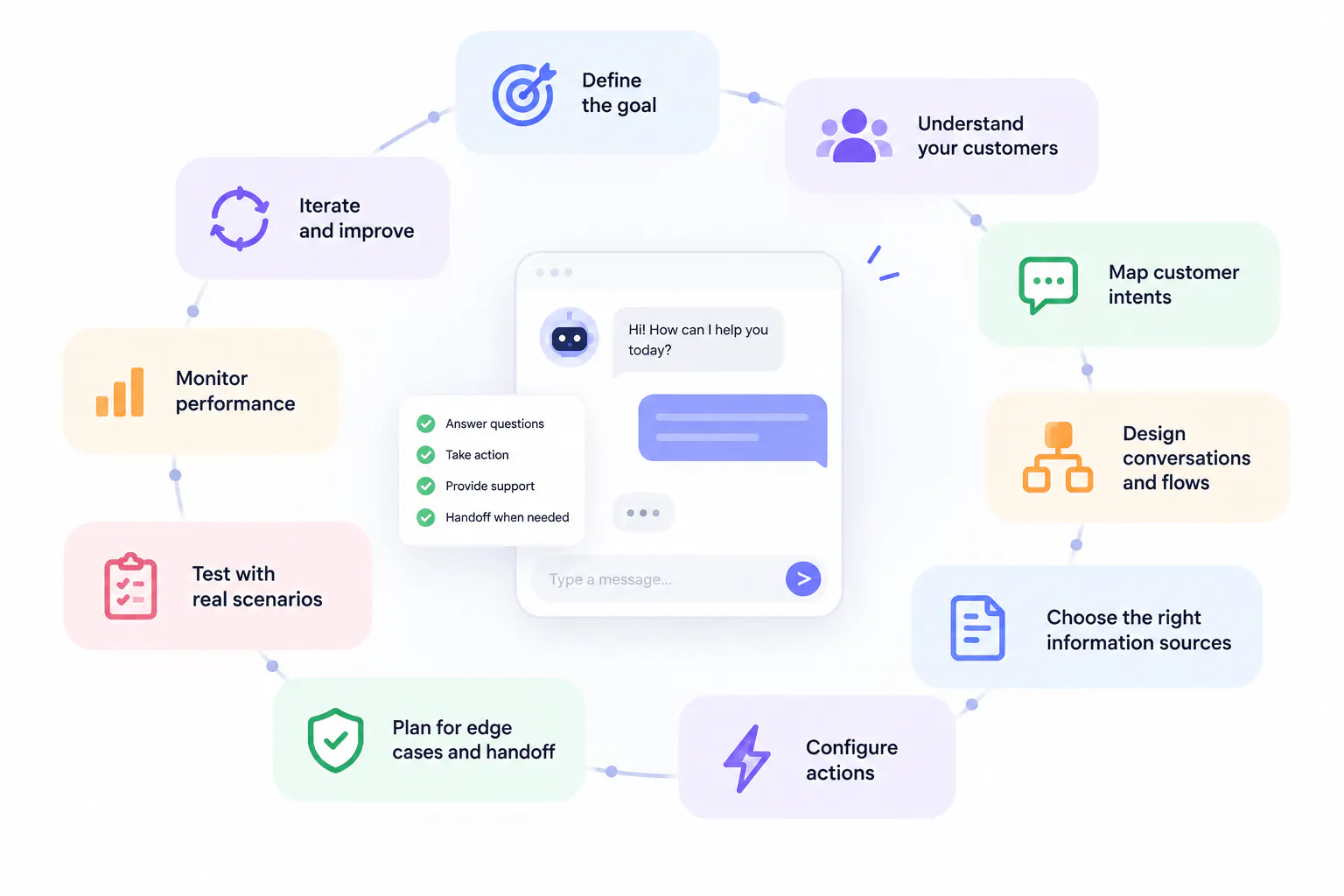
If you are learning how to design a chatbot, start with the customer's task rather than the chatbot's messages. The most reliable process is to define the scope, map customer intents, establish outcomes, identify required information, decide where AI and structured flows belong, design the conversation, configure the chatbot's behavior, define actions, build fallback and handoff paths, choose the UI, and then test the experience with realistic conversations.
Each stage should produce something you can use in the next stage. That prevents the common problem of writing dozens of chatbot messages before you know what the chatbot is actually supposed to accomplish.
1. Define the chatbot's scope
The first step is to decide exactly what the chatbot will help customers do.
Avoid broad descriptions such as "answer customer questions" or "provide customer support." They sound useful but give you no way to determine what belongs inside the chatbot and what does not.
Instead, list the actual customer jobs.
For example, an ecommerce support chatbot might handle:
- Order tracking: Help customers find the current status of an order and understand what that status means.
- Returns: Help customers understand return requirements and guide them through the appropriate return process.
- Delivery problems: Help customers who have a delayed, missing, or incorrectly marked delivery.
- Product questions: Answer questions about product features, specifications, compatibility, availability, or policies using approved information.
- Pre-purchase questions: Help customers decide which product or option is relevant to their needs.
- Human support: Transfer conversations that require investigation, exceptions, or direct human assistance.
The scope should also specify what the chatbot does not handle. For example, if the chatbot cannot make account-security decisions, customers should be routed elsewhere rather than receiving an improvised AI response.
Customer problem | What the chatbot should handle | What happens if it cannot complete the task |
|---|---|---|
Order tracking | Identify the order, retrieve available status information, and explain the status | Ask for another identifier, explain the limitation, or route to support |
Return request | Identify the order, provide relevant requirements, and guide the customer through the process | Explain the limitation or escalate an exception |
Product question | Answer using reliable product information and ask relevant follow-up questions when necessary | Say when the required information is unavailable rather than guessing |
Missing delivery | Understand the problem, retrieve relevant information, and provide the appropriate next step | Create or route a support request if investigation is required |
Lead qualification | Ask relevant qualifying questions, collect contact information, and route or book when appropriate | Provide another contact route if qualification cannot continue |
Appointment booking | Ask for relevant preferences, show availability, and complete the booking | Provide another booking route if the action cannot be completed |
This scope becomes the boundary for the rest of the chatbot design.
Read Next: How to Build Chatbots for Lead Generation: Step-by-Step Guide
2. Define the successful outcome
For every customer task, finish this sentence:
"The interaction is successful when..."
The answer should describe an observable result, not a vague intention.
For example:
- Order tracking: The customer knows the current order status and what that status means.
- Return request: The customer knows whether the return can proceed and has the information or process needed to move forward.
- Product recommendation: The customer receives relevant options based on their actual requirements rather than a generic product list.
- Lead qualification: The business has the information needed to qualify the lead, and the prospect knows what happens next.
- Technical support: The customer either resolves the issue, receives a useful next troubleshooting step, or reaches a human with the relevant context.
- Appointment booking: The customer selects a suitable time and receives confirmation that the appointment has been booked.
This matters because the desired outcome determines the conversation.
If the outcome is simply "answer a shipping question," the chatbot may only need to provide information. If the outcome is "help the customer resolve a missing-delivery problem," the chatbot may need to identify an order, retrieve information, troubleshoot, create a ticket, or hand the conversation to a human.
3. Build an intent map
Customers describe problems in their own language, so your chatbot design should map different phrases to the underlying customer intent.
For example, these requests may all relate to order tracking:
"Where's my package?"
"Can you track order 48291?"
"When will my order arrive?"
"My delivery hasn't shown up."
"What's happening with my shipment?"
"Why hasn't the tracking changed?"
But "It says delivered and I never received it" represents a more specific delivery problem. The chatbot needs to recognize that the conversation has moved beyond a simple status request.
Create an intent map such as this:
Intent | Example customer language | Information needed | Customer outcome | Possible branches |
|---|---|---|---|---|
Track an order | "Where's my package?", "Track 48291", "When will my order arrive?" | Order identifier or another available way to locate the order | Customer receives current status and relevant delivery information | Order found, order not found, multiple matches, status unavailable |
Start a return | "I want to return this", "How do I send this back?" | Order and product information, plus any required return details | Customer understands or starts the return process | Eligible, ineligible, insufficient information, exception |
Product question | "Does this work with X?", "What's included?", "Does it come in black?" | Product identity and relevant question | Customer receives an accurate answer | Information available, information missing |
Product recommendation | "Which plan should I choose?", "What should I buy?" | Requirements that affect the recommendation | Customer receives relevant options | Enough information, needs clarification |
Missing delivery | "It says delivered but I don't have it" | Order and delivery information | Customer receives troubleshooting or escalation | Information available, investigation required |
Human support | "I need to speak to someone" | Reason for handoff if useful | Customer reaches an appropriate human | Immediate handoff, information collection before handoff |
This map becomes the foundation for your chatbot conversation design and chatbot flow design.
4. Identify what information is actually needed
Once you know the intent, determine what the chatbot needs to complete it.
This is where many chatbot designs become unnecessarily complicated. Teams create a list of every piece of information they might want from a customer and then ask for everything at the beginning.
Instead, separate information into three categories:
- Information the chatbot already has: For example, information available from the current conversation, page context, saved contact data, or another connected system.
- Information the chatbot can retrieve: For example, an order status that can be retrieved after the customer provides an order identifier.
- Information the customer actually needs to provide: Only ask for information that the chatbot cannot obtain elsewhere and that is required for the current task.
Suppose a customer says they want to return a pair of shoes. You may need the order number. Once the order is found, the system may already know the product, purchase date, and customer information.
That produces a much more efficient interaction than asking the customer to manually provide every field. The design principle is simple: collect information when it becomes necessary, not merely because you can collect it.
Chatling's Knowledge Base supports sources including websites, sitemaps, URL lists, PDFs, DOCX files, TXT files, text, FAQs, Zendesk, and Zoho. Website sources can be crawled, with the documented crawler supporting up to 1,000 pages. Supported sources can also be re-synced, including automatic syncing for applicable sources.
Read Next: How to Implement a Knowledge Base Chatbot: Our Comprehensive Guide
5. Decide where to use AI, structured flows, or both
There is no reason every chatbot interaction has to be either completely free-form or completely flow-based.
Structured chatbot flows are useful when the customer is making predictable choices and the sequence needs to be tightly controlled. AI-driven conversations are useful when customers express requests in many different ways or when the chatbot needs to interpret context.
A hybrid approach often makes sense.
Interaction | Structured flow | AI conversation | Why a hybrid can help |
|---|---|---|---|
Choosing between a few support categories | Excellent fit | Not necessary | AI can recognize free-text requests and route them into the correct structured category |
Product questions | Can become difficult to maintain if every question is mapped manually | Strong fit | AI can answer varied questions while buttons provide useful follow-up choices |
Lead qualification | Useful for structured fields and predictable questions | Useful for understanding the prospect's initial request | AI can identify the intent, then a form or structured sequence can collect required information |
Technical support | Useful for known troubleshooting steps | Useful for interpreting the customer's description | AI can identify the problem while a structured troubleshooting flow handles known resolutions |
Appointment booking | Useful for predictable booking steps | Useful for understanding when the customer wants to book | AI can determine intent and collect context before triggering the booking workflow |
Human escalation | Useful for explicit support options | Useful for recognizing when escalation is appropriate | AI can identify the need for escalation while structured routing determines where the conversation goes |
Chatling supports both flexible AI-driven conversations through AI Agents and structured flow-based experiences through AI Chatbots. Its AI Agents can understand user intent and dynamically determine how to respond and which configured actions to use, while the AI chatbot for website can be built with structured elements such as messages, questions, buttons, forms, conditions, AI responses, variables, triggers, and actions.
The decision should therefore be based on the customer task, not on whether one approach sounds more sophisticated.
6. Map the conversation around customer decisions
Now move from the intent map to the actual conversation.
At every stage, ask three questions:
- What does the chatbot know now?
- What does it still need to know?
- What can it do once it has that information?
Suppose the customer says they want to return an order.
At that point, the chatbot knows the customer wants a return. It may not know which order they mean.
The next question should therefore help identify the order.
Once the customer provides the order number, the chatbot should use it. It should not return to the beginning and ask the customer to explain the request again.
The conversation should continually move from uncertainty to information to action.
7. Write specific AI instructions
AI chatbot design requires more than writing example responses. You also need instructions that tell the AI how to behave when it encounters situations you did not explicitly script.
A weak instruction might be:
"Be helpful and friendly."
That does not tell the AI what "helpful" means in a particular business.
A stronger instruction might define the chatbot's responsibility, information sources, boundaries, response style, and escalation rules.
For example, an AI customer support chatbot might need instructions covering:
- Role: Act as the first point of support for product, order, and delivery questions.
- Scope: Handle product questions, order tracking, returns, and delivery problems.
- Information: Use the approved company information available to the Agent.
- Question handling: Ask only for information required to answer or complete the current request.
- Accuracy: Do not invent product specifications, policies, order status, delivery estimates, refund eligibility, or actions that were not performed.
- Ambiguity: Ask a targeted clarification question when the customer's request could refer to more than one thing.
- Actions: Use configured actions only when their conditions are satisfied.
- Escalation: Hand off when the customer requests a human or when the issue cannot be resolved using the available information and configured actions.
- Tone: Use clear, concise language appropriate for customer support.
- Response length: Avoid unnecessary explanations when a direct answer is sufficient.
Chatling's AI Agent instructions can define role, purpose, goals, tone, response length, language, formatting, topics to avoid, business rules, compliance requirements, legal disclaimers, PII handling, and safety requirements.
The key is specificity. The instruction should tell the AI what behavior looks like in the situations it will actually encounter.
8. Decide what the chatbot should do, not just what it should say
A chatbot becomes significantly more useful when it can complete tasks instead of simply directing customers elsewhere.
For every important intent, ask whether the customer needs:
- Information: The customer only needs an answer, such as a product specification or policy detail.
- Retrieval: The customer needs information about a specific record, such as an order or account.
- Data collection: The customer needs to provide information, such as contact details for a sales conversation.
- Record creation: The customer needs a support request or lead created.
- Record update: The customer needs information changed in a supported system.
- Communication: The customer needs an email or confirmation sent.
- Booking: The customer needs an appointment scheduled.
- External action: The chatbot needs to interact with another system or API.
9. Define action triggers and restrictions
An action should not run simply because the AI thinks it might be useful.
For every action, define:
- When it should trigger: What customer request or situation makes the action relevant?
- What must be known first: Which information is required before the action can run?
- What should not trigger it: Which similar-looking requests should be handled without the action?
- What happens after success: What should the chatbot tell the customer?
- What happens after failure: How should the customer recover?
For example, a support-ticket action could have a rule such as: use the action when the customer's issue remains unresolved after the available troubleshooting or information has been exhausted; collect the relevant customer and issue information first; do not create a ticket for questions that can be answered directly.
Chatling's AI Actions can be configured with an action name, instructions for when to use the action, frequency, and input parameters where required. The "When to Use" instructions can specify when the action should be triggered, what needs to be true before it runs, and situations where it should not be used. This gives you more control over when an AI Agent uses an action and what conditions need to be met first.
10. Design human handoff before you build the chatbot
Human handoff should be treated as part of the main chatbot experience, not as a last-minute escape hatch.
Decide what should trigger escalation.
Examples include:
- The customer explicitly requests a human: If someone says, "I need to speak to an agent," continuing to force them through automation usually adds unnecessary friction.
- The issue requires investigation: A customer reporting a complex account problem may need a human who can investigate beyond the chatbot's available information.
- The customer disputes an automated outcome: If the chatbot says a request does not meet a policy and the customer believes there is an exception, escalation may be appropriate.
- Automation cannot complete the action: If the chatbot cannot retrieve the necessary information or an external system fails repeatedly, the customer needs another path.
- The customer has already completed the available troubleshooting: Repeating the same troubleshooting steps does not move the conversation forward.
- The issue requires human judgment: Some requests cannot be safely resolved using predefined information and actions.
The handoff should preserve context whenever possible. If a customer has already explained that order 48291 was marked delivered but was never received and that they have already checked with neighbors, the human should not begin with "What seems to be the problem?"
Chatling includes Human Handoff and Live Chat capabilities, along with an agent inbox and support features such as AI summaries, internal notes, priority, assignment, routing, and round-robin workflows.
How To Design A Chatbot Conversation
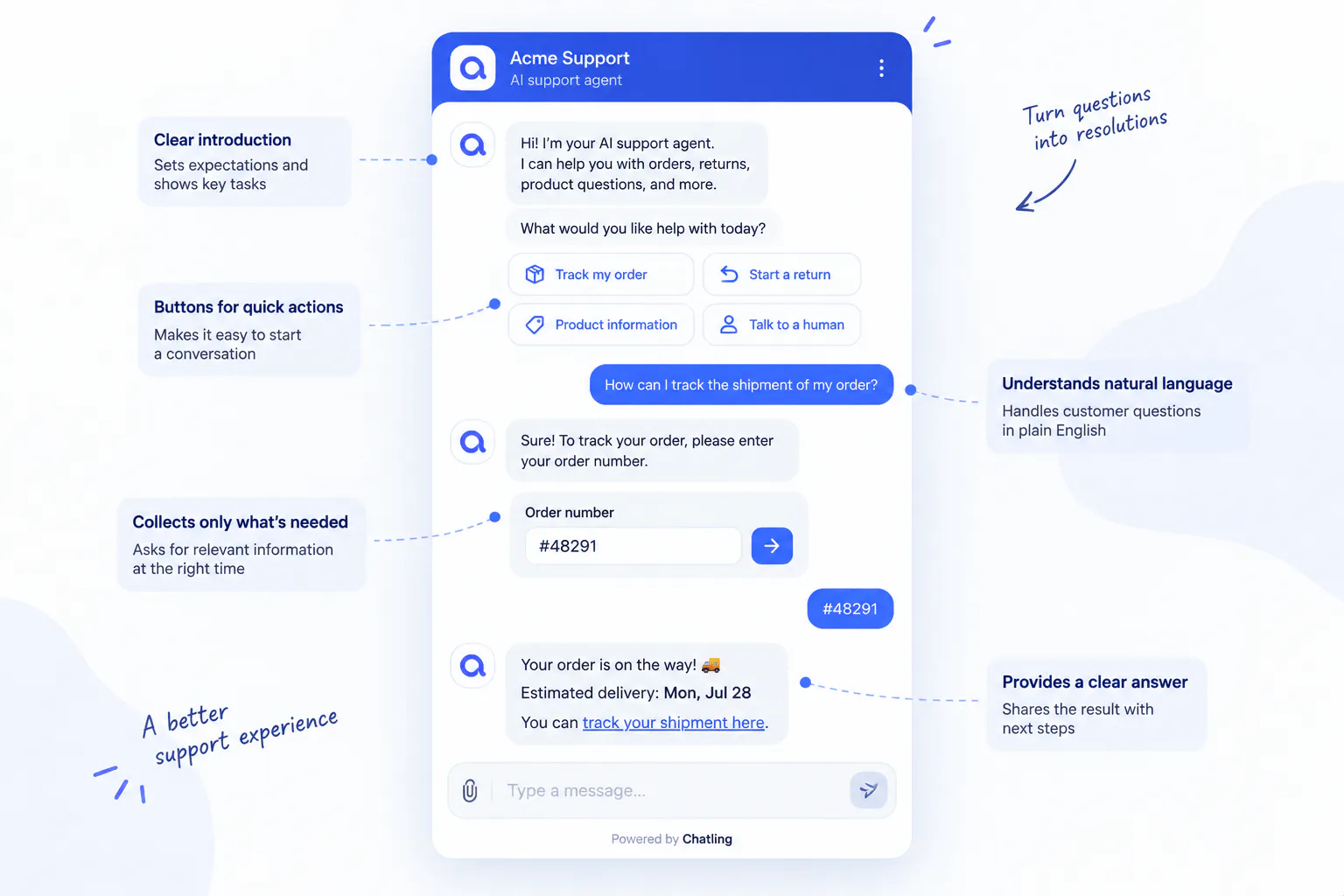
Chatbot conversation design is the process of planning how the customer and chatbot communicate from the initial request through completion.
The goal is not to make every message sound conversational for the sake of sounding human. The goal is to make the dialogue efficient, understandable, and capable of handling real customer behavior.
A useful conversation generally moves through some combination of these stages: identify what the customer needs, clarify ambiguity, collect necessary information, provide information or perform an action, confirm important results, and explain the next step.
The exact sequence depends on the task.
- Start with a useful opening: Tell customers what the chatbot can help with and give them a clear way to begin. For example, an ecommerce chatbot could offer options for orders, returns, delivery, and product questions.
- Ask only useful questions: Every question adds friction, so collect only the information needed for the next step. If a customer wants to track an order, ask for the information needed to identify it instead of unrelated personal details.
- Ask questions in the right order: Prioritize information that changes what the chatbot does next. For example, a laptop recommendation chatbot should ask about intended use and budget before asking for the customer's name.
- Make clarification specific: When a customer's request is ambiguous, explain the available options instead of simply asking, "Can you clarify?" If they say, "I want to change it," ask whether they mean the delivery address, order items, or delivery date.
- Handle unexpected answers: Use information the customer provides even when it does not directly answer the question. If someone responds to an order-number request by saying their package is late, acknowledge the delivery issue and guide them toward identifying the order.
- Let customers change direction: Customers may switch from asking about returns to order tracking, pricing to technical questions, or troubleshooting to human support. The chatbot should adapt instead of forcing them through the original conversation path.
- Confirm important actions: Ask for confirmation before consequential actions such as cancelling an order, booking an appointment, or submitting a support request. Simple, reversible interactions usually do not need confirmation.
- End with a clear result: After completing a task, explain what happened and what comes next. For example, after submitting a support request, provide the reference information, expected response, and any next steps instead of ending with a generic offer to help.
5 Steps to Designing a Chatbot Flow
Chatbot flow design is the logic that determines how different customer inputs lead to different responses, actions, and outcomes.
A flow is more than a sequence of messages. It is a decision system.
A simple support flow might look conceptually like this: identify the customer's request, identify the relevant order or account, determine the specific problem, retrieve the necessary information, complete the task if possible, and escalate when the task cannot be completed.
The important work happens inside those stages.
#1) Design the entry point
Consider where the conversation begins.
A customer might start from the homepage, a product page, a pricing page, a support article, an order-status page, or a messaging channel. The context available at the starting point may influence what the chatbot needs to ask.
For example, if a customer opens the chatbot from a specific product page and asks a question about that product, making them select the product again may be unnecessary. Good flow design uses available context wherever possible.
#2) Create branches only when they change what happens next
A branch should exist because different answers require different handling.
For example, "Track an order" and "Start a return" need different processes, so they should lead to different paths.
But creating separate branches for "Yes," "Sure," "Okay," and "Yep" is unnecessary if they all represent the same customer decision.
The purpose of a branch is not to represent every possible sentence. The purpose is to determine what the system should do next.
#3) Use conditions to change the experience
Conditions become important when the same request can produce different outcomes.
Consider a return request. The chatbot might determine that the order qualifies, does not qualify under the standard policy, cannot be verified, or requires human review.
Each state should have its own response and next step.
Condition | What the chatbot knows | What the customer should receive | Next step |
|---|---|---|---|
Information confirms the request can proceed | The required information is available and the next step is clear | An explanation of what can happen next | Continue the return or relevant action |
The standard requirements are not met | The request does not fit the normal process | A clear explanation of the applicable limitation | Provide relevant information or offer escalation where appropriate |
Required information is missing | The chatbot cannot determine the correct outcome | A specific request for the missing information | Continue once the information is provided |
Customer disputes the result | The customer believes the automated result is incorrect or exceptional | Acknowledgement that the case needs further review | Human handoff |
External action fails | The chatbot cannot complete the configured action | A clear explanation that the action could not be completed | Retry where appropriate or provide another route |
This is what makes a flow usable. The design accounts for actual states rather than drawing only the ideal sequence.
#4) Carry information between steps
Information collected in one part of the conversation should be available later when appropriate.
This can include:
- Customer identity: Name, email, phone number, or another identifier already provided.
- Order information: Order number, product, order status, or relevant date.
- Intent: What the customer originally came to accomplish.
- Preferences: Product requirements, appointment preferences, or other choices.
- Troubleshooting history: Steps the customer has already attempted.
- Qualification information: Answers that affect lead routing or recommendations.
This prevents repetitive questions and allows later actions to use information already collected.
#5) Design failure paths beside success paths
For every important action, explicitly design what happens if it fails.
For an order lookup:
Success: Order is found and current information is available.
Failure: Order cannot be found.
Alternative: Customer does not have the expected identifier.
Ambiguity: Multiple records may match.
For a booking action:
Success: An available time is selected and the appointment is booked.
Failure: The booking cannot be completed.
No availability: There are no suitable times.
For an external API:
Success: Valid information is returned.
Failure: The request returns an error or no usable result.
This is one of the biggest differences between a chatbot that works in a demo and a chatbot that works for real customers.
6 Chatbot Design Examples
The best way to understand chatbot design is to see how the design changes depending on the customer's objective.
#1) FAQ chatbot design
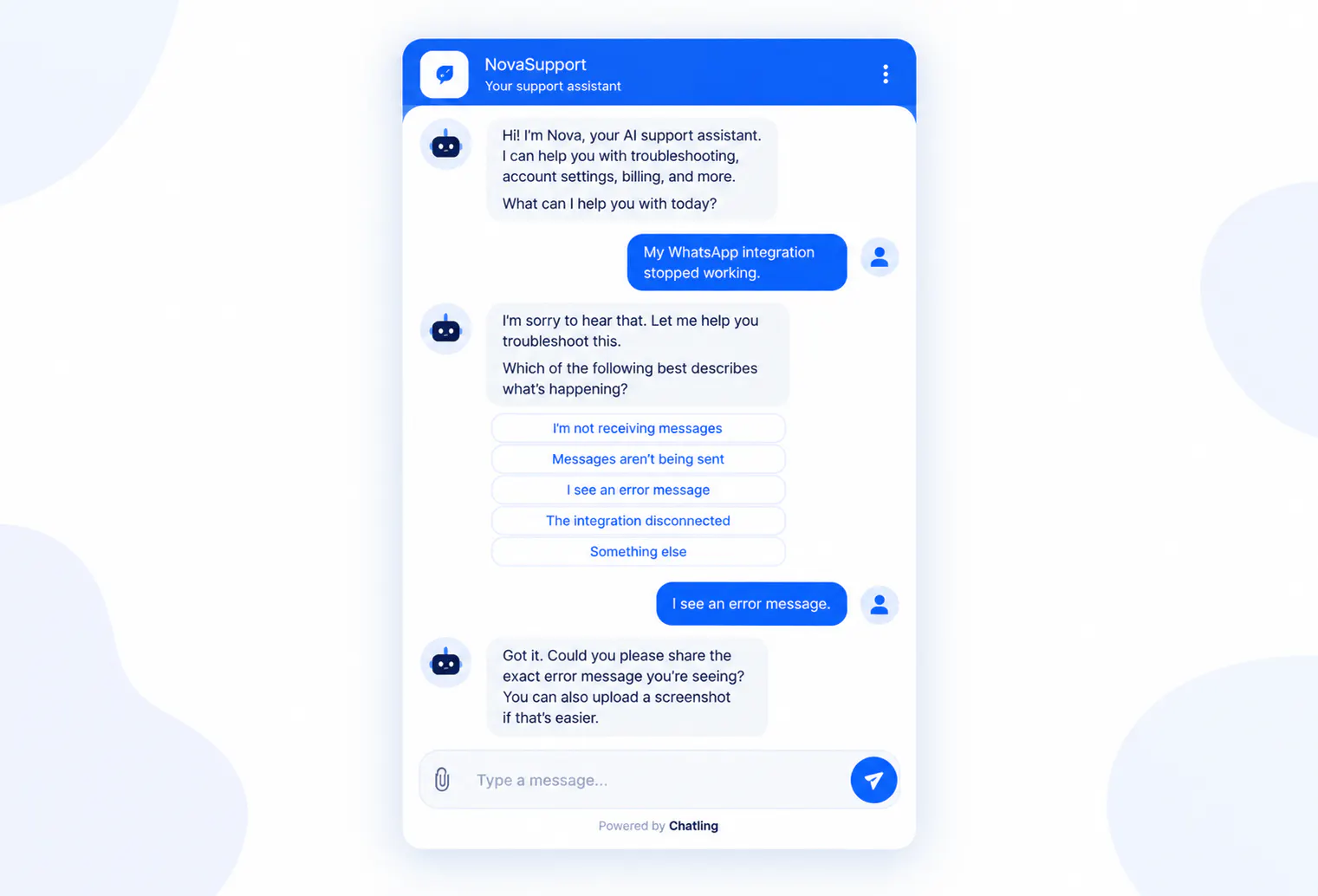
An FAQ chatbot is designed primarily to answer common questions from reliable company information.
Suppose a customer asks about shipping times. The chatbot can answer the general question, but it should also recognize when the customer's question requires a different workflow.
"How long does shipping take?" is an informational question.
"How long does shipping take to Canada?" may require destination-specific information.
"Do you offer next-day shipping?" may require information about available shipping options.
"My order is two days late" is no longer just an FAQ. It is a customer-specific support issue.
A well-designed FAQ chatbot therefore needs to distinguish between general questions and situations that require customer-specific information or action.
#2) Product recommendation chatbot design
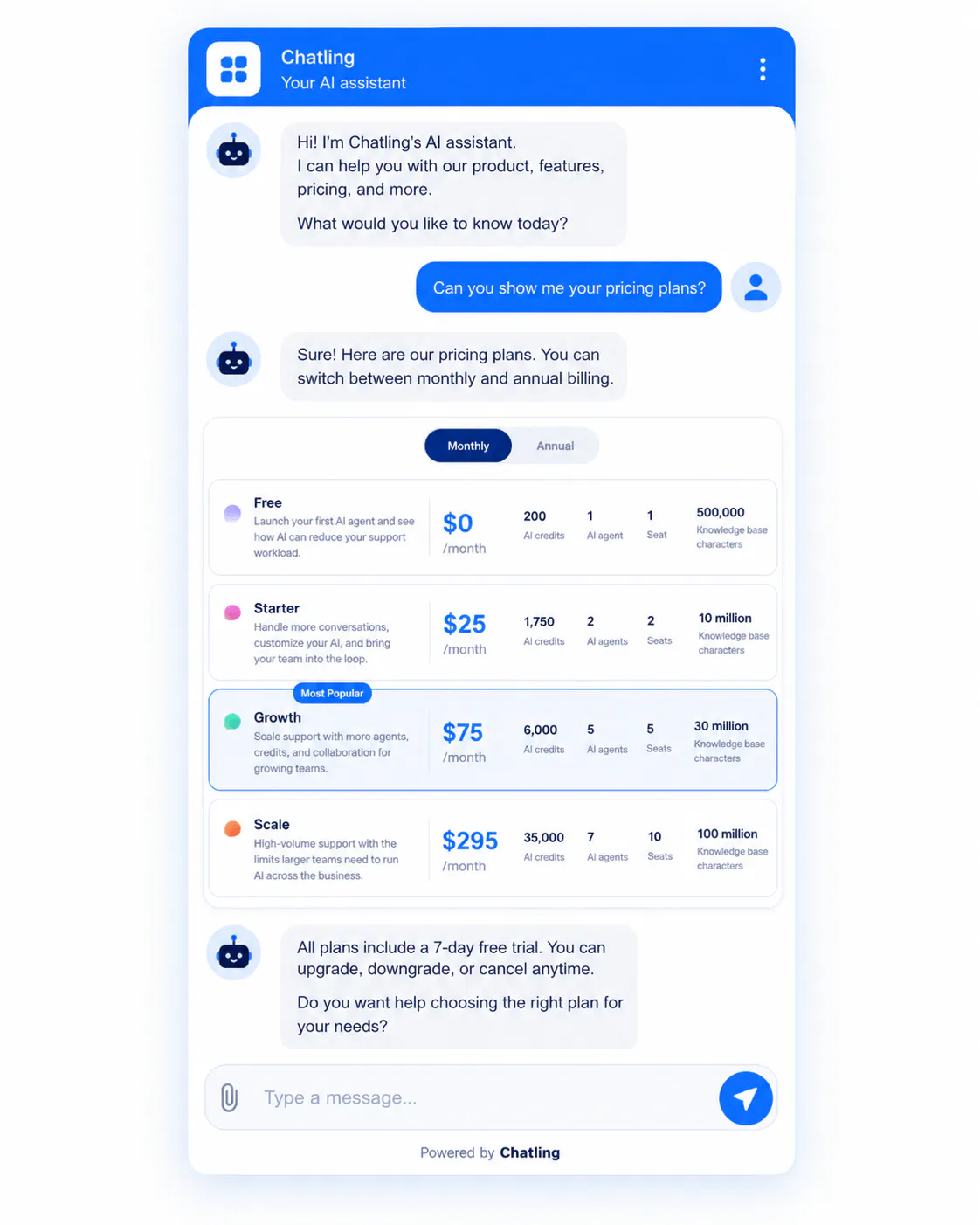
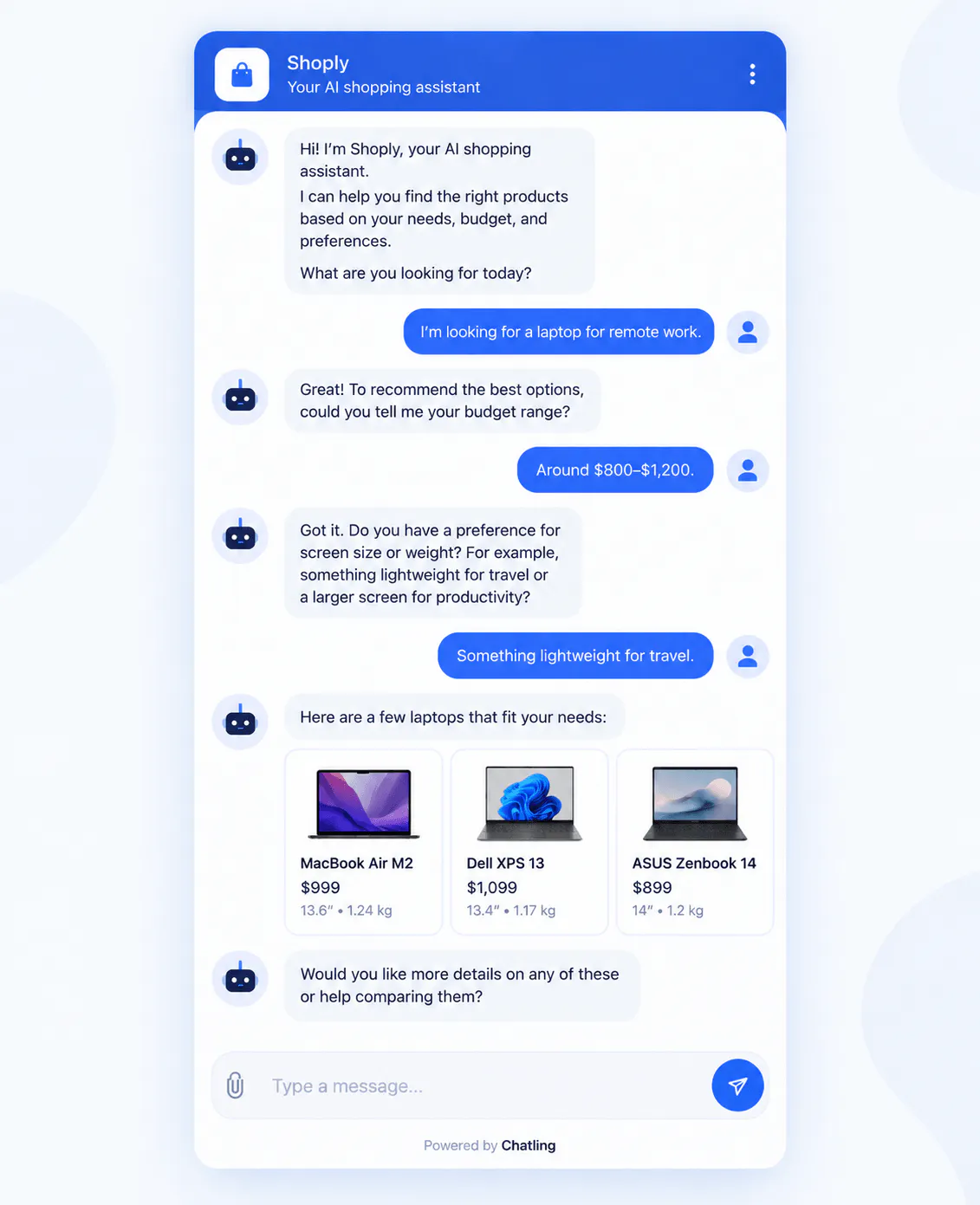
A product recommendation chatbot should identify the customer's requirements before making a recommendation.
Suppose a customer asks which laptop they should buy. The chatbot may need to understand what the customer will use it for, their approximate budget, and any requirements that materially affect the available options.
The questions should be selected based on their impact on the recommendation.
If budget changes which products are suitable, ask about budget.
If the customer's use case determines which features matter, ask about use case.
If a particular requirement has no effect on the recommendation, there is no reason to collect it.
This is a good example of chatbot interaction design because the questions themselves become part of the recommendation logic.
#3) Ecommerce chatbot design
An ecommerce chatbot often needs to combine product discovery, product questions, order support, and post-purchase assistance.
A customer might begin with:
"Is this available in black?"
Then ask:
"How long does shipping take?"
Then:
"Can I return it if the size is wrong?"
These are related to the same purchase journey but represent different intents.
A well-designed ecommerce chatbot should not treat each message as an unrelated FAQ. It should preserve relevant context while still allowing the customer to move between product, shipping, and return questions.
Read Next:
- Chatbot Integration for E-Commerce: What You Need to Know
- How an AI Chatbot for E-Commerce Can Enhance Your Customer Experience
#4) Lead-generation chatbot design
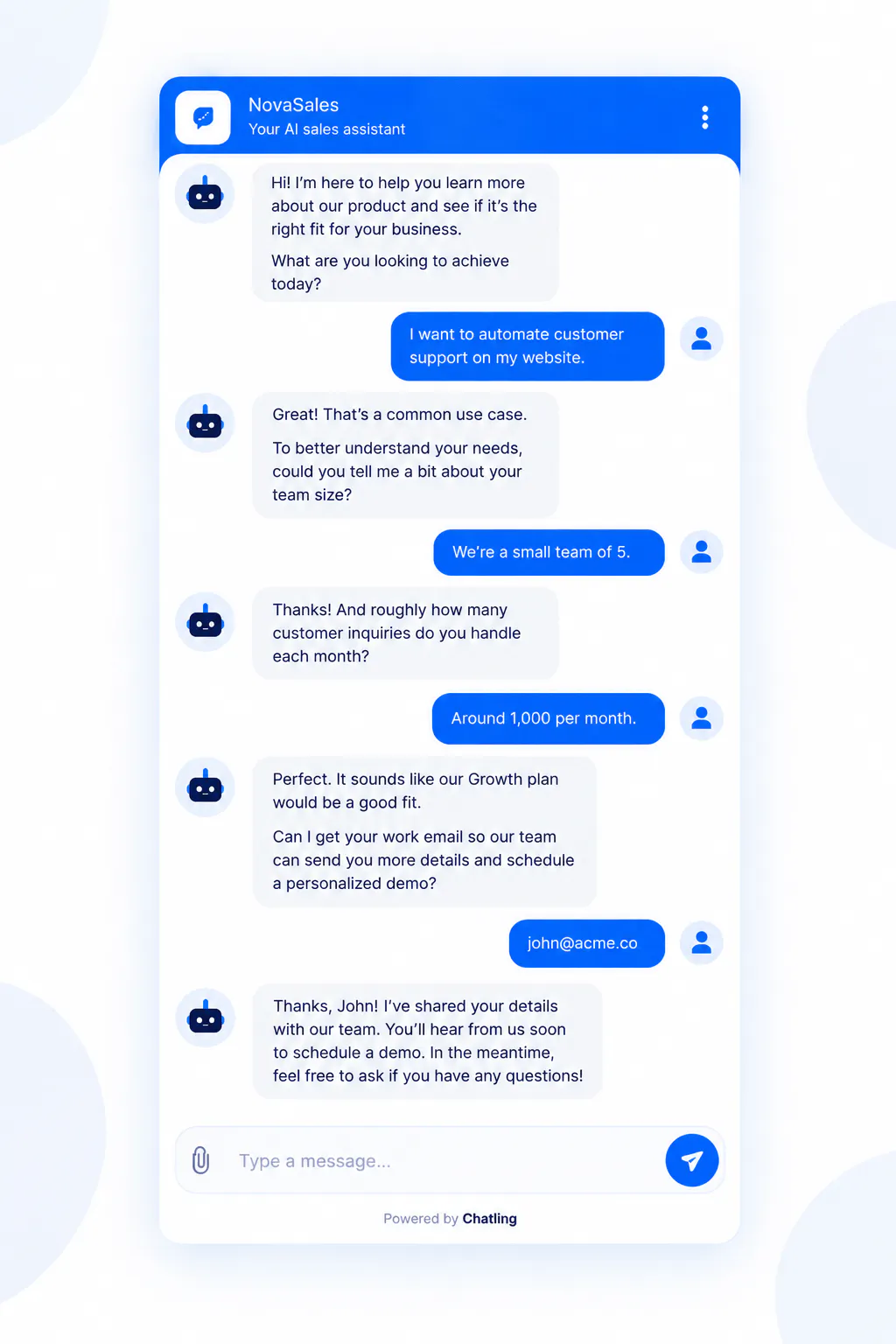
Lead-generation chatbots have a different outcome from support chatbots.
The objective may be to understand what the visitor needs, determine whether the visitor fits a particular customer profile, collect contact information, and move the visitor toward a sales conversation.
A good design avoids turning the interaction into an unnecessarily long qualification form.
For example, if the visitor says they want help with customer support automation, the chatbot can ask questions that actually affect qualification or routing. Once the relevant information is collected, the chatbot can request contact details and offer an appropriate next step.
#5) Technical support chatbot design
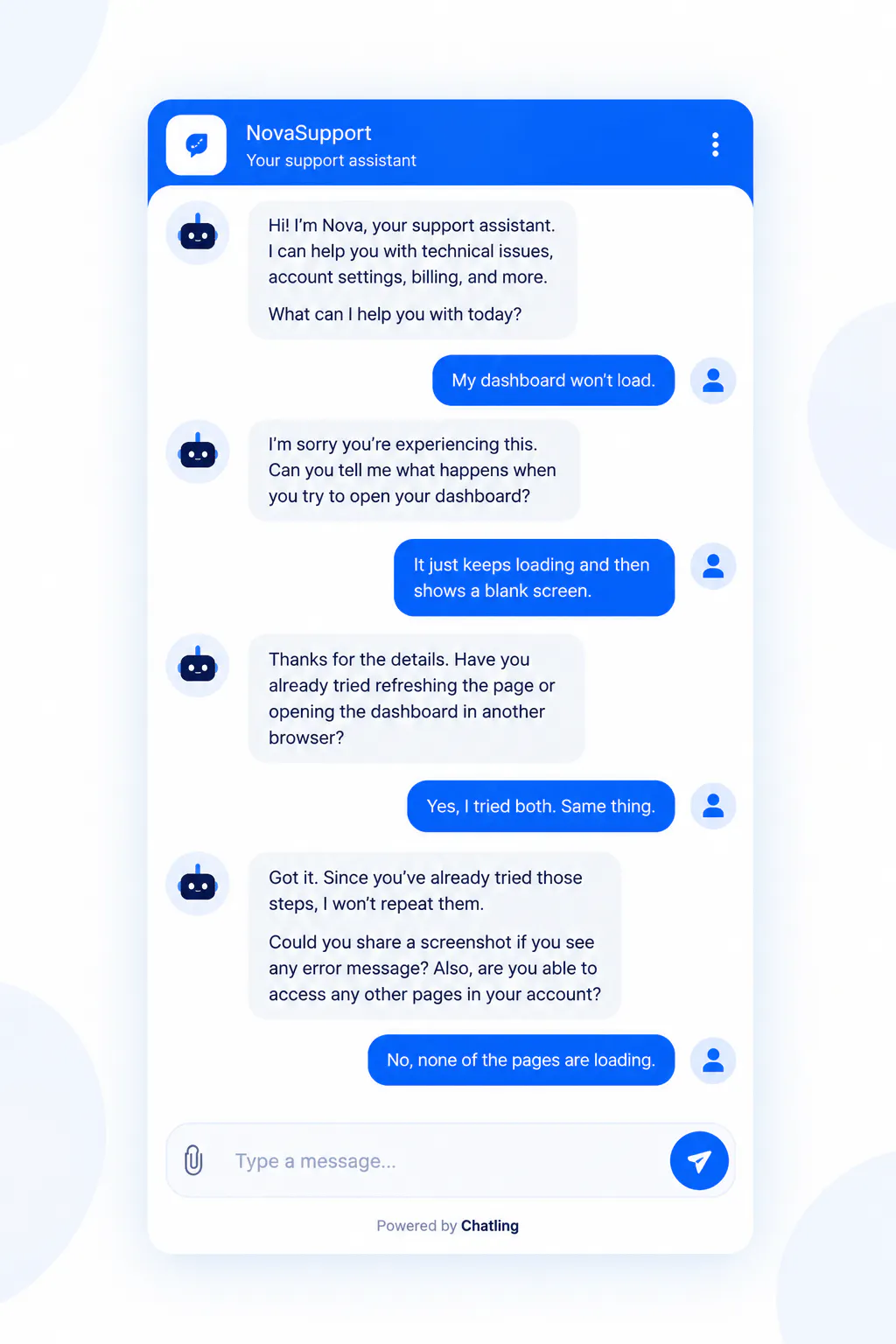
Technical support is one of the clearest examples of why chatbot conversation design needs to account for context.
A customer may begin with a vague statement such as "It isn't working."
The chatbot needs to narrow the problem without overwhelming the customer.
It may first identify what they were trying to do, then determine what happened, then identify any error message, and finally establish which troubleshooting steps have already been attempted.
The conversation should become more specific as information is collected.
If the chatbot cannot resolve the issue, the handoff should include that troubleshooting history so the customer does not have to repeat it.
How To Test And Improve Chatbot Design (7 Simple Steps)
A chatbot is not ready because the happy path works in a demo.
You need to test the system against the ways real customers are likely to behave.
#1) Test different phrasings
For every important intent, create several test inputs.
For order tracking, test formal wording, casual wording, short wording, contextual wording, and messages that contain extra information.
The goal is not for every response to be identical. The goal is for the chatbot to understand the same underlying customer need and move the interaction toward the correct outcome.
#2) Test incomplete information
If a workflow requires an order number, test what happens when the customer does not provide it.
Then test what happens when the customer says they do not have it.
Then test whether the chatbot has another way to identify the order.
This is how you determine whether the flow actually works outside the ideal case.
#3) Test unexpected information
If the chatbot asks, "What is your order number?" and the customer responds, "The package was supposed to arrive yesterday," the system should not blindly repeat the same question.
The customer's response contains useful information that may change the support path.
#4) Test multiple requests
Customers frequently combine requests.
For example:
"I want to track my order and also know whether I can return it if it doesn't fit."
A good design should have a strategy for handling multiple intents. It may answer one and then address the other, or clarify which one the customer wants handled first if the workflow requires sequencing.
#5) Test action failures
If the chatbot uses an external system, deliberately test what happens when the external action fails.
Chatling's HTTP Request action, for example, supports connecting an AI Agent to external APIs, using information collected in the conversation or saved contact data, sending requests, and using returned information in the conversation or another action. The documented action supports GET, POST, PUT, PATCH, and DELETE requests, with testing based on sample inputs and a requirement for a 2xx response and valid JSON for the action test.
The customer-facing experience should still be designed when the external request fails.
#6) Test human handoff
Ask for a human explicitly.
Then create a scenario where the chatbot genuinely cannot solve the issue.
Check whether the handoff:
- happens at the appropriate point;
- preserves the relevant conversation context;
- routes the customer appropriately;
- avoids making the customer repeat information;
- clearly explains what happens next.
#7) Improve the chatbot after launch
Real conversations will reveal problems you did not anticipate.
Look for:
- Repeated unanswered questions: These may indicate missing information or poor intent coverage.
- Repeated clarification loops: These may indicate unclear instructions or an ambiguous flow.
- Frequent human handoffs: These may indicate that the chatbot lacks information, actions, or a suitable workflow.
- Repeated customer corrections: These may indicate that the chatbot is making incorrect assumptions.
- Repeated action failures: These may indicate an integration or action-design problem.
- High abandonment at a particular question: This may indicate that the chatbot is asking for too much information or asking at the wrong point.
- Questions the chatbot answers incorrectly: These may indicate a knowledge or instruction problem rather than a copy problem.
Chatling also gives you tools to improve the chatbot after you build it. You can use Analytics to see how conversations are performing, track leads and resolution rates, identify common questions and content gaps, and spot trends in how customers interact with your AI. Before making changes, you can use the Playground to compare models and configurations and test different scenarios.
From there, you can use what you learn from real conversations to update your company information or Agent instructions, test the changes again, and redeploy the improved experience.
Chatbot Design Patterns: 7 Patterns For Building Better Conversations
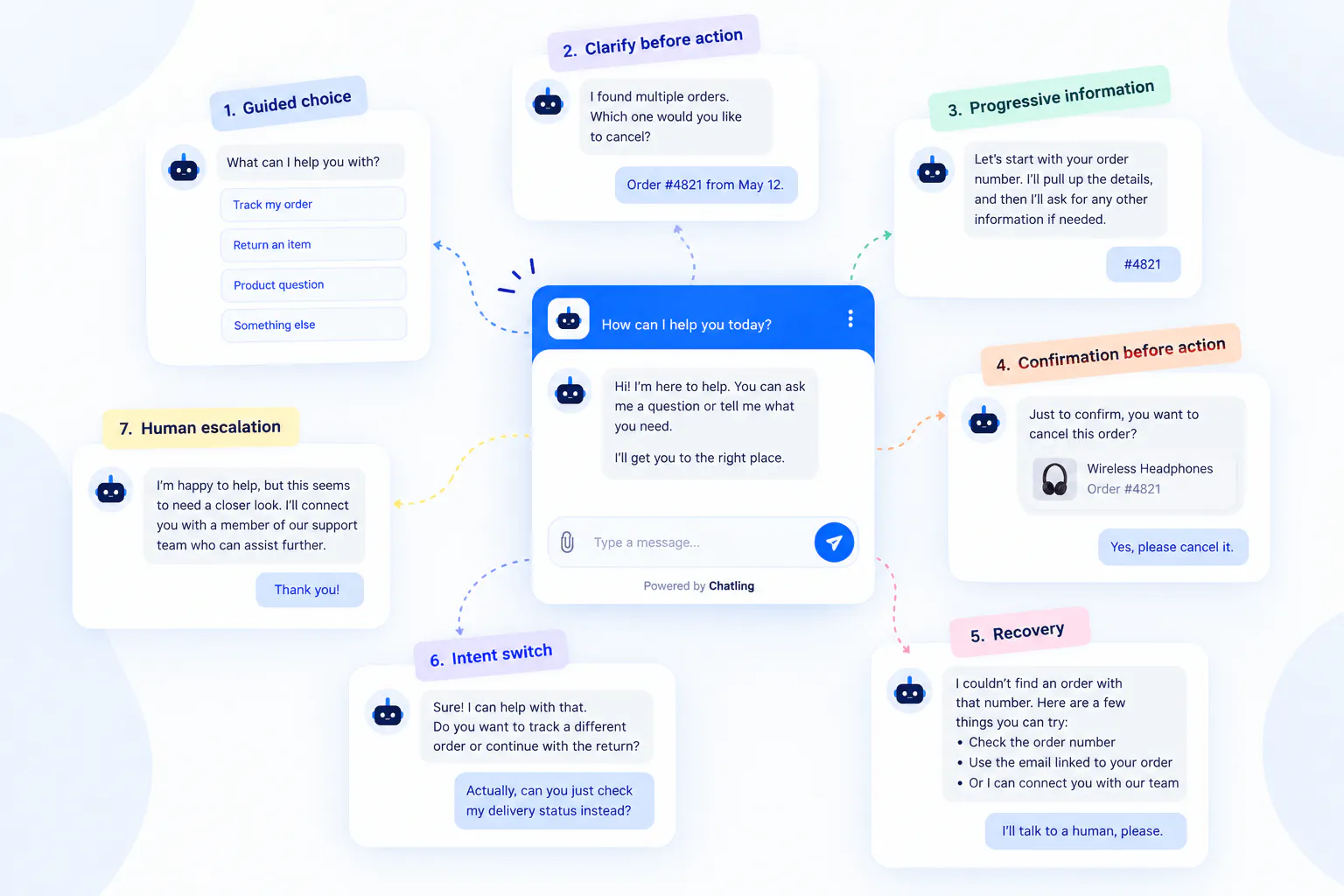
Chatbot design patterns are reusable approaches for solving common conversation problems. They give you a consistent way to handle predictable situations, from guiding customers to the right path to recovering when something goes wrong.
#1) Guided-choice pattern
Use this when: Customers commonly arrive with a small number of predictable needs.
Example: A support chatbot asks whether the customer needs help with an order, return, product question, or another issue.
Why it works: Customers get immediate direction without needing to know the exact wording the chatbot expects.
What to watch for: Keep the choices limited. If customers may have many different problems, provide free-text input as another route.
#2) Clarify-before-action pattern
Use this when: A customer requests an action but the chatbot cannot safely determine what they mean.
Example: A customer asks to cancel "it," but several orders or products could be involved. The chatbot identifies the correct one before cancelling.
Why it works: It prevents the chatbot from taking a consequential action based on an assumption.
#3) Progressive-information pattern
Use this when: The chatbot needs several pieces of information, but not all of them are needed immediately.
Example: Identify an order first, retrieve its product and purchase details, then ask for additional information only if the return requires it.
Why it works: Customers provide less information manually, and each question has a clear purpose.
#4) Confirmation-before-action pattern
Use this when: The chatbot is about to perform an important or potentially irreversible action.
Example: Before cancelling an order, confirm the specific order and item.
Why it works: The customer gets a final opportunity to catch an error before something changes.
#5) Recovery pattern
Use this when: The chatbot cannot complete the expected path.
Example: If an order cannot be found, explain the problem and offer another way to identify the order or get help.
Why it works: A failed step does not become a dead end. The customer still has a clear way forward.
#6) Intent-switch pattern
Use this when: Customers may change what they need during a conversation.
Example: A customer starts with a return request but then asks about delivery status. The chatbot switches to tracking without making them restart.
Why it works: It reflects how people actually communicate instead of treating the customer's first request as permanent.
#7) Human-escalation pattern
Use this when: Automation can no longer reasonably resolve the customer's issue.
Example: A customer disputes a policy outcome or requests an exception that the chatbot cannot verify.
Why it works: It gives the conversation a clear exit instead of continuing with increasingly unhelpful AI responses.
Chatbot Design Best Practices
The best chatbot designs make it easy for customers to accomplish what they came to do without unnecessary questions, confusing choices, or dead ends. The following practices bring together the key decisions that affect how a chatbot performs across real customer conversations.
- Design around the customer's outcome: Start with what the customer needs to accomplish, such as tracking an order, solving a support issue, finding the right product, or booking an appointment. Use that outcome to determine what the chatbot needs to ask, know, and do.
- Ask only for information you need: Don't collect information simply because it is available. Ask for an order number when you need to identify an order, contact details when you need to follow up with a lead, or additional product requirements when they affect a recommendation.
- Preserve conversation context: Use information the customer has already provided instead of asking them to repeat it. If they have already explained that an order was marked delivered but never arrived, that context should remain available throughout the support interaction.
- Support different ways of expressing the same intent: Customers will not always use the wording you expect. Design the chatbot to recognize that questions such as "Where's my package?", "When will my order arrive?", and "Can you track my delivery?" may represent the same underlying need.
- Give every failure a next step: When the chatbot cannot find information or complete an action, explain what happened and provide a useful alternative. That could mean asking for another identifier, offering another way to complete the task, or escalating the conversation.
- Use AI and structured flows where they fit: AI works well when customers may express requests in different ways or when the conversation requires context. Structured flows are useful for predictable processes with defined decisions, forms, conditions, and actions.
- Confirm consequential actions: Ask for confirmation before actions such as cancelling an order or booking an appointment when an incorrect action could create a meaningful problem. Simple, reversible interactions generally do not need the same level of confirmation.
- Make human handoff part of the design: Define when automation should stop, such as when the customer requests a person, an issue requires investigation, or the available actions cannot resolve the problem. Preserve the conversation context so the customer does not have to start again.
- Test beyond the happy path: Test incomplete information, ambiguous requests, unexpected answers, multiple requests, changed intent, failed actions, out-of-scope questions, and human handoff instead of testing only the ideal conversation.
- Improve the chatbot using real conversations: After launch, look for repeated unanswered questions, clarification loops, customer corrections, failed actions, frequent handoffs, and points where customers abandon the interaction. Use those patterns to refine the chatbot and test the changes again.
Final Takeaway
Good chatbot design is about building a complete customer experience, not writing a collection of chatbot messages. Start with what customers need to accomplish, define what success looks like, map the different ways they may express each intent, and decide what information, actions, and decisions are needed to get them there. From there, design the conversation, flow, AI behavior, UI, fallback paths, and human handoff around those customer goals.
Key takeaways:
- Design around outcomes: Start with what the customer needs to accomplish, such as tracking an order, solving a support issue, booking a meeting, or finding the right product.
- Make every interaction purposeful: Ask for information only when it helps the chatbot answer the question, make a decision, or complete the next step.
- Design beyond the happy path: Account for ambiguity, missing information, intent changes, failed actions, unexpected questions, and human escalation.
- Choose the right interaction: Use AI and free text for flexible conversations, structured flows for predictable processes, and buttons or forms when they genuinely reduce effort.
- Keep improving after launch: Use real conversations to find unanswered questions, repeated friction, content gaps, and workflow problems, then refine the chatbot and test those changes again.
If you want to put these principles into practice, Chatling gives you the tools to build both flexible AI Agent experiences and structured AI Chatbots, connect them to company information, add actions such as forms, API requests, bookings, emails, and AI support workflows, and improve the experience using testing and analytics.
Start using Chatling for free to automate customer support while keeping your human agents in the loop.
Read Next:
- How to Create a Chatbot for Free - A Simple Guide to Getting Started
- How to Integrate a Chatbot to Your Website: A Complete Guide
Chatbot Design FAQs
What is AI chatbot design?
AI chatbot design is the process of planning how an AI chatbot interprets requests, uses information, follows instructions, responds, performs actions, handles uncertainty, and escalates when needed. It still requires clear scope, information, instructions, boundaries, and testing.
What is chatbot interaction design?
Chatbot interaction design focuses on how customers and chatbots respond to each other. It covers questions, choices, information requests, actions, confirmations, unexpected answers, changed intent, and failure recovery.
How do you design chatbot workflows?
Start with the task the chatbot needs to complete. Identify the entry point, required information, decisions, conditions, actions, success and failure states, and human escalation points. Then connect them into a workflow that preserves context and provides a path forward when the expected sequence breaks.
What makes a good chatbot design?
Good chatbot design helps customers complete a specific task with minimal unnecessary effort. It handles different ways of expressing an intent, asks useful questions, uses available information, provides clear next steps, handles failures, and offers human support when needed.
How do you test chatbot UI design?
Test different ways of expressing the same intent, incomplete and ambiguous requests, unexpected answers, multiple requests, changed intent, action failures, out-of-scope questions, and human handoff. After launch, review real conversations for recurring failures, unnecessary clarification, repeated handoffs, and abandonment.
Can an AI chatbot use structured flows?
Yes. AI and structured flows can work together. AI can interpret natural-language requests, while structured interactions handle predictable decisions, forms, conditions, and actions. Chatling supports both AI Agents for flexible conversations and AI Chatbots for structured flows.
Should every chatbot use buttons?
No. Buttons work best for a small number of clear choices. Free text is better for unusual or open-ended problems, while forms work well when several structured fields need to be collected. A chatbot can use all three at different points.
Should a chatbot ask for customer information at the beginning?
Not necessarily. Request information when it is needed to answer a question, make a decision, complete an action, qualify a lead, or route the conversation. Asking too early can add unnecessary friction.
How should a chatbot handle questions it cannot answer?
It should not invent an answer. Instead, it can explain what it knows, ask for missing information, direct the customer to an appropriate source, or escalate to a human when the issue requires further assistance.
How do you design a chatbot conversation?
Start with the customer's goal and map the conversation from the initial request to completion. Ask only necessary questions, clarify ambiguous requests, collect information in a logical order, handle unexpected answers, allow customers to change direction, confirm important actions, and clearly explain the result.
When should a chatbot hand a conversation to a human?
Human handoff makes sense when the customer asks for a person, the chatbot cannot resolve the issue with its available information or actions, an exception requires investigation, the customer disputes an automated result, or continuing with automation would not move the conversation toward a solution.