
Ecommerce customer service is the support a business provides before, during, and after an online purchase. It covers product questions, purchase guidance, order and shipping issues, returns and refunds, payment problems, troubleshooting, and other issues that affect the customer experience.
Gartner reported in 2024 that only 14% of customer service issues were fully resolved through self-service. Even among issues customers considered "very simple," only 36% were fully resolved.
A strong ecommerce customer service operation combines self-service, AI support, automation, and human assistance. The goal is not to automate every conversation. It is to resolve simple questions quickly, help shoppers make informed purchases, reduce repetitive work for support teams, and give customers an easy path to a human when an issue requires judgment or intervention.
TL;DR
- Ecommerce customer service covers the entire customer journey: Customers may need help choosing a product, completing a purchase, tracking an order, returning an item, requesting a refund, troubleshooting a product, or resolving a complaint.
- Different support stages require different resolution paths: A pre-purchase product question is fundamentally different from a damaged-order complaint, so businesses should not treat every support request as the same type of work.
- A strong ecommerce customer service strategy starts with real support data: Audit customer requests, group them by intent, identify high-volume and high-effort issues, distinguish information requests from action requests, and define what successful resolution means.
- Hiring more agents increases capacity but does not remove repetitive demand: Ecommerce businesses still have recurring questions, seasonal spikes, training requirements, coverage limitations, and support work that does not require human judgment.
- Ecommerce customer support automation should be selective: Start with high-volume, repetitive, predictable requests that can be resolved using reliable information or clearly defined actions.
- AI support should not mean removing people from the process: Customers should have a clear path to human support when an issue requires investigation, judgment, an exception, or simply a person.
- The goal is resolution, not automation for its own sake: Measure whether customers get answers and problems solved, whether they need to contact support again, and whether automation is actually reducing unnecessary effort.
What Is Ecommerce Customer Service?
Ecommerce customer service is the process of helping customers with questions, decisions, and problems related to an online store and its products. It begins before a purchase and continues through checkout, delivery, product use, returns, refunds, and any problems that arise afterward.
That means ecommerce customer service is broader than answering support tickets. It includes every customer-facing interaction where someone needs information, assistance, clarification, or a resolution from the business.
What Does Ecommerce Customer Service Include?
The exact workload depends on the products, business model, and customer base, but most ecommerce businesses handle several recurring categories of support:
- Product information: Customers may ask about specifications, dimensions, materials, ingredients, compatibility, sizing, features, availability, or differences between products.
- Product selection: Customers may need help deciding which product is appropriate for their requirements, budget, use case, or preferences.
- Purchase and checkout assistance: Customers may need help with payment problems, discount codes, shipping charges, addresses, payment options, or other issues preventing them from completing a purchase.
- Order support: Customers may ask about order status, delivery dates, delayed packages, missing items, incorrect products, or changes to an order.
- Shipping information: Customers may want to know available shipping methods, delivery windows, geographic coverage, shipping costs, or what happens when a delivery is delayed.
- Returns and exchanges: Customers may need to understand eligibility, deadlines, return instructions, exchange options, and what happens after the returned product reaches the business.
- Refund support: Customers may ask whether they qualify for a refund, when the refund will be processed, or why a refund has not appeared yet.
- Product troubleshooting: Customers may need help with setup, compatibility, usage, maintenance, or diagnosing a problem with a product.
- Complaints and unusual cases: Customers may receive damaged or incorrect products, experience repeated delivery problems, dispute a resolution, or request an exception to a standard policy.
The important distinction is that these are not all the same kind of support request. Some require a straightforward explanation. Others require access to customer-specific information, an action, an investigation, or human judgment. A good ecommerce support strategy accounts for those differences from the beginning.
6 Stages Customers Need eCommerce Support
Customers need support at different points in the buying journey, and the reason they contact a business changes depending on where they are. Mapping these stages gives you a clearer picture of the support workload before you decide how each request should be handled.
#1) Before The Purchase
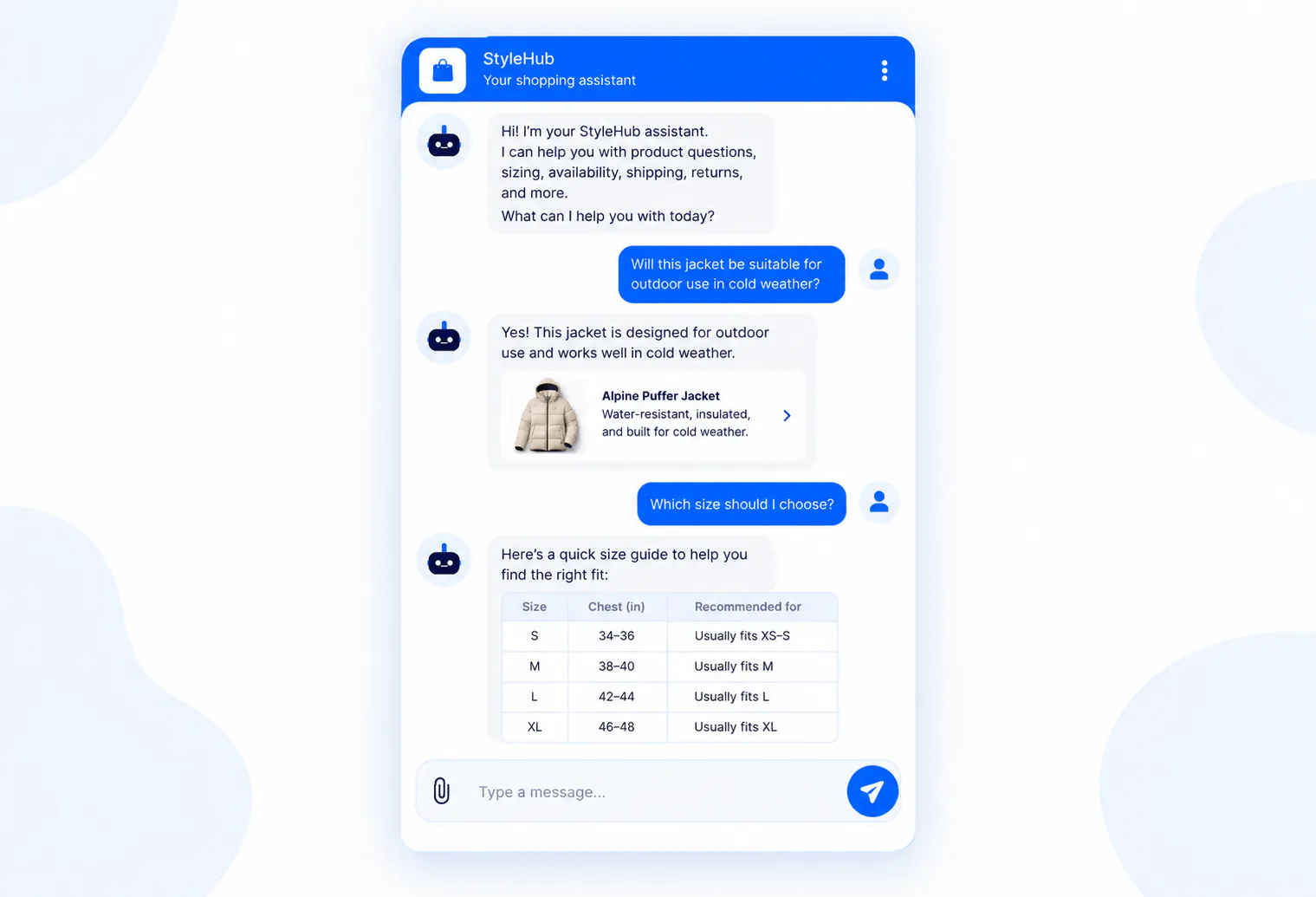
Before purchasing, customers are usually trying to reduce uncertainty. They want enough information to decide whether a product is right for them and whether buying from the business makes sense.
Common questions include:
- Product suitability: “Is this product suitable for outdoor use?”
- Compatibility: “Will this work with the model I already own?”
- Sizing: “Which size should I choose?”
- Comparison: “What is the difference between these two products?”
- Availability: “Is this product currently in stock?”
- Delivery: “How long will this take to arrive?”
- Policies: “Can I return this if it does not fit?”
The support requirement at this stage is clarity. Customers need accurate information that helps them make a purchase decision without having to search through multiple pages or contact the business several times.
#2) During Checkout
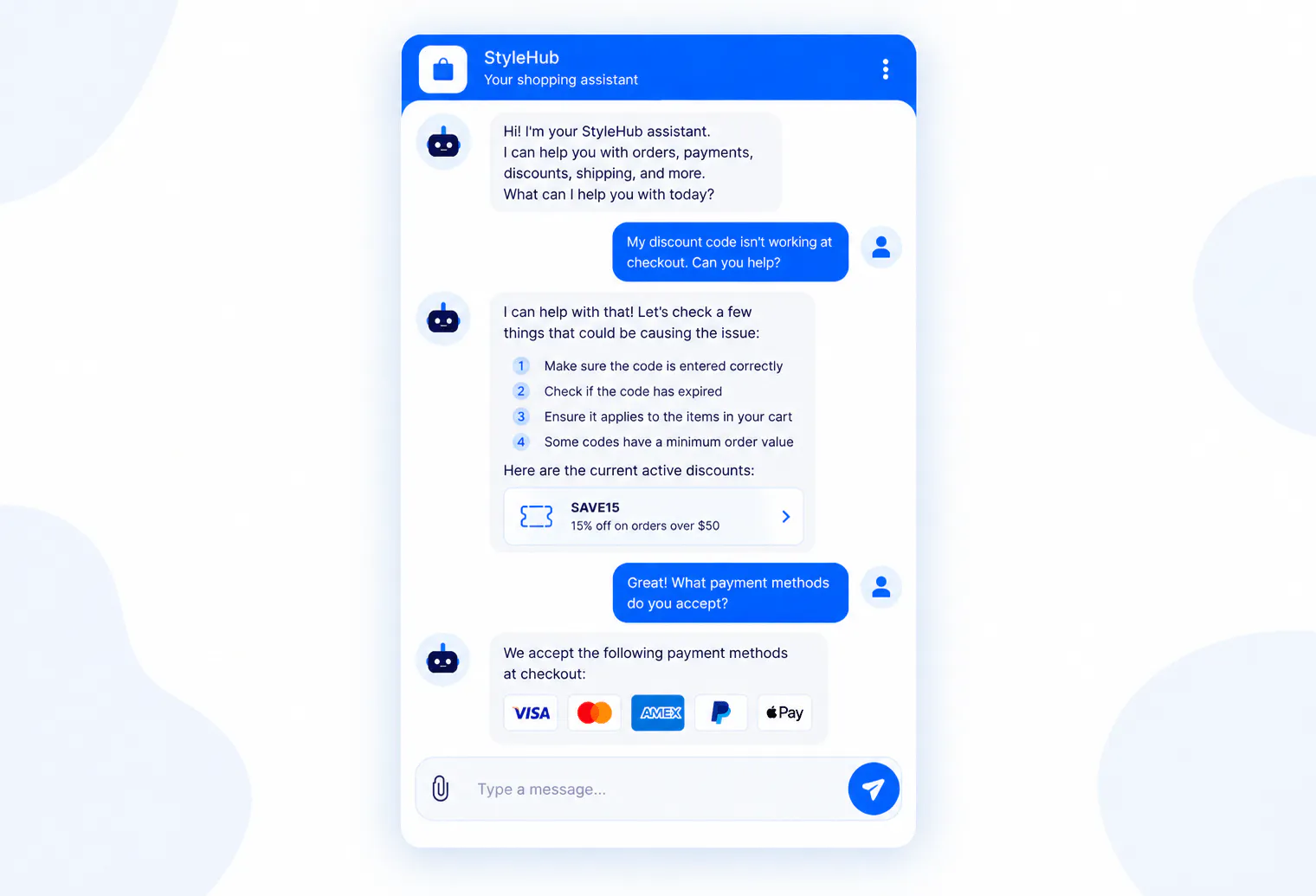
Checkout support deals with problems that interrupt the purchase process or create uncertainty immediately before payment.
Typical requests include:
- Payment problems: The customer cannot complete payment or wants to understand which payment methods are accepted.
- Discount issues: A promotion or coupon is not being applied as expected.
- Shipping costs: The customer wants to understand why a particular delivery charge appears at checkout.
- Address problems: The customer needs clarification about delivery addresses or available delivery locations.
- Order details: The customer wants to confirm what they are purchasing before completing the transaction.
The customer's goal is usually straightforward: complete the purchase successfully. Support therefore needs to remove the specific obstacle rather than send the customer through a general support process.
#3) After The Purchase
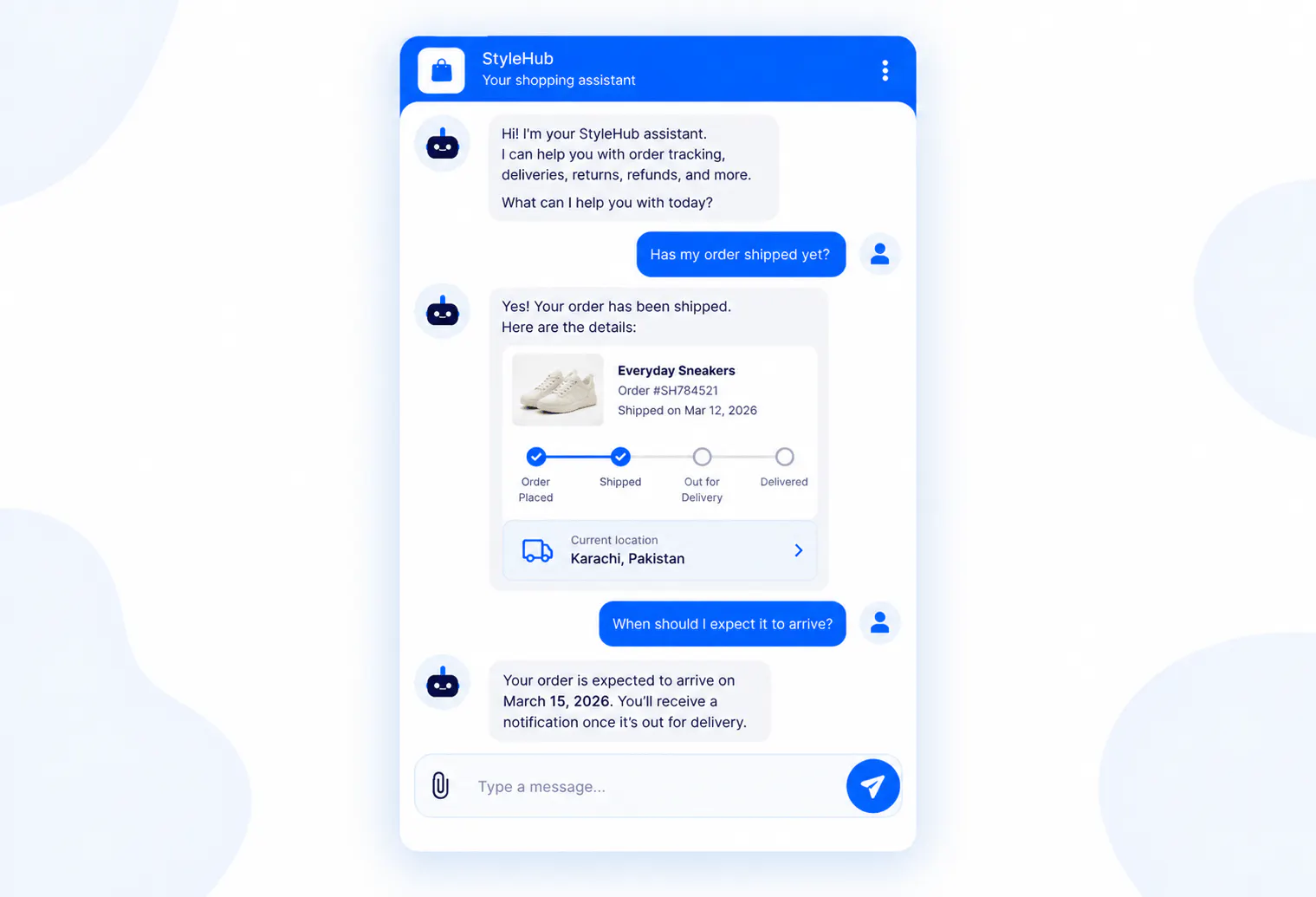
Once an order has been placed, support shifts toward fulfillment and order-specific questions.
Customers may ask:
- Order status: “Has my order shipped yet?”
- Delivery timing: “When should I expect it?”
- Delayed delivery: “My package was supposed to arrive yesterday. What happened?”
- Missing items: “One product from my order was not included.”
- Incorrect items: “I received the wrong product.”
- Order changes: “Can I change something about my order?”
These requests are often more specific than pre-purchase questions because they relate to a particular transaction. A general shipping policy may answer “How long does delivery usually take?” but it does not necessarily answer “Where is my order right now?”
#4) Returns, Exchanges And Refunds
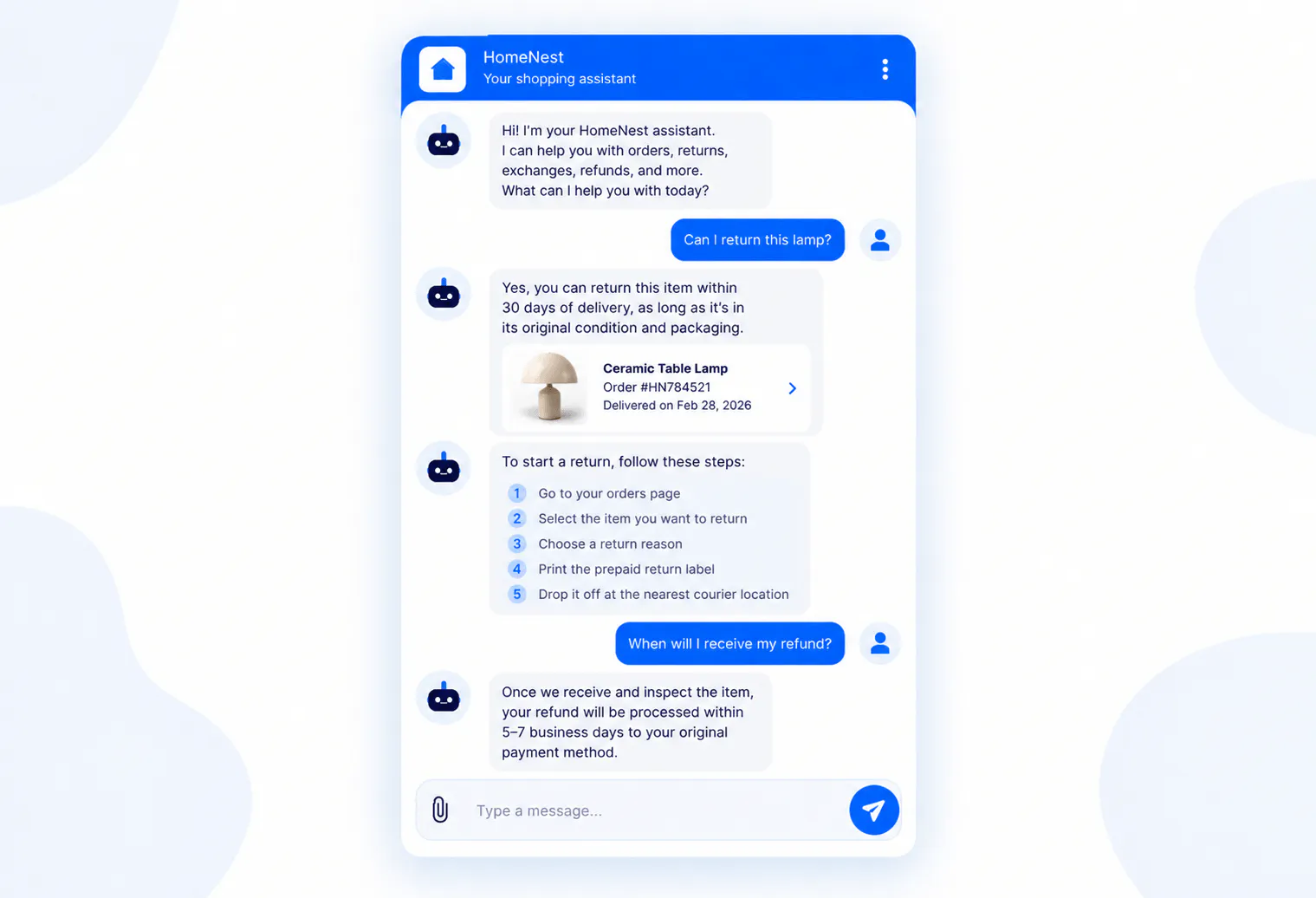
Returns and refunds create another major category of ecommerce support because customers need to understand both the rules and what they need to do next.
Common questions include:
- Eligibility: “Can I return this item?”
- Deadlines: “How long do I have to return it?”
- Process: “How do I send the product back?”
- Exchanges: “Can I exchange this for another size?”
- Refunds: “When will I receive my refund?”
- Exceptions: “Can I still return this even though the deadline passed?”
Returns are particularly important because poor experiences can affect whether customers buy again.
NRF and Happy Returns reported in 2024 that 67% of consumers said a negative return experience would discourage them from shopping with a retailer again, while 76% considered free returns a key factor when deciding where to shop.
This makes returns support a meaningful part of the customer experience rather than an administrative task that can be treated separately from ecommerce operations.
#5) Product Use And Troubleshooting
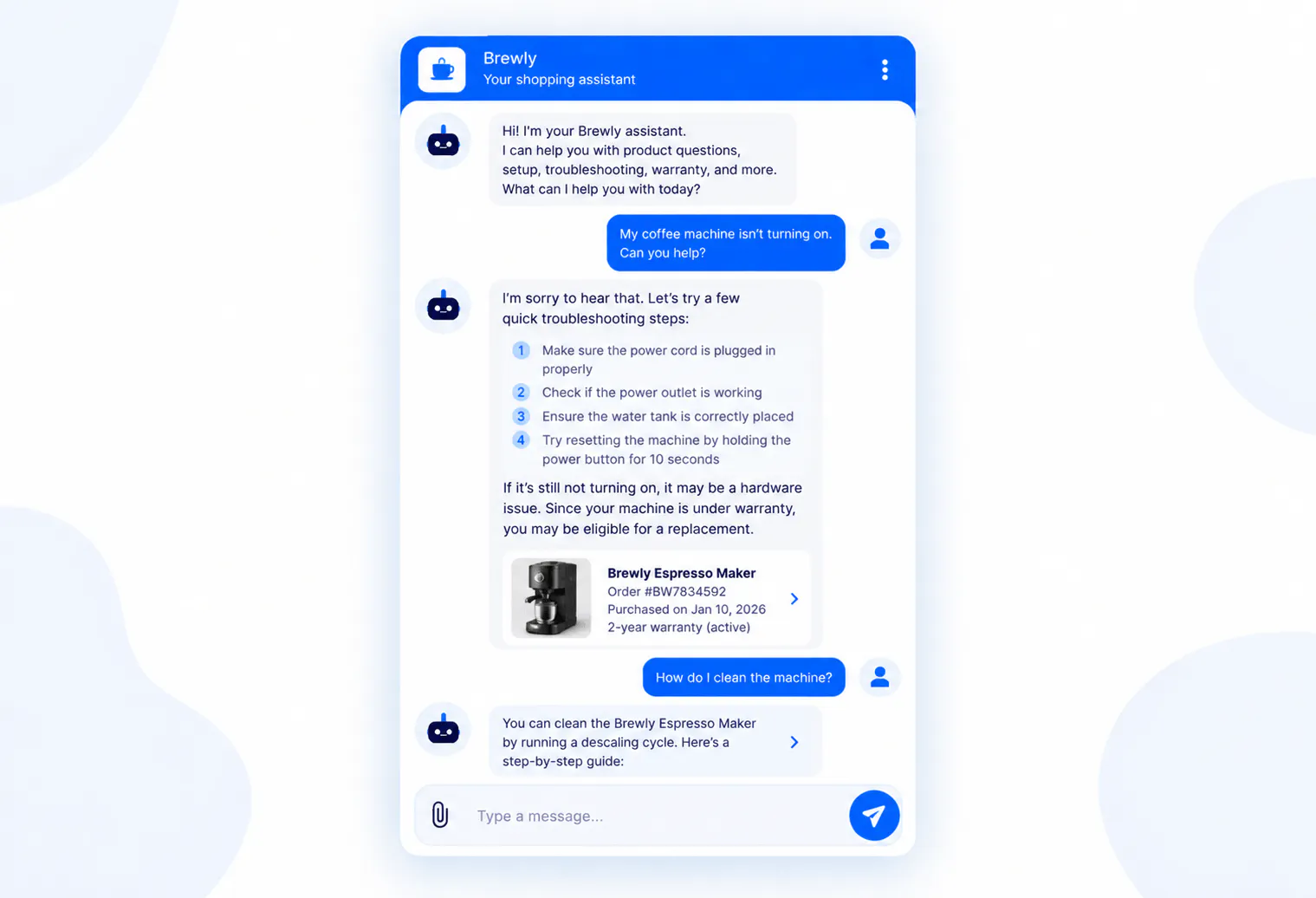
Customers can continue needing support after receiving a product. They may need help understanding how to use it, setting it up, determining compatibility, or resolving an issue.
The complexity varies:
- Simple usage question: The customer needs a specific instruction.
- Compatibility question: The customer needs to determine whether the product works with another product or system.
- Troubleshooting: The customer needs to work through several possible causes of a problem.
- Product failure: The business may need to determine whether the issue falls under a warranty, replacement, repair, or other resolution process.
The support process should account for that range rather than assuming every post-purchase question can be answered in the same way.
#6) When Something ELSE Goes Wrong
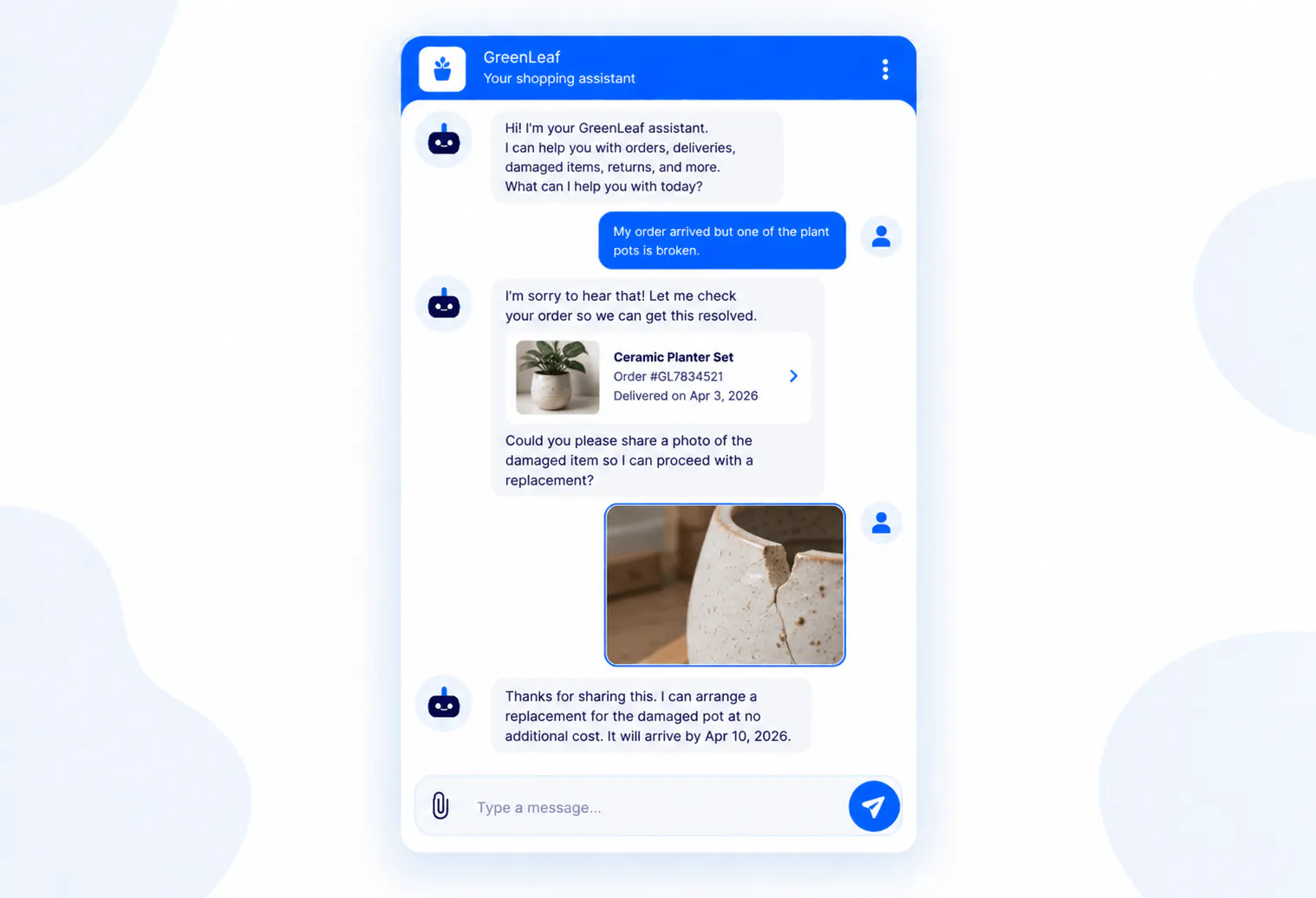
Some customers contact support because the normal process has broken down. Their order may be damaged, missing, incorrect, delayed, or otherwise outside the expected experience.
These situations often require more than an explanation. The business may need to gather additional information, investigate what happened, determine which policy applies, and decide how to resolve the case.
This distinction becomes important later when deciding which ecommerce customer support requests are suitable for automation and which should remain within a human-led process.
How To Design an Ecommerce Customer Service Strategy (7 Simple Steps)
An ecommerce customer service strategy should be built around customer requests and resolution paths. Before deciding whether you need more agents, ecommerce customer service software, or AI support, understand where your current support workload comes from and what is making it difficult to resolve.
The strategy should answer five practical questions: What are customers asking? Which requests consume the most effort? What does a successful resolution look like? Which requests require judgment? And where can the process be improved?
#1) Audit Existing Support Requests
Start with actual customer conversations rather than assumptions. Pull a representative sample of emails, tickets, calls, contact forms, and other support requests and analyze what customers are trying to accomplish.
Look specifically for:
- High-volume requests: Which questions appear repeatedly and account for a significant share of incoming support?
- High-effort requests: Which issues take agents the longest to resolve, even if they are not the most common?
- Repeat contacts: Which problems cause customers to contact the business multiple times?
- Escalation patterns: Which requests frequently move from one person or team to another before they are resolved?
- Seasonal spikes: Which questions increase during holidays, promotions, product launches, or periods of delivery disruption?
- Information gaps: Which questions exist because customers cannot easily find the information they need?
- Inconsistent answers: Which questions receive different answers depending on which agent handles them?
- Unresolved issues: Which conversations end without a clear resolution or next step?
The purpose of this audit is not to create a giant spreadsheet for its own sake. It is to understand where customer effort and support-team effort are actually being spent.
#2) Group Requests By Intent
Next, group requests by the customer's underlying intent rather than the exact words they use.
For example:
- Shipping intent: “How long does shipping take?”, “When will my order arrive?”, and “Do you ship to Canada?” all relate to shipping.
- Product-selection intent: “Which product should I buy?”, “What’s the difference between these products?”, and “Which model is better for beginners?” all involve choosing a product.
- Return intent: “Can I return this?”, “What’s your return policy?”, and “How do I send this back?” all relate to returning a product.
- Order-status intent: “Where’s my order?”, “Has my order shipped?”, and “Can you check the status of my delivery?” all relate to an existing order.
This grouping lets you measure the actual demand for each support intent and identify which workflows deserve attention first.
#3) Identify High-Volume And High-Effort Requests
Volume alone is not enough to determine which support processes should be improved.
Consider two examples. A business might receive 1,000 product-information questions that each take an agent one minute to answer. It might receive only 100 damaged-order complaints, but each complaint could require 15 minutes of investigation and follow-up.
The first creates a large amount of repetitive work. The second creates fewer requests but considerably more effort per case.
Prioritize based on a combination of:
- Volume: How frequently does the request occur?
- Repetition: How similar are the requests to one another?
- Effort: How much employee time does each resolution require?
- Predictability: Can the resolution be clearly defined?
- Customer impact: What happens if the request is not resolved quickly?
- Complexity: Does the issue require investigation or judgment?
- Data requirements: Does the resolution require customer-specific or external information?
- Action requirements: Does someone need to change, create, retrieve, or update something?
- Risk: What happens if the request is answered incorrectly?
#4) Separate Information, Data And Action Requests
Not every support request that sounds simple is technically simple. One of the most useful distinctions is whether the customer needs information, customer-specific data, or an action.
Request type | Example | What resolution requires |
|---|---|---|
General information | “What is your return policy?” | Accurate business information |
Product information | “Does this fit a 15-inch laptop?” | Accurate product information |
Customer-specific data | “Where is my order?” | Access to the relevant order information |
Action | “Can you change my delivery address?” | A defined process for making or requesting the change |
Investigation | “My package says delivered but I never received it.” | Investigation and potentially human judgment |
Exception | “Can you make an exception to the return deadline?” | Policy review and human decision-making |
This distinction prevents a common mistake: assuming that because an AI system can answer a question, it can also resolve the underlying customer problem.
#5) Define Resolution Paths
For every important support intent, define what “resolved” actually means.
For example:
- Product question: The customer receives accurate information that answers their question.
- Return question: The customer knows whether the product qualifies and what they need to do next.
- Order-status request: The customer receives the relevant status and understands the next step if the order is delayed.
- Damaged-product complaint: The business gathers the necessary information, determines the appropriate resolution, and gives the customer a clear next step.
- Refund question: The customer understands whether the refund has been issued, when it should arrive, or what needs to happen next.
This definition matters because a response is not automatically a resolution. A customer who receives three paragraphs of information but still does not know what to do has not necessarily been helped.
#6) Define Human Escalation Criteria
Some support requests should be designed around human involvement from the start.
Human review may be appropriate when:
- The customer requests a person: The customer should not have to repeatedly justify why they want human assistance.
- The case requires judgment: Exceptions, disputes, and unusual circumstances may need a human decision.
- The available information is insufficient: The support process should not guess when important information is missing.
- The issue is unresolved: Customers who have already tried the standard process should have another path.
- The situation is sensitive: Certain complaints or customer circumstances require careful handling.
- An investigation is necessary: Problems involving damaged, missing, or incorrect orders may require someone to review what happened.
- The business needs to make an exception: A standard policy cannot automatically determine the right outcome for every unusual case.
The purpose is not to send every difficult conversation to an agent immediately. It is to make sure the support strategy has a defined path for situations where human judgment is genuinely necessary.
#7) Decide Which Channels You Actually Need
Once the support workflow is defined, the required information and instructions are in place, actions are configured, and human escalation rules have been established, you can deploy the AI experience across the channels where your customers already ask for help.
For ecommerce businesses, that may include your website as well as messaging and social channels. The important consideration is not simply being available everywhere. Each channel should serve the support workflows you have already decided to automate.
The advantage of supporting multiple channels is that customers do not have to change how they communicate with your business just to get support. At the same time, the automation should remain consistent across those channels, with the same business information, instructions, and resolution rules guiding the experience.
Why Hiring More Support Agents May Not Be Enough
Hiring more support agents can increase capacity, but it does not change the nature of the incoming workload. If customers repeatedly ask the same questions about products, shipping, returns, and order status, more people simply create more capacity to answer those same questions.
Headcount also introduces its own operational constraints:
- Training: New agents need to learn products, policies, processes, systems, and escalation rules before they can handle support independently.
- Management: Larger teams require more coordination, quality control, scheduling, coaching, and performance management.
- Coverage: More agents do not automatically provide continuous coverage across every time zone without additional staffing.
- Seasonality: A business may need significantly more support capacity during certain periods but far less at other times.
- Consistency: Adding people does not guarantee that every agent interprets policies or explains products in exactly the same way.
- Repetitive workload: More agents increase the number of people available to answer repetitive questions, but they do not reduce the number of repetitive questions customers ask.
There is also a more important question: Does the request actually require a person?
If an agent spends much of the day answering questions whose answers are already known and predictable, that time could potentially be redirected toward cases where human expertise creates more value.
That is the operational problem automation should address.
7 Benefits Of Automating Ecommerce Customer Support?
Automating ecommerce customer support can reduce repetitive manual work and give customers faster access to predictable support. The strongest results come when businesses automate specific resolution paths rather than attempting to automate every possible customer interaction.
The distinction is important because poorly designed automation can create more work instead of less.
Automating ecommerce customer support can reduce repetitive manual work and give customers faster access to predictable support. The strongest results come when businesses automate specific resolution paths rather than attempting to automate every possible customer interaction.
The distinction is important because automation should take meaningful work off the support team's plate, not simply move customers into another support channel.
McKinsey estimates that generative AI could increase customer-care productivity by 30% to 45%.
For ecommerce businesses, the lesson is straightforward: automation needs to resolve customer problems, not simply deflect conversations.
#1) Faster Responses
Automated support can respond immediately to customer questions instead of placing customers in a queue for an agent.
#2) 24/7 Support
An automated support process can remain available outside the hours covered by a human team.
For ecommerce businesses serving multiple countries or time zones, this means customers do not necessarily have to wait until the next working shift to get basic support.
That does not mean every issue needs to be resolved overnight. It means customers can receive useful information or begin the appropriate resolution process when they need it.
#3) Less Repetitive Work
Repetitive support requests are one of the clearest opportunities for automation.
Examples include:
- Shipping questions: Customers repeatedly ask about standard delivery times, available methods, or shipping locations.
- Return questions: Customers repeatedly ask about deadlines, eligibility, and the return process.
- Product questions: Customers repeatedly ask about specifications, compatibility, sizing, or product differences.
- Store policies: Customers repeatedly ask about payment methods, warranties, refunds, or other standard policies.
Removing appropriate repetitive work from the human queue gives agents more time for complex customer problems.
#4) Better Capacity During Support Spikes
Ecommerce support volume can change quickly during promotions, holidays, product launches, and delivery disruptions.
Automation can absorb part of the predictable increase without requiring the business to recruit and train a large temporary team for every spike.
The key is scope. Automation should handle the requests it can resolve reliably while the human team remains available for issues that require investigation or judgment.
#5) More Consistent Responses
A controlled automated process can give customers the same approved information for predictable questions.
This is particularly useful for policies. If different agents interpret a return policy differently, customers may receive inconsistent answers depending on who responds.
Consistency does not mean every conversation should sound identical. It means the underlying facts, policies, and resolution rules should remain consistent.
#6) Better Use Of Human Agents
The most useful role of automation is often to change what human agents spend their time doing.
Instead of using human capacity primarily for repetitive questions, a business can reserve more of that capacity for troubleshooting, complaints, exceptions, investigations, and cases where judgment is required.
Gartner reported in 2026 that 85% of customer service and support leaders were expanding human agent responsibilities as AI reduced contact volume and shifted work toward higher-value tasks.
#7) Lower Customer Effort For Predictable Requests
Customers do not necessarily want a conversation with a person every time they need help. They want the easiest path to getting the issue resolved.
For ecommerce, reducing effort can mean allowing a customer to quickly find out whether an item is returnable, understand a shipping policy, get product information, or determine what they need to do next.
Automation is useful when it makes those paths shorter, not when it creates another obstacle between the customer and a person.
How To Automate Ecommerce Customer Support: A Step-By-Step Guide
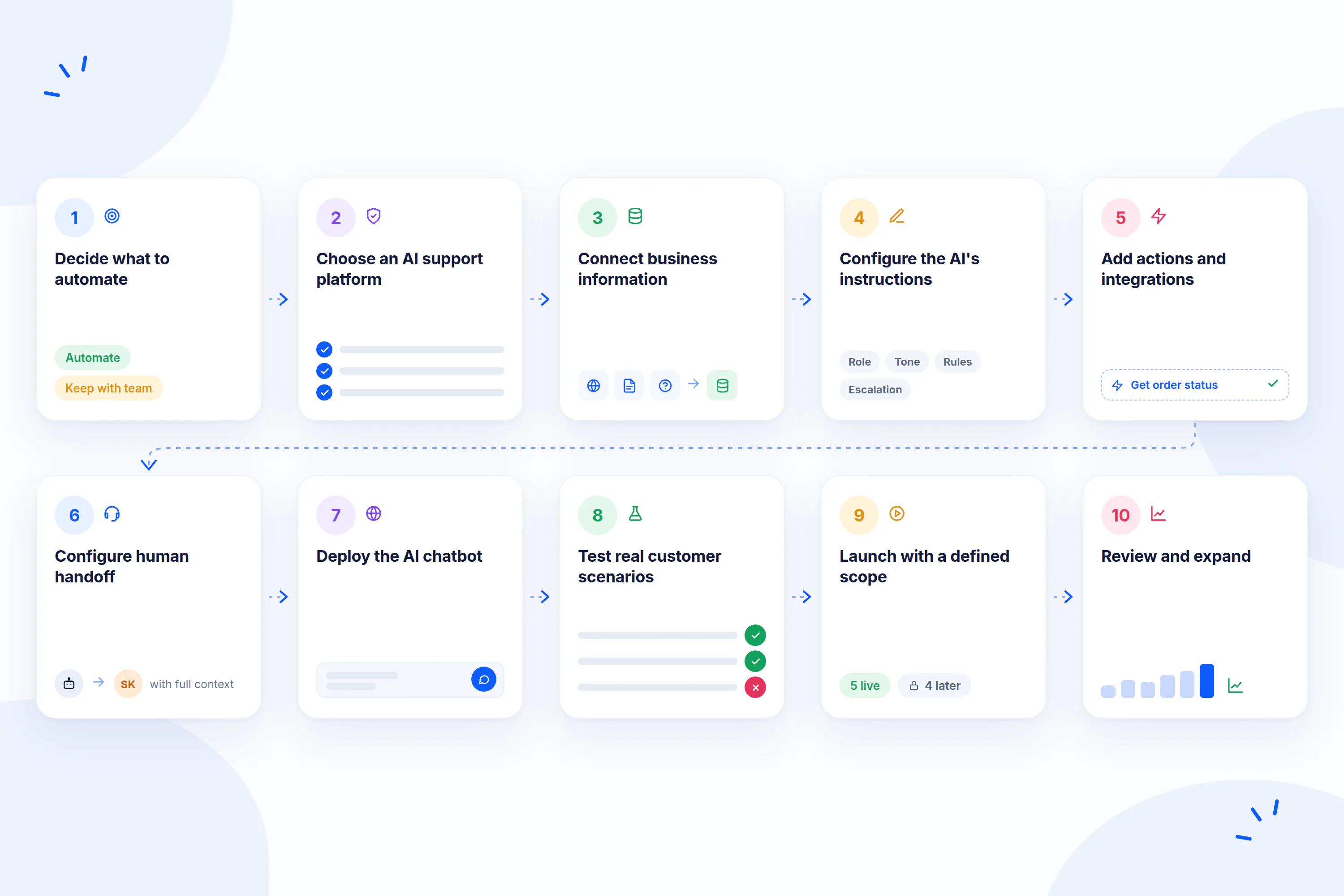
The right way to automate ecommerce customer support is to start with the support operation rather than the technology. First identify the requests you want to improve, then define their resolution paths, provide the information and instructions required to resolve them, connect the actions the system needs to perform, establish human escalation rules, and test the experience before expanding its scope.
Step 1: Decide What To Automate
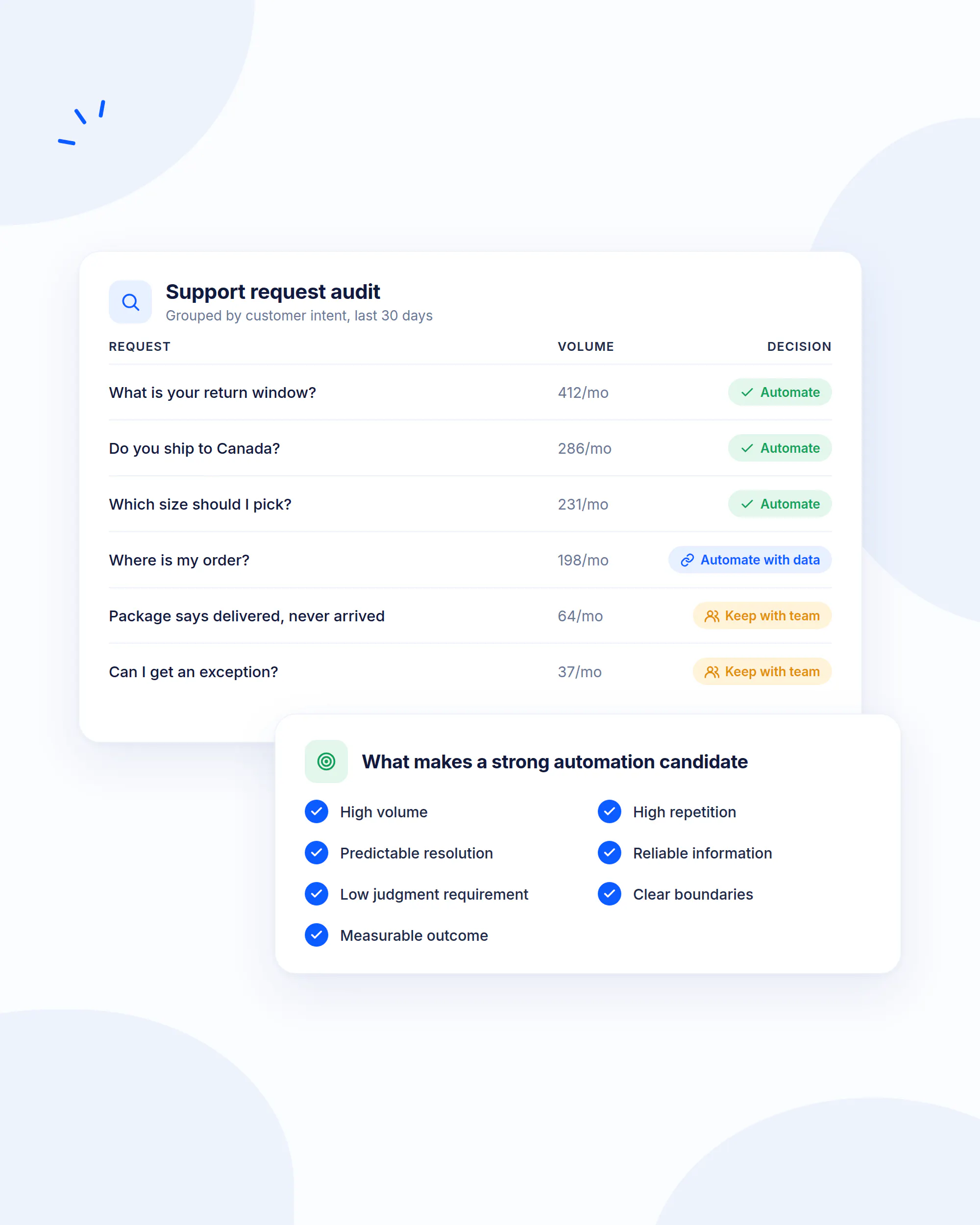
Start with the support categories you identified during your audit. Do not begin by trying to automate everything.
A strong automation candidate usually has several of these characteristics:
- High volume: The request occurs frequently enough that handling it manually consumes meaningful capacity.
- High repetition: Customers are asking substantially the same question or following the same process.
- Predictable resolution: You can clearly describe what a successful resolution looks like.
- Reliable information: The business has accurate information that can be used to resolve the request.
- Low judgment requirement: The request normally does not require a person to make an exception or investigate unusual circumstances.
- Clear boundaries: You can define when the automated process should handle the request and when it should stop.
- Measurable outcome: You can determine whether the customer actually received a resolution.
For example, “What is your return window?” is a strong candidate because the answer is normally defined by company policy.
“My package says delivered but I never received it” is more complicated because the resolution may require order information, carrier information, investigation, and potentially human judgment.
The objective is not to automate the easiest-looking questions. It is to automate the requests where doing so can reliably improve the customer and support-team experience.
Step 2: Choose An AI Customer Support Platform
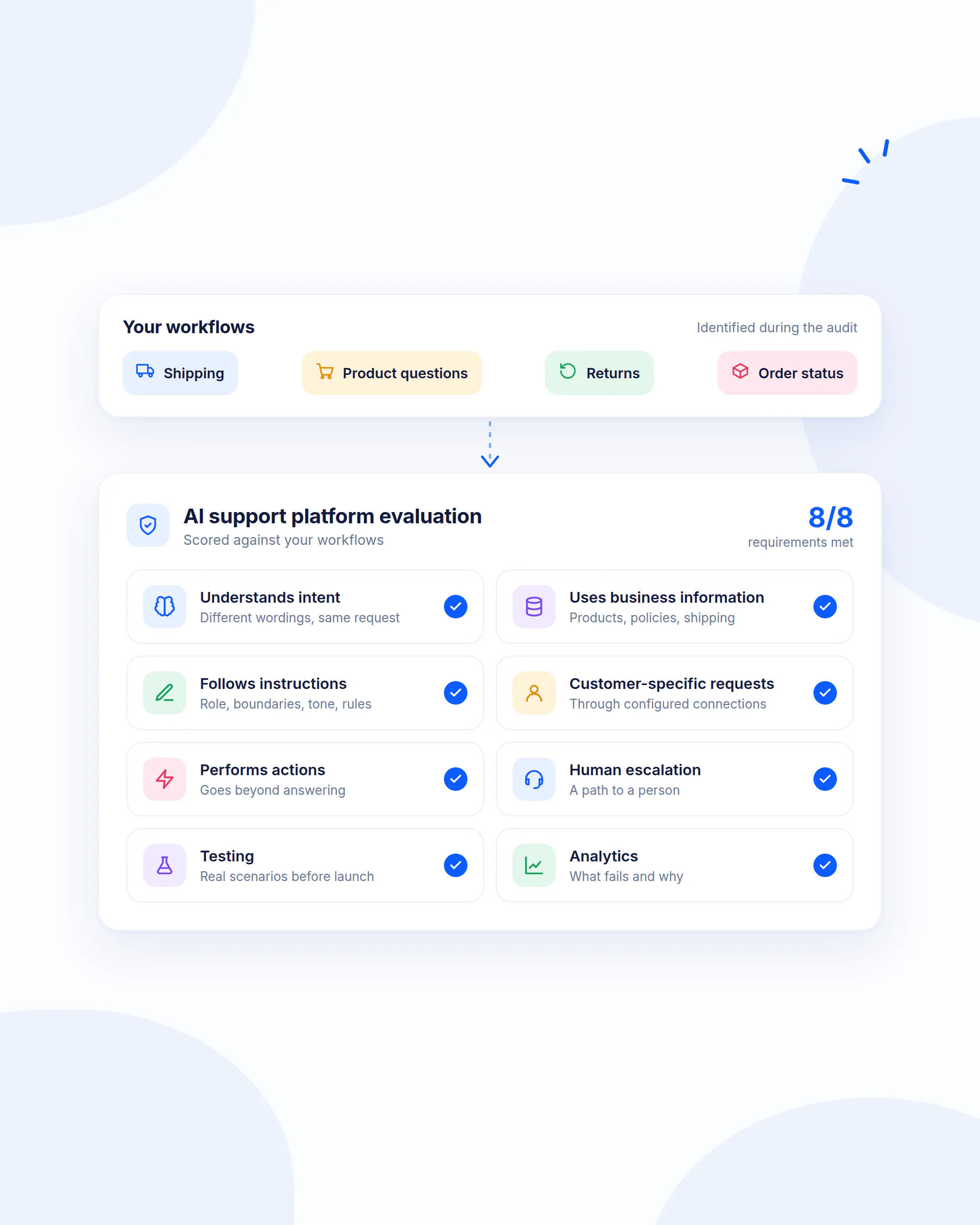
Once you know which workflows you want to automate, evaluate AI customer support software against those workflows.
Do not choose a platform simply because it can generate conversational responses. Look at whether it can:
- Understand intent: The system should recognize that different wordings can represent the same underlying customer request.
- Use business information: It should be able to answer using your actual product, policy, shipping, and support information.
- Follow instructions: You should be able to define its role, boundaries, tone, rules, and behavior.
- Handle customer-specific requests: Where appropriate, it should be capable of working with customer-specific information through configured connections.
- Perform actions: It should be able to do more than provide an answer when the workflow requires a defined action.
- Support human escalation: Customers should have a path to a person when the automated process cannot resolve the issue.
- Support testing: You should be able to test real scenarios before exposing the workflow to customers.
- Provide analytics: You should be able to identify what customers ask, where the system fails, and which workflows need improvement.
This is the difference between choosing a generic conversational interface and choosing an AI support platform that can become part of the ecommerce operation.
Chatling brings these capabilities together through AI Agents, AI Chatbots, AI Actions, human handoff, Playground, and Analytics, giving ecommerce teams the tools to build, test, deploy, and improve automated support workflows.
Step 3: Connect Your Business Information
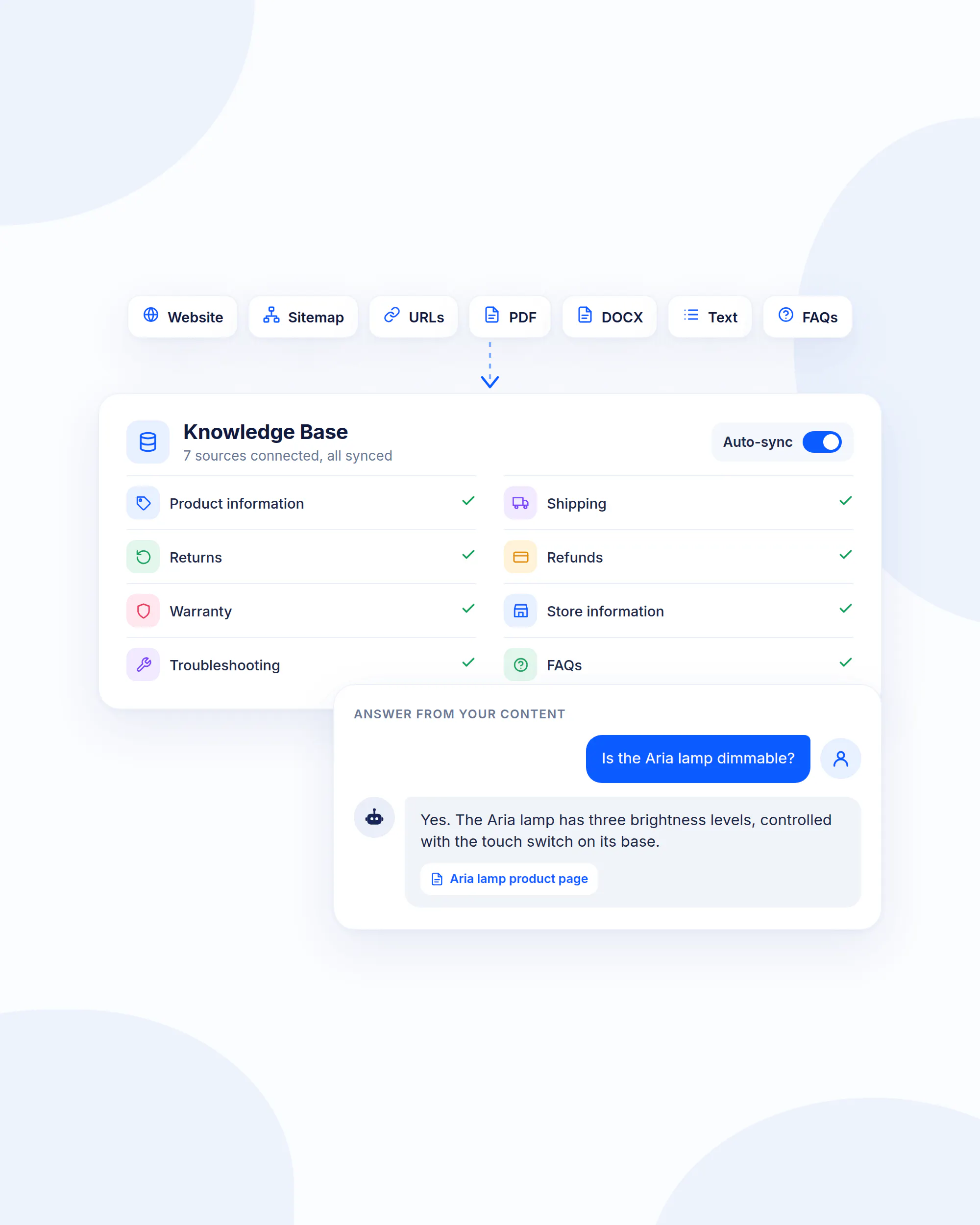
An AI support system needs access to the information required to answer customer questions accurately.
For ecommerce businesses, that may include:
- Product information: Specifications, dimensions, materials, ingredients, compatibility, features, sizing, and product differences.
- Shipping information: Delivery methods, costs, locations, expected delivery windows, and relevant restrictions.
- Returns information: Eligibility rules, deadlines, instructions, exclusions, and exchange policies.
- Refund information: Eligibility, processing times, refund methods, and relevant conditions.
- Warranty information: Coverage, limitations, procedures, and eligibility.
- Store information: Business hours, locations, contact information, and other customer-facing details.
- Troubleshooting information: Setup instructions, common problems, compatibility guidance, and resolution steps.
- Frequently asked questions: Recurring customer questions and approved answers.
Step 4: Configure The AI's Instructions
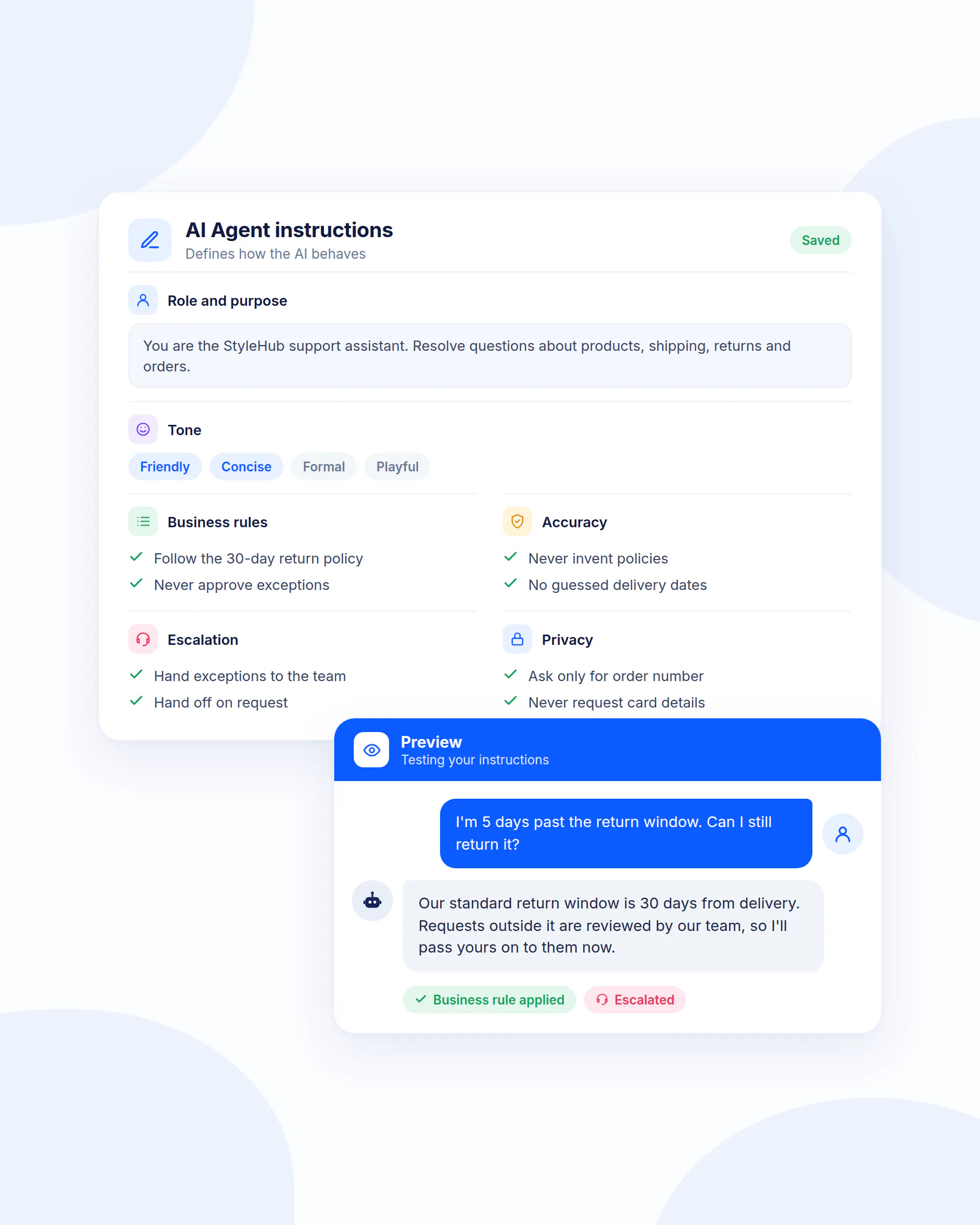
Information tells the system what it can use. Instructions define how it should behave.
For ecommerce support, instructions should establish:
- Role: Define what the AI is responsible for handling.
- Purpose: Explain the support outcomes it is expected to achieve.
- Tone: Set the appropriate communication style for your brand and customer base.
- Scope: Specify which topics it should handle and which topics fall outside its role.
- Business rules: Define policies and conditions it must follow.
- Response behavior: Explain when to answer directly, when to ask a clarifying question, and when to stop.
- Accuracy rules: Tell it not to invent product information, policies, delivery estimates, or other unsupported details.
- Escalation rules: Define the situations that require human support.
- Safety and privacy rules: Specify how sensitive information should be handled.
For example, an instruction might establish that the AI should not guess whether an order qualifies for an exception. Instead, it should explain the standard policy and route the customer to the appropriate support process.
Step 5: Add Actions And Integrations
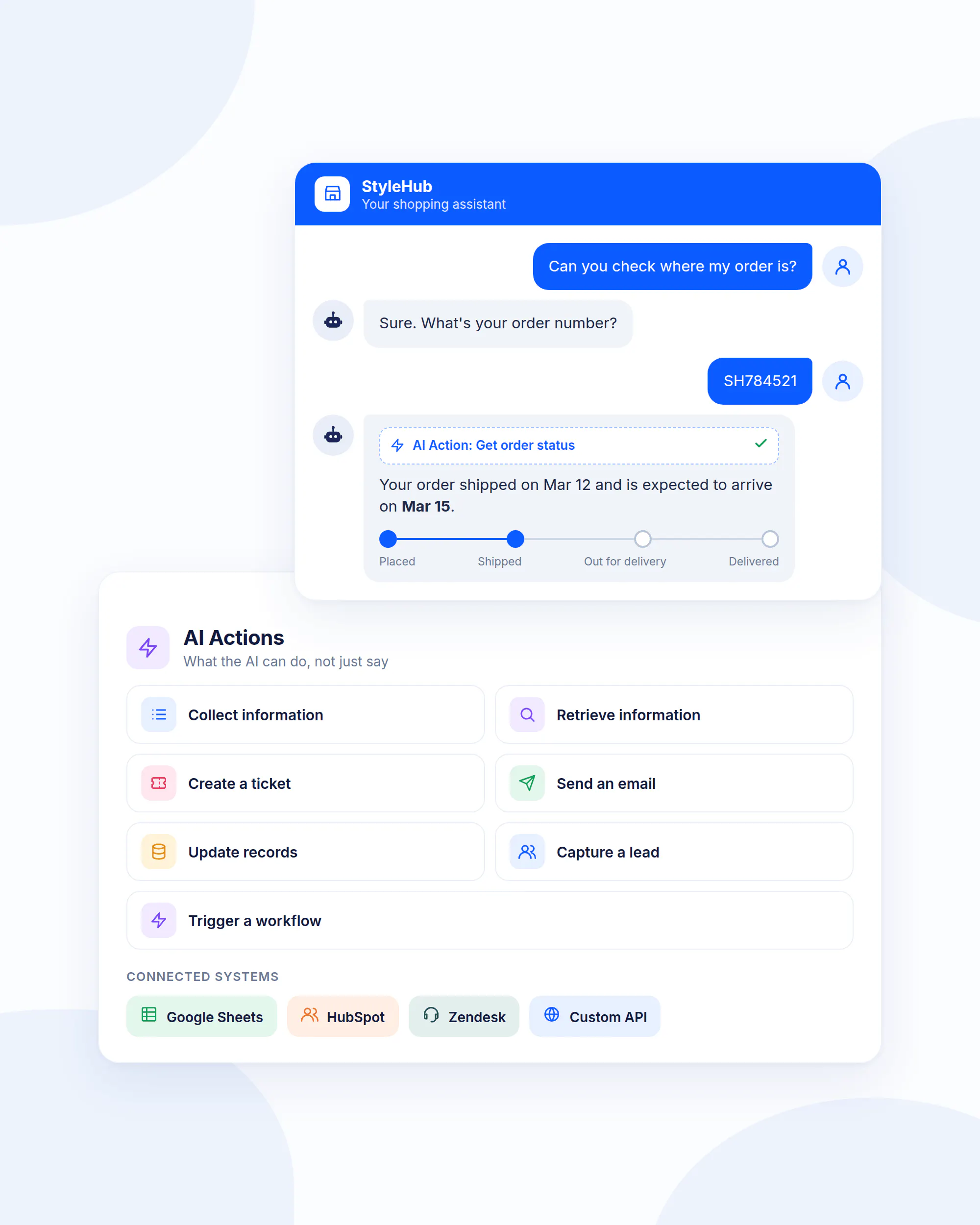
This is where ecommerce customer support automation moves beyond answering questions.
Consider the difference between:
“Our standard shipping time is three to five business days.”
and:
“Can you check where my order is?”
The first is an information request. The second may require retrieving customer-specific information.
The same distinction applies to actions:
- Collecting information: Ask the customer for an order number, email address, or other required details.
- Retrieving information: Pull relevant information from a connected system.
- Creating a ticket: Send an issue to the support team when a case needs further attention.
- Sending an email: Trigger a defined follow-up communication.
- Updating records: Change information in a connected system when the workflow permits it.
- Capturing a lead: Collect contact information and qualifying details from a prospective buyer.
- Triggering a workflow: Start a defined process based on the customer's request.
Step 6: Configure Human Handoff
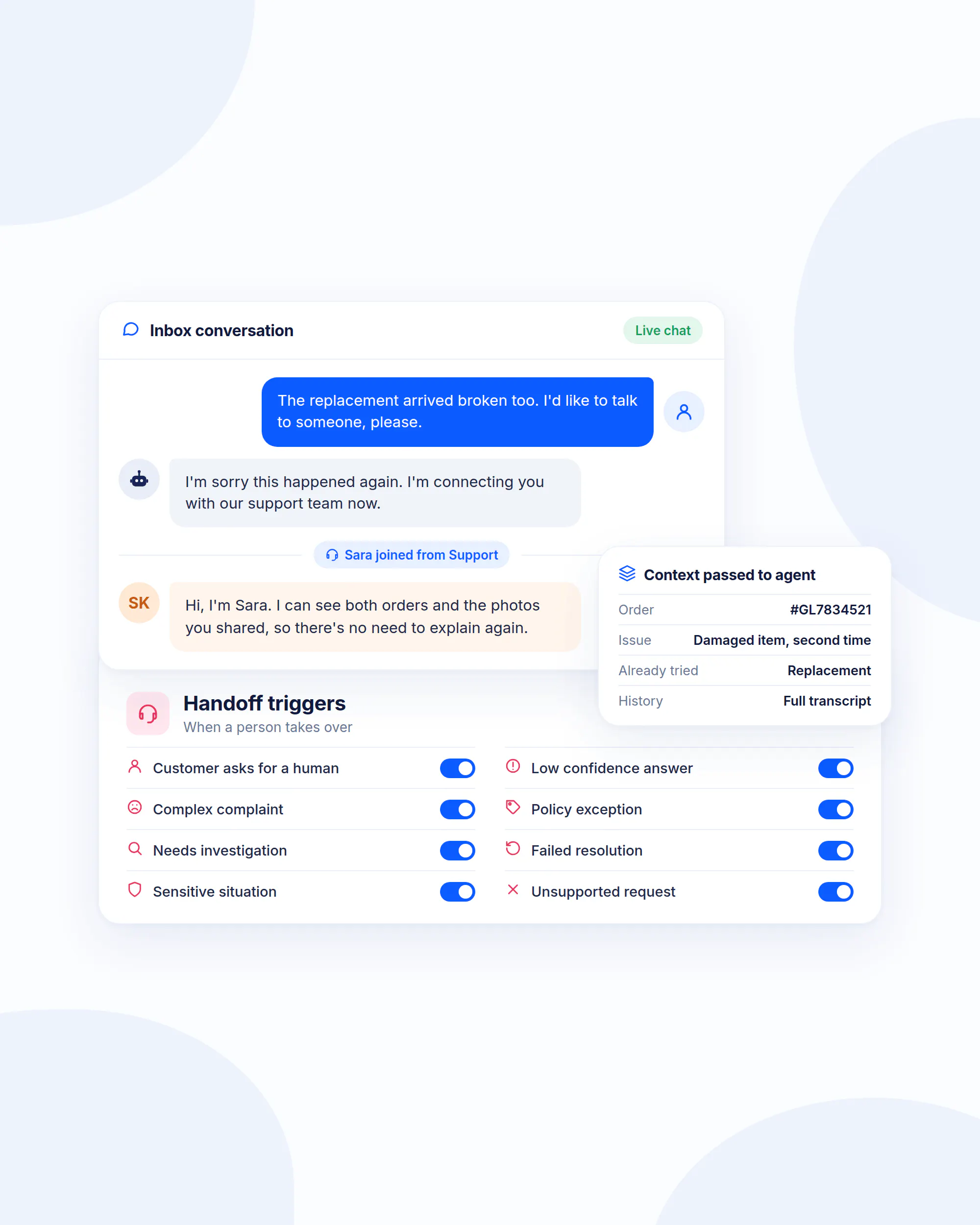
Automation should always have a defined boundary.
A customer should be able to reach a person when the issue cannot be reliably resolved through the automated workflow. The exact criteria will differ by business, but common triggers include:
- Customer request: The customer explicitly asks to speak with a human.
- Low confidence: The AI does not have enough information to provide a reliable answer.
- Complex complaint: The issue involves dissatisfaction, repeated failures, or circumstances that require careful handling.
- Policy exception: The customer wants something outside the standard policy.
- Investigation: The issue requires someone to review what happened.
- Failed resolution: The customer has already tried the automated process without getting the problem resolved.
- Sensitive situation: The request requires judgment or handling that should remain with a person.
- Unsupported request: The workflow falls outside the system's defined scope.
The customer should not have to start over when that happens. The support team should receive the relevant context so the customer does not have to repeat everything they already explained.
Step 7: Deploy The Custom AI Chatbot
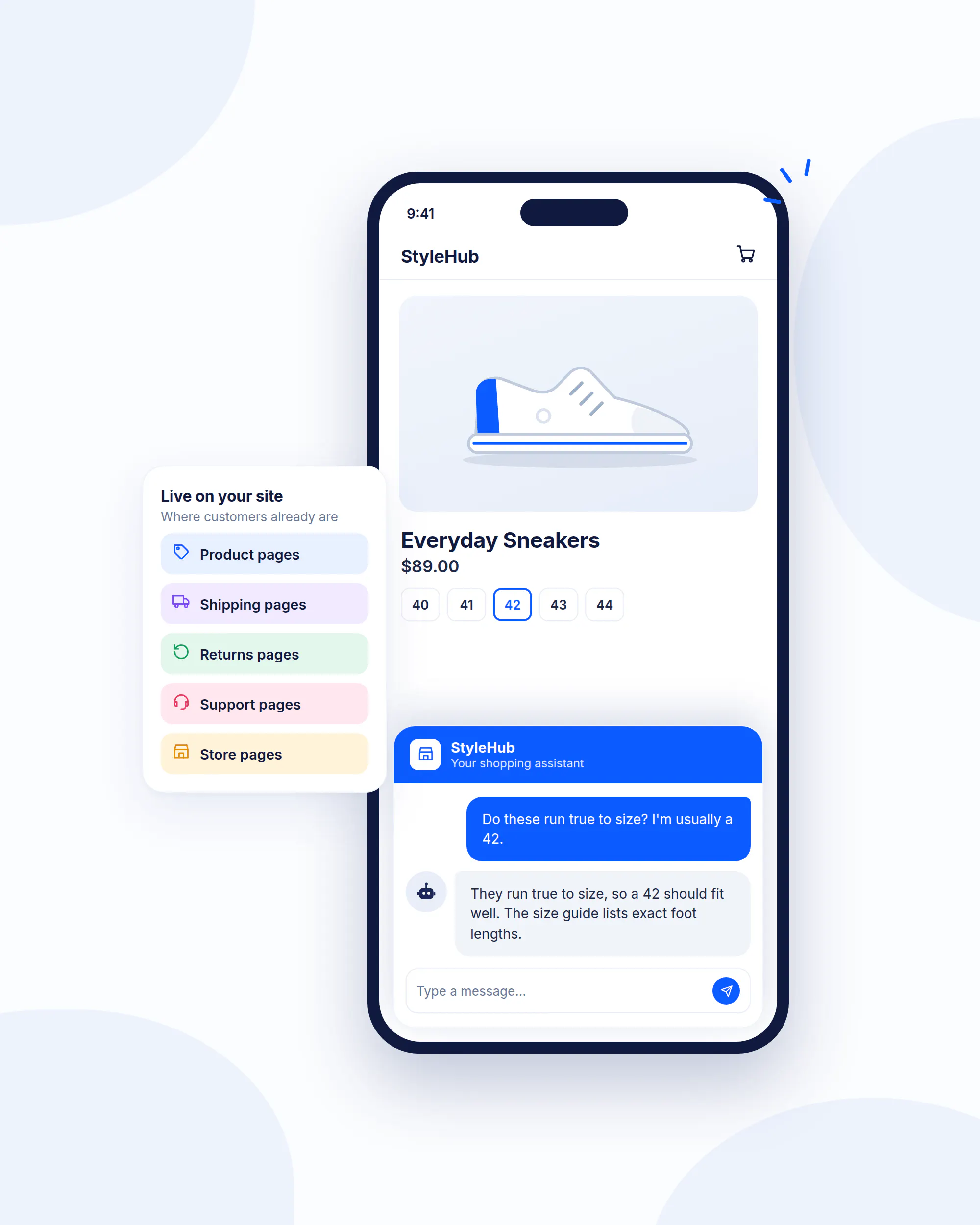
Once the AI chat support support workflow is defined, the information is connected, instructions are configured, actions are available, and human escalation is established, you can deploy the AI chatbot.
For ecommerce businesses, an AI chatbot for websites can provide support directly where customers are browsing.
The use case depends on the page and customer intent:
- Product pages: Customers can ask about specifications, compatibility, sizing, differences, or product suitability.
- Shipping pages: Customers can ask about delivery options, timing, and geographic availability.
- Returns pages: Customers can ask about eligibility, deadlines, and the return process.
- Support pages: Customers can describe problems and receive guidance on the appropriate next step.
- Store pages: Customers can ask about policies, locations, hours, or other general business information.
Step 8: Test Real Customer Scenarios
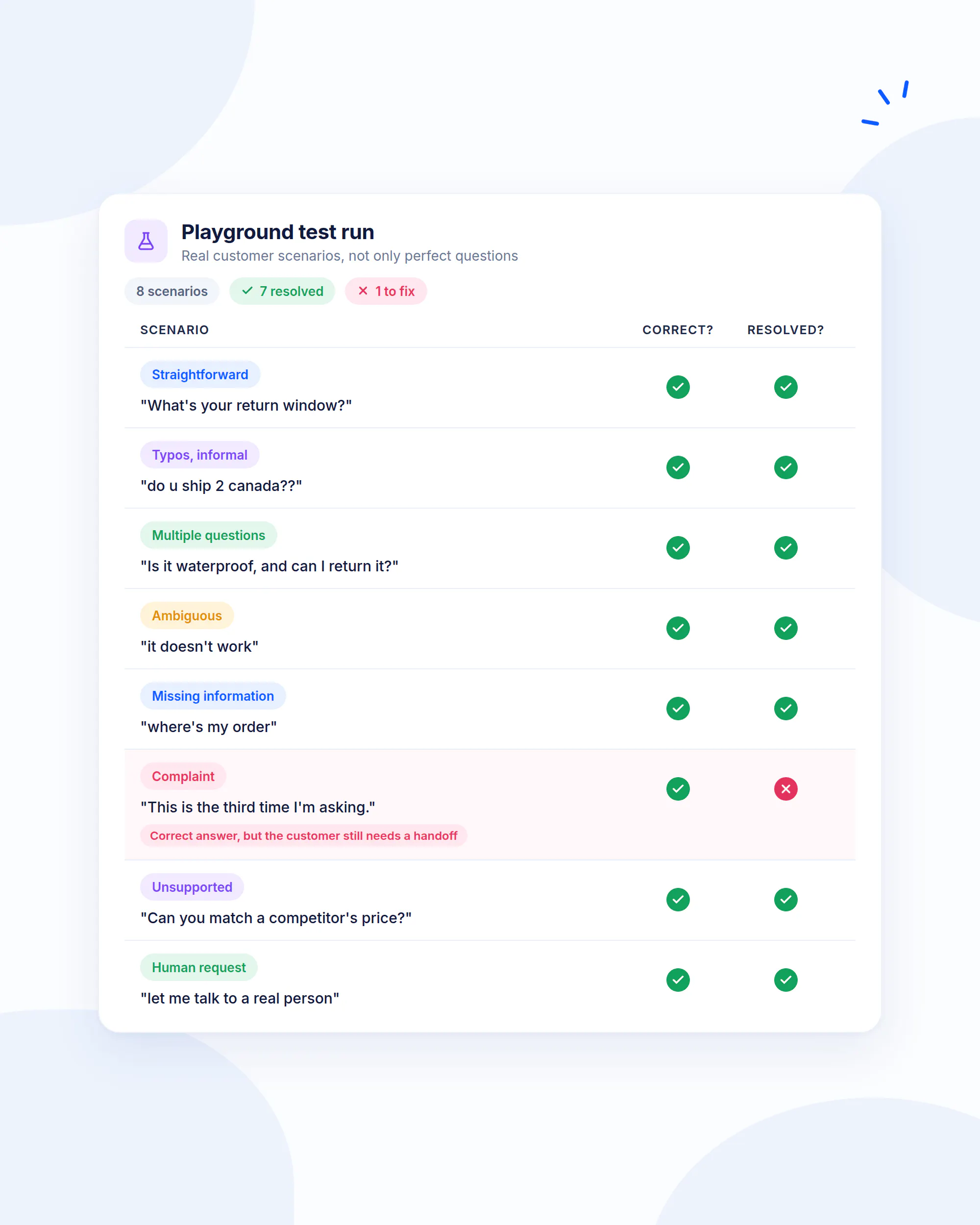
Testing should use real support situations, not only perfectly phrased questions.
Build a test set that includes:
- Straightforward questions: Test whether the AI handles common requests accurately.
- Typos and informal language: Test whether customers can ask questions naturally without using precise wording.
- Multiple questions: Test whether the system can handle a customer asking about a product, shipping, and returns in one conversation.
- Ambiguous requests: Test whether it asks for clarification instead of guessing.
- Missing information: Test what happens when the customer has not provided something required for resolution.
- Customer-specific requests: Test whether the workflow recognizes when general information is insufficient.
- Action requests: Test whether the correct action is triggered and whether the required information is collected.
- Exceptions: Test requests that fall outside standard policies.
- Complaints: Test frustrated customers and unusual circumstances.
- Unsupported questions: Test whether the system admits when it cannot help rather than inventing an answer.
- Human requests: Test whether customers can reach the appropriate person without unnecessary friction.
- Failed resolutions: Test what happens when the first automated response does not solve the issue.
For every scenario, evaluate two things: Was the answer correct? Was the customer actually closer to resolution?
A system can produce a polished response while still failing the customer.
Step 9: Launch With A Defined Scope
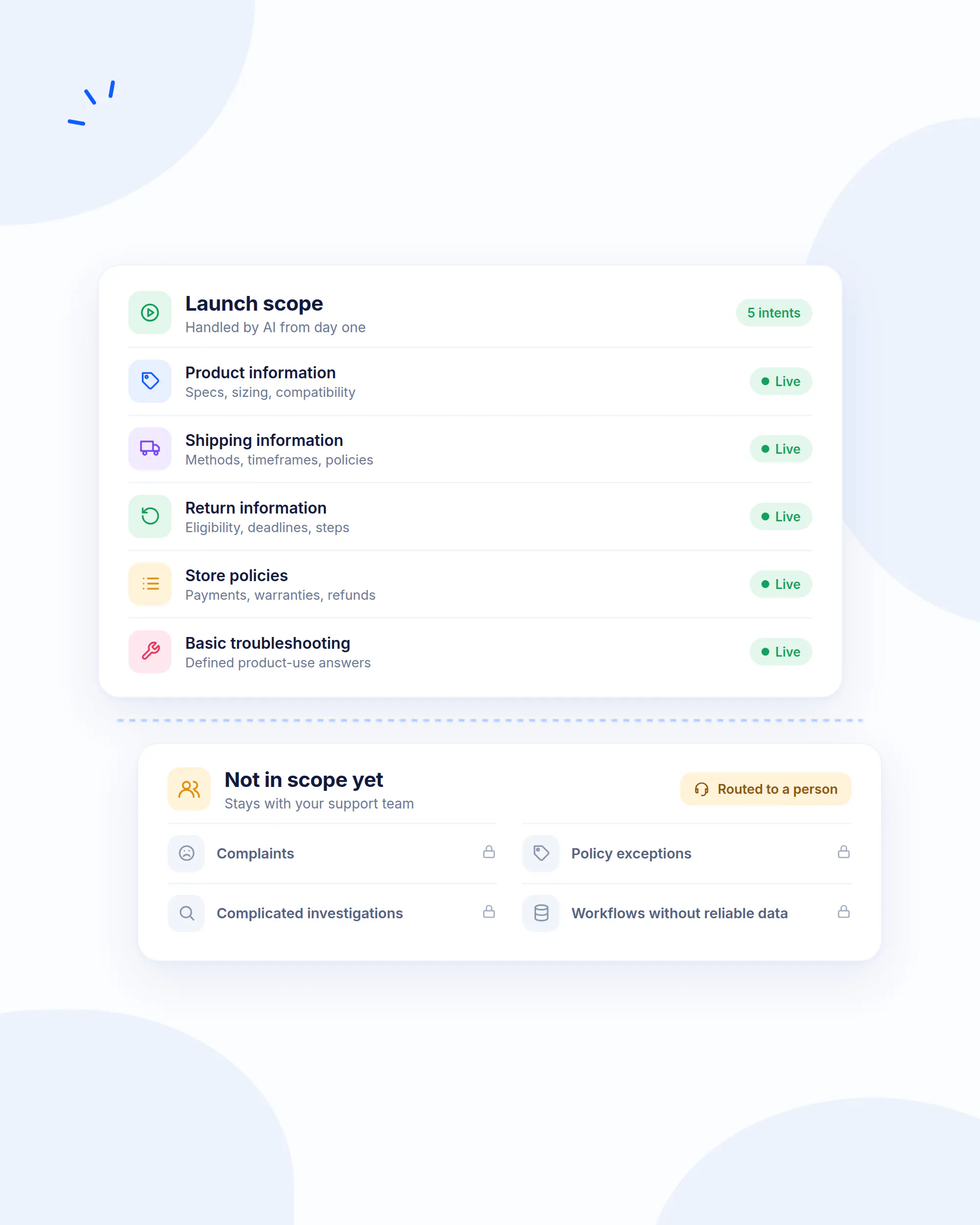
Start with a small group of support intents that you know are suitable for automation.
For example, an initial ecommerce automation scope might cover:
- Product information: Specifications, sizing, compatibility, and product differences.
- Shipping information: Delivery methods, standard timeframes, and shipping policies.
- Return information: Eligibility, deadlines, and standard procedures.
- Store policies: Common questions about payments, warranties, refunds, and other published policies.
- Basic troubleshooting: Straightforward product-use questions with defined answers.
Do not automatically include complaints, exceptions, complicated investigations, or workflows that require information the system cannot access reliably.
A narrow system that consistently resolves useful requests is more valuable than a broad system that frequently fails.
Step 10: Review And Expand Automation
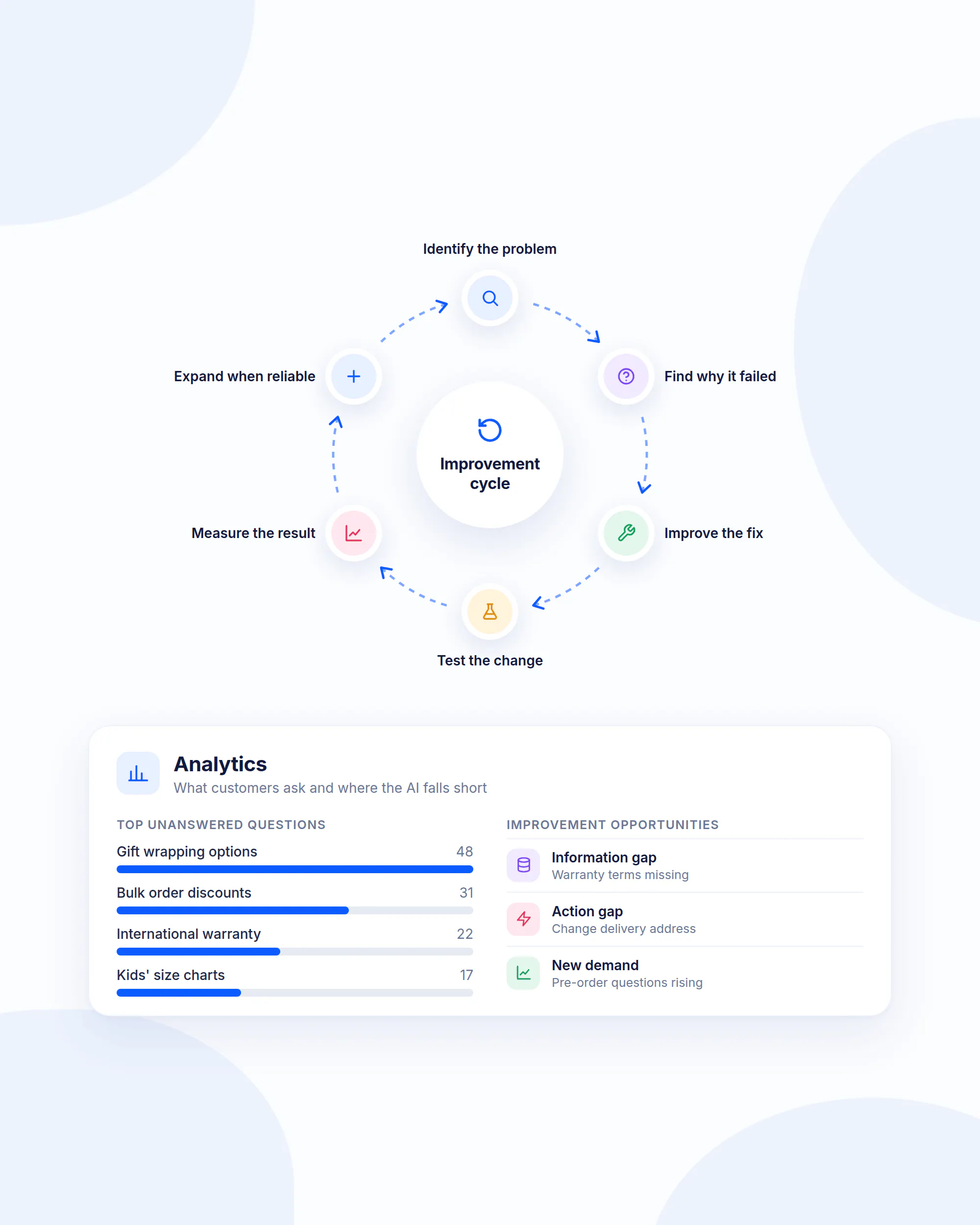
Once the AI support workflow is live, your customer conversations become a source of information about what to improve.
Review:
- Unanswered questions: Which requests does the AI regularly fail to resolve?
- Clarification requests: Which questions require customers to provide information the workflow could potentially request more effectively?
- Escalations: Which intents repeatedly require human support?
- Information gaps: Which questions reveal missing or unclear company information?
- Action gaps: Which customer requests require actions that are not currently available?
- Repeated failures: Which workflows produce incomplete or incorrect answers?
- New demand: Which questions are appearing frequently that were not included in the original scope?
- Customer feedback: Which interactions result in dissatisfaction or repeat contacts?
Use those findings to expand the automation gradually.
The improvement cycle should look like this: identify the problem → determine why the workflow failed → improve the information, instruction, action, or escalation path → test the change → measure the result → expand only when performance is reliable.
Why Use An Ecommerce Chatbot For Lead Generation
Customer support conversations can also uncover buying intent. A customer asking which product is right for their needs may be looking for support, but they may also be close to making a purchase.
The opportunity is to help the customer first and introduce lead capture only when it makes sense.
A useful workflow might look like this:
- Identify buying intent: The customer asks about product suitability, pricing, availability, or which option to choose.
- Answer the immediate question: Give the customer useful product information instead of immediately asking for contact details.
- Offer the next step: If the customer appears interested, offer product-selection assistance, a consultation, or another relevant next step.
- Qualify the lead: Ask only the information needed to determine whether the prospect is a fit.
- Capture contact information: Collect an email address or other relevant contact details when the customer agrees.
- Route the lead: Send the information to the appropriate sales workflow or CRM.
A lead generation chatbot can also identify buying intent during customer conversations and turn relevant interactions into qualified leads.
How To Measure Ecommerce Customer Support
The most important ecommerce customer service metrics measure whether customers actually get their problems solved. A support operation can have fast response times and high conversation volumes while still creating unnecessary effort if customers have to contact the business repeatedly.
Track performance by support intent where possible. A return question, a product comparison, and a damaged-order investigation have different resolution requirements, so one overall support number can hide important problems.
- Resolution rate: Measure the percentage of support requests that reach a defined successful outcome. Establish what “resolved” means for each major support intent before measuring it.
- First contact resolution: Measure how often customers get their issue resolved without needing another interaction. A low rate can indicate unclear answers, missing information, or processes that create unnecessary back-and-forth.
- First response time: Measure how long customers wait before receiving an initial response. Use this to evaluate responsiveness, while keeping it separate from actual resolution.
- Average resolution time: Measure how long it takes to bring a support issue to a successful conclusion. Break this down by issue type because a straightforward product question and a damaged-order investigation have different resolution requirements.
- Human escalation rate: Measure how often automated conversations require human assistance. A high rate can indicate that the automated scope is too broad or that the workflow lacks the information or actions needed to resolve requests. Some requests should reach human agents, so the goal is not necessarily to minimize this metric.
- Customer satisfaction: Measure how customers evaluate the support experience after an interaction. Compare satisfaction across different support paths to see whether automation is improving the customer experience.
- Repeat contact rate: Measure how often customers return about the same issue. This can reveal resolution problems that first-response metrics miss. Customers may receive a quick response and still contact the business again because their original issue remains unresolved.
- Automation resolution rate: Measure how many eligible automated conversations reach a successful resolution without unnecessary human intervention. Count successful outcomes, not simply conversations handled by AI.
- Unresolved question rate: Track questions the system could not answer or resolve. Recurring unanswered questions can reveal missing information, unsupported workflows, poor instructions, or opportunities for further automation.
- Support volume: Track the number of requests by intent and over time. Look for seasonal spikes, product-specific issues, policy-related questions, and recurring problems that could point to an operational issue outside the support team.
- Lead conversion: If support conversations also identify buying intent, measure how many qualified prospects move into the sales process. Keep this separate from support resolution so sales activity does not distort customer support performance.
Build an Ecommerce Customer Support System That Scales With You
A scalable ecommerce customer service strategy starts with understanding the support workload, then deciding where automation can genuinely improve the customer experience. Look at what customers ask, group requests by intent, separate information requests from cases requiring customer-specific data or actions, define successful resolution, and establish clear points for human involvement.
- Start with the support requests that create the most repetitive work. High-volume questions with clear resolution paths are usually the strongest starting point for automation. Once those workflows are working reliably, you can identify additional requests that fit the same criteria.
- Give automation everything it needs to resolve the request properly. That includes current business information, clear instructions, and the ability to perform relevant actions when a customer needs something done. Test real customer scenarios and use the results to improve the experience as new questions and gaps appear.
- Keep human support available for situations that need judgment. Complaints, exceptions, investigations, failed resolutions, and customers who ask to speak with someone should have a clear path to a human agent. This gives customers quick access to automated help while preserving human involvement where it matters.
Chatling brings these workflows together with AI Agents and AI Chatbots, with shared capabilities including the Knowledge Base, live chat, human handoff, and analytics. AI Agents can also use AI Actions for support workflows that require additional actions, while the Playground lets teams test Agent configurations before deployment.
Start for free with Chatling and put your ecommerce customer support on autopilot while keeping human support available when your customers need it.
Frequently Asked Questions
What is e-commerce customer service?
Ecommerce customer service is the support a business provides before, during, and after an online purchase. It includes product questions, purchase assistance, checkout issues, shipping and order support, returns, refunds, exchanges, troubleshooting, and complaints.
What is the main role of customer support?
The main role of customer support is to help customers resolve questions and problems throughout their relationship with a business. For ecommerce businesses, this includes helping customers choose products, complete purchases, understand orders and shipping, manage returns and refunds, troubleshoot products, and resolve problems.
What support services are available for e-commerce?
Common ecommerce support services include product information, product selection assistance, checkout support, order and shipping support, returns and exchanges, refund assistance, product troubleshooting, account assistance, and complaint resolution. Businesses can deliver these services through human agents, self-service resources, AI support, or a combination of these approaches.
How to automate ecommerce support with AI?
To automate ecommerce support with AI, first identify high-volume and predictable support requests. Then choose an AI customer support platform, connect accurate company information, configure instructions and business rules, add actions and integrations where required, define human escalation criteria, deploy the AI chatbot, test real customer scenarios, launch with a limited scope, and expand automation based on actual performance.
What’s the best customer support chatbot for an e-commerce website?
The right customer support chatbot depends on the ecommerce business's support volume, workflows, information requirements, integrations, automation goals, and human support process. Evaluate whether it can use accurate company information, understand customer intent, follow business rules, perform appropriate actions, support human escalation, and provide analytics for continuous improvement.
Which AI chatbot is best for e-commerce?
The right ecommerce chatbot platform depends on the support workflows you want to automate. Look for accurate information handling, intent recognition, configurable instructions, actions and integrations, testing capabilities, analytics, and a clear human support path. A system that resolves a defined set of ecommerce problems reliably is generally more useful than one that attempts to handle every possible request without sufficient accuracy.
What should ecommerce businesses automate first?
Ecommerce businesses should generally start with requests that are high-volume, repetitive, predictable, and possible to resolve using reliable information or clearly defined actions. Product questions, shipping information, return policies, and other common support requests can be good starting points when their resolution paths are well defined.
When should an ecommerce chatbot hand off to a human?
An ecommerce chatbot should hand off to a human when the customer requests a person, the system cannot resolve the issue confidently, the case requires investigation or judgment, the customer wants an exception, the automated process has failed, the issue is sensitive, or the request falls outside the system's defined scope.
How can an ecommerce chatbot generate leads?
An ecommerce chatbot can identify buying intent, answer product questions, help customers choose products, qualify prospects, collect contact details, gather information about their needs, and route qualified prospects to a sales process. The strongest approach is to provide useful assistance first and introduce lead capture when it is relevant to the customer's intent.