
This guide covers how to set up multilingual customer support that works. It includes the exact settings involved, how to pick which languages to prioritize, and the practices that keep translation from undermining trust. Visit the Chatling blog for more guides like this.
Customers won't wait for support in the wrong language
Losing a customer over language rarely looks dramatic. It often looks like someone closing the chat after a confusing reply and never coming back. No complaint gets logged, so your team may never see the problem.
Customers are far more likely to trust a business that speaks their language. In CSA Research’s Can’t Read, Won’t Buy study, 76% of consumers said they prefer buying from businesses that provide information in their own language, while 40% confirmed they would not buy from websites in other languages. That is why multilingual support needs more than basic translation.
In this Chatling guide, we’ll show you how to choose the right languages, configure Chatling to detect and respond in them, and avoid the mistakes that make translated support feel unreliable.
What is multilingual customer support?
Multilingual customer support means offering the same quality of help across every language your customers actually use. It's not just translating your existing English content after the fact and hoping the result reads naturally.
That distinction matters. A support experience that reads like a translation feels worse than no translation at all. It signals the effort stopped at the words instead of the customer.
In practice, this covers three layers:
- The agent answering in real time
- The knowledge base it draws from
- The handoff path for a tricky conversation
Getting one layer right while ignoring the other two is how a lot of multilingual projects end up feeling half-finished. They are technically available in five languages but only work in one.
Most businesses start in one of three ways. They hire native-speaking agents, contract a language service provider for overflow, or deploy an AI agent that handles detection and response directly.
Each option has a different cost and a different ceiling on how many languages you can realistically support before the approach stops scaling.
Machine translation isn't the same as multilingual AI support
This distinction gets blurred constantly, but the two approaches work in opposite directions:
- Translation widget: Takes your existing English chatbot and runs its replies through a translation layer after the fact.
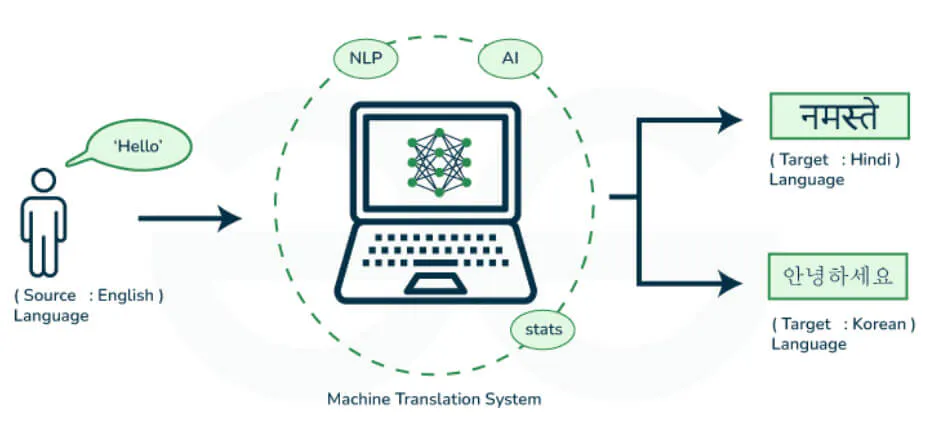
- AI agent: Understands the question in the original language and generates a native response, instead of translating a pre-written English answer.
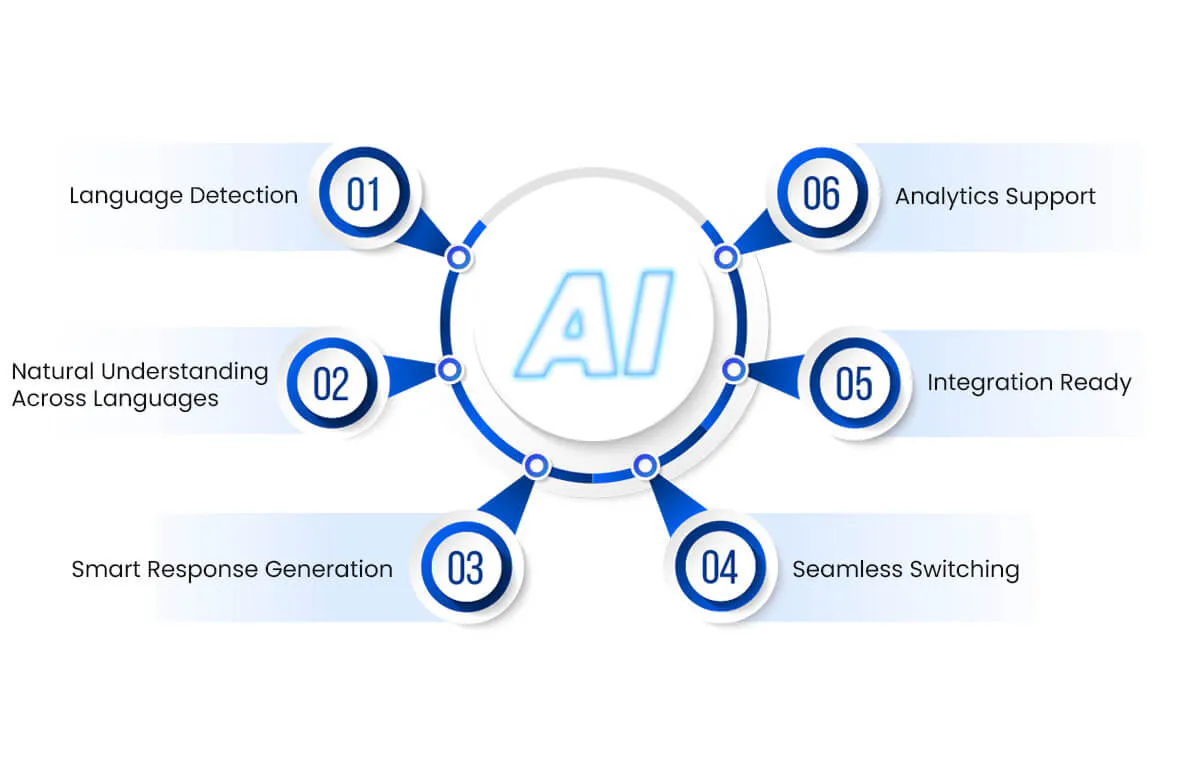
The difference shows up in edge cases:
- Translation widget: Will mistranslate an idiom or a product-specific term it's never seen, since it has no context beyond the words themselves.
- AI agent: Draws on your actual knowledge base in the language the customer is using, producing a natural answer even when the question is unusual.
Any tool worth evaluating should answer one question: does it translate fixed English replies, or generate a native response from your own content?
The setup steps below focus on getting that second approach right, since it's the version customers notice and trust.
How many languages should you realistically support?
Most guides say "know your audience" without saying how. Here's a concrete way to do it:
- Pull your existing support tickets and sort them by the language the customer wrote in. Don't use their billing address or IP location, since those two often don't match what a customer speaks.
- Check your analytics for the countries generating the most traffic and signups, then cross-reference against the languages spoken there. A market can send you real traffic without a single ticket in that language, because customers gave up before contacting you at all.
- Rank languages by ticket volume first, revenue second. A language with few tickets but high-value customers still deserves priority over one with more tickets but low-value traffic. A handful of high-value accounts speaking one language can justify support before a language with more total tickets but mostly low-value traffic.
- Start with your top 3 to 5 languages by that combined score. Don't try to cover every language your product technically supports just because the option exists.
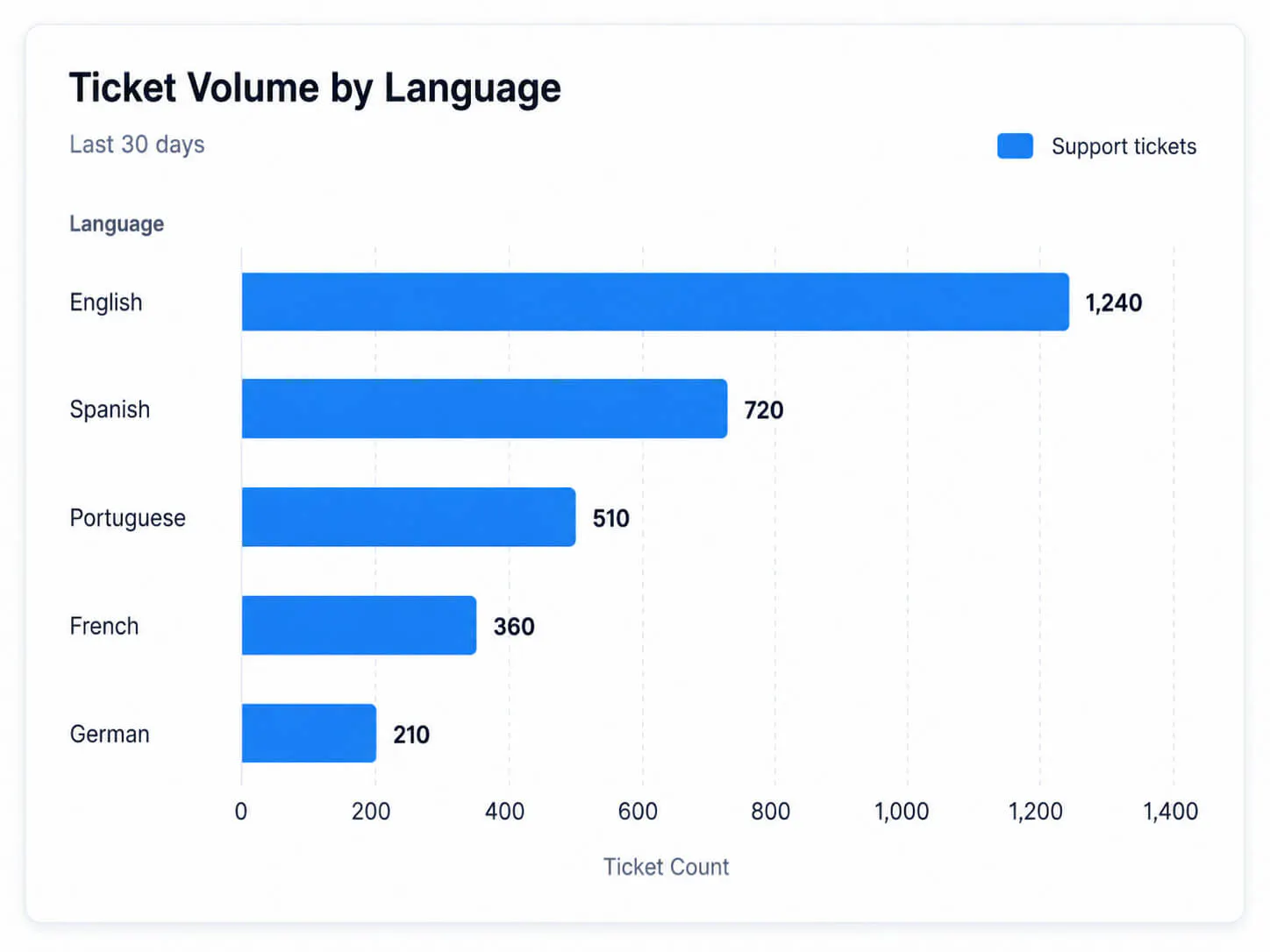
Adding a language you can't properly support is worse than not offering it. A customer who gets a broken experience in their own language trusts you less than one who never had the option to begin with.
How to set up multilingual support in Chatling
Setting this up well comes down to six specific steps, most of which take a few minutes inside your dashboard.
1. Turn on automatic language detection
Don’t make customers choose a language before they can ask for help.
In Chatling, open the widget designer, go to Interface, set Widget language to Auto, and click Save. The AI then detects the visitor’s language from their browser settings and updates the widget text, buttons, placeholders, and system messages automatically.
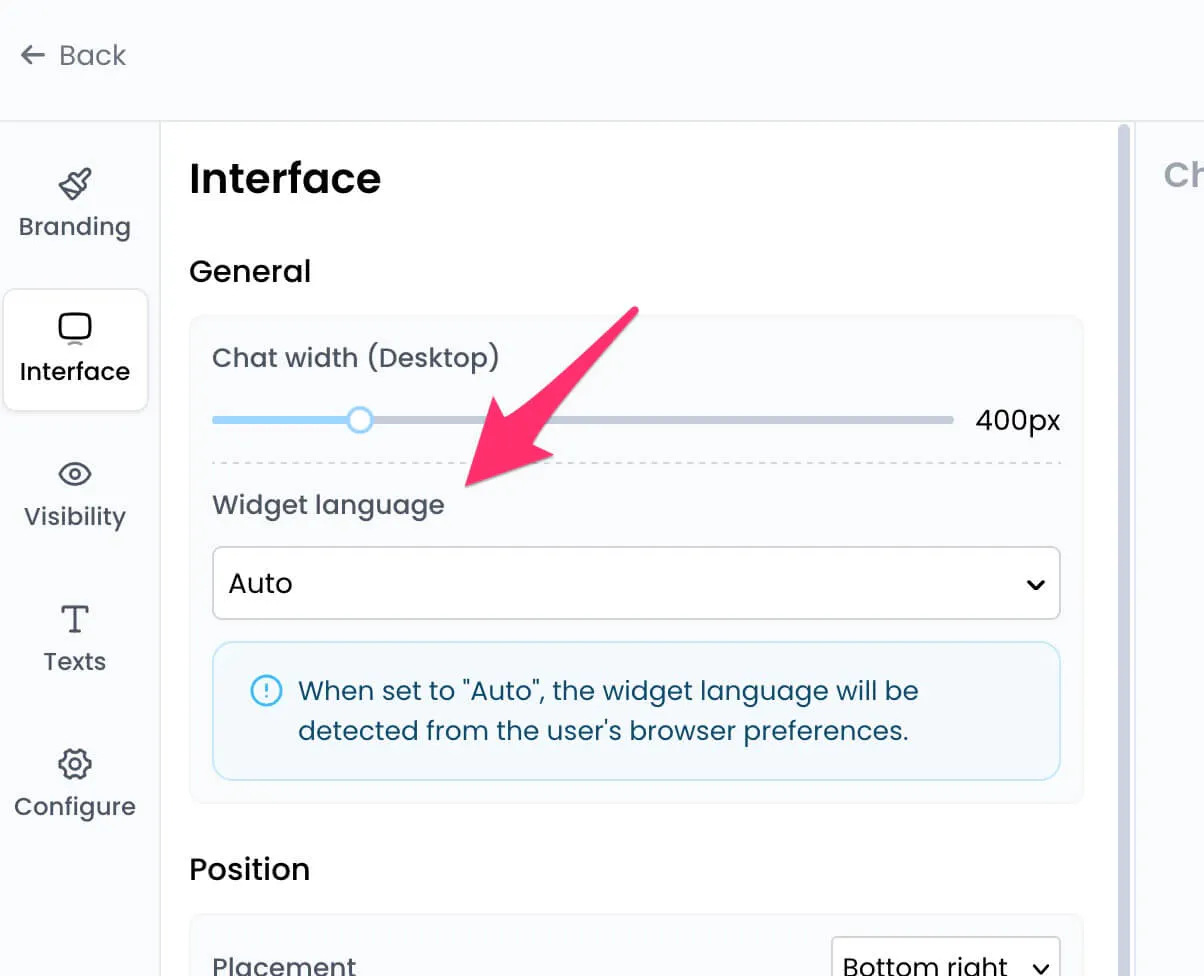
This pairs with Chatling’s multilingual AI support, which lets AI agents understand and reply in 80+ languages. That means international customers can get answers in the language they already use, without your team creating separate chatbot flows for every market.
2. Feed the knowledge base in every language you support
An AI agent is only as good as what it's trained on. In the Knowledge Base tab, add data sources for each language you support. Use URLs, FAQs, or documents, rather than relying on the AI to translate a single English source on the fly.
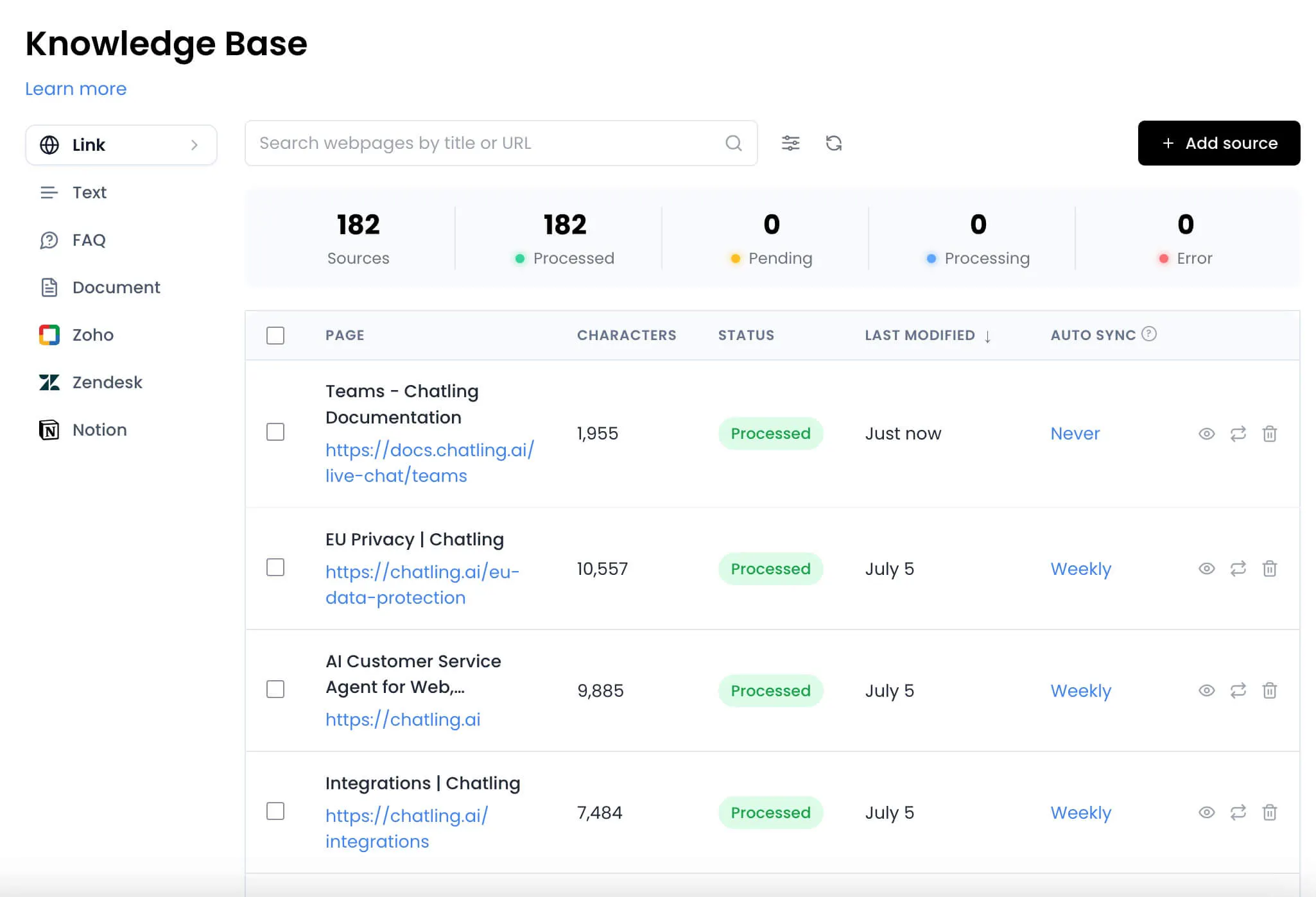
Chatling auto-syncs data sources once set up, so updates to the original content flow through without a manual re-upload. Our guide to building a knowledge base chatbot covers how to structure this properly. That matters even more across languages, since a stale English article is a minor problem, but a stale translated one compounds the confusion. This gets worse when the update involves a pricing change or a policy customers rely on getting right.
4. Pick the AI model that handles your priority languages well
Not every AI model performs the same way in every language. Chatling's Supported AI Models settings let you choose which model powers your chatbot's responses.
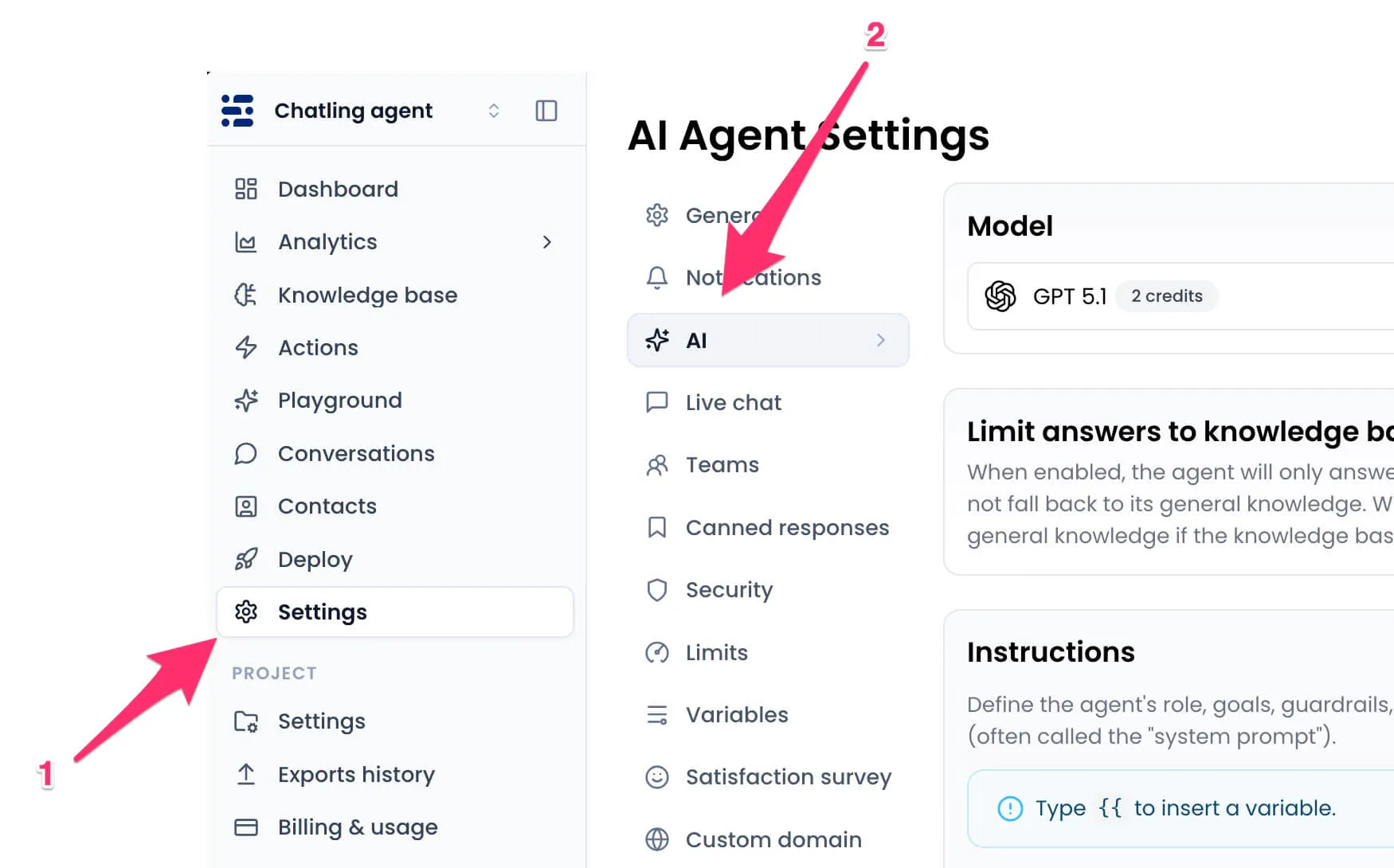
Test more than one against your top-priority languages before settling on a default. A model that sounds natural in English can sound stiff or overly formal once it's replying in another language.
Review a handful of sample conversations in each language with a native speaker before launch. A response can be factually correct and still feel slightly off in a way that a simple fluency check won't catch on its own.
5. Route complex conversations to someone who speaks that language
AI can handle the first response, but complex issues still need the right human backup. Before you launch multilingual support, map the languages your team can actually cover and decide who owns each one.
In Chatling, use human handoff rules for conversations that need a person, such as billing issues, complaints, account-specific requests, or anything the AI cannot resolve confidently. For flow-based chatbots, you can also use conditions to branch conversations by language, so users are not sent to the next available agent by default.
For languages your team does not cover, decide the fallback before tickets arrive. The AI can continue handling simple questions, but sensitive or high-value cases may need a bilingual teammate, external language support, or a clear follow-up process.
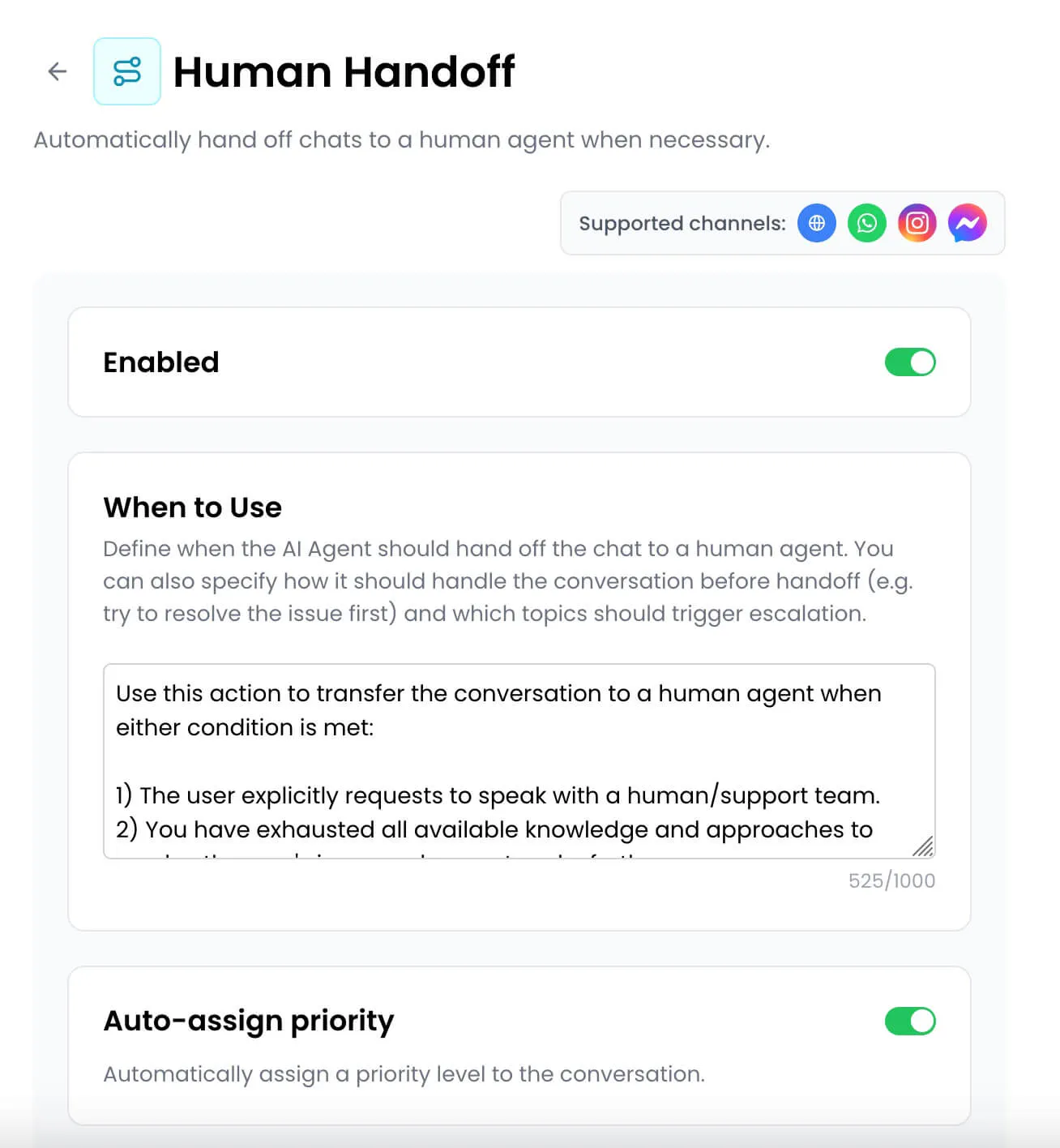
Also account for time zones. If most customers for one language are eight hours ahead, your support window may barely overlap with theirs. Plan coverage, reply-time expectations, and handoff rules before customers start relying on support that is not really available yet.
6. Watch support quality by language
A blended satisfaction score can hide a language that is underperforming. If English support sits at 90% satisfaction and another language sits at 60%, the overall average can still look fine while a real customer segment is having a poor experience.
Review conversations and satisfaction feedback by language on a regular schedule. Chatling lets you collect satisfaction survey responses at the end of chats, view them in Conversations, and track chatbot performance through analytics.
Our guide to chatbot analytics covers metrics like response time, fallback rate, retention rate, conversion rate, and user satisfaction.
The goal is simple: don’t let one weak language get buried inside one company-wide number. Track it separately, fix the source content or handoff path, and keep improving the experience for that market.
Best practices for multilingual customer support
A handful of practices separate multilingual support that genuinely works from a chatbot that merely exists in multiple languages.
Track resolution by language, not just deflection
Our guide to deflection rate covers why a high deflection rate can mean resolution, or mean customers giving up. That gap is often wider in non-English languages. A customer is more likely to abandon a confusing bot than push through it in an unfamiliar language.
Test right-to-left and non-Latin scripts before launch, not after
Arabic and Hebrew read right-to-left, and languages like Japanese and Korean use entirely different character sets. Checking how your chat widget and knowledge base render in these languages ahead of time catches problems real customers would otherwise find first. These issues are often hard to notice unless you're looking for them.
Keep translated content on the same update schedule as the English source
When your knowledge base changes, update every language version at the same time, not whenever someone gets around to it. A customer reading current instructions in their own language should be the norm, not a pleasant surprise. Treating it as an afterthought is how translated content quietly falls out of date.
Train on region-specific content, not one generic version of a language
Spanish for Spain and Spanish for Latin America use different vocabulary and formality norms. The same goes for Portuguese in Portugal versus Brazil, and French in France versus Canada. Generic training reads slightly off to speakers in the "wrong" region. That gap tends to stay invisible until a customer from that region flags it.
Test with real, mixed-language conversations before assuming your AI handles them well
Customers who are bilingual themselves often code-switch, writing part of a message in one language and part in another. Pull a handful of real conversations from bilingual customers. Check whether your AI agent follows the actual intent instead of getting stuck on the mixed phrasing.
Which channels to prioritize for multilingual conversations
Email, live chat, social media, and phone all carry multilingual conversations, but they don't carry equal risk if you get the language wrong:
- Live chat and messaging apps (WhatsApp, Instagram, Facebook): Highest priority. The conversation happens in real time, so there's no chance to reach for a translation tool if something goes wrong.
- Email: Lower urgency. The slower pace gives both sides room to clarify or re-read a confusing reply before it becomes frustrating.
- Social media: Similar to email in pace, but public, so a visible mistranslation is more embarrassing than a private one.
- Phone: Hardest to get right, and the last channel to tackle. It requires either a fluent live agent or a voice AI mature enough to handle accent and tone. A mistranslation here is also harder to walk back mid-call than a text one.
Bringing website, WhatsApp, and Instagram conversations into one inbox, the way Chatling does, means language coverage doesn't have to be rebuilt separately for each channel. See how this looks in practice on the customer support use case page.
Build multilingual support that actually works
Multilingual support is worth doing properly. A chatbot that translates words but misses context, tone, or policy details can damage trust faster than clear English-only support.
Start with the languages your customers actually use. Then train each one with reliable source content, keep your knowledge base chatbot updated, and use automatic language detection so customers do not have to choose a language before getting help.
Chatling also supports auto-syncing knowledge base sources, model selection, and human handoff, so multilingual support can fit into your existing customer service automation workflow instead of becoming another tool to manage.
Frequently asked questions
What’s the difference between bilingual and multilingual customer support?
Bilingual support covers two languages, usually English plus one other. Multilingual support covers three or more languages across support, sales, and self-service. That is where AI can help small teams scale without hiring for every language. See our best multilingual chatbots roundup for tools built for this.
Can AI handle customers who mix two languages in one message?
Yes, but you should test it. Code-switching can confuse basic bots that expect one language per message. Pull real bilingual conversations and check whether your AI agent understands the intent, not just the words. Our AI chatbots for customer support guide compares tools for messier support conversations.
What happens when a ticket comes in a language you don’t support yet?
Set the fallback before it happens. You can route the ticket to a language service provider, reply in your closest supported language, or flag it for someone with partial fluency. Our customer service automation guide covers how routing rules fit into a wider support workflow.
Is multilingual support worth it for a small business?
Yes, if customers are already asking for help in multiple languages. AI agents reduce the cost of offering multilingual customer support because they can answer common questions before a human needs to step in. See Chatling’s customer support chatbot page for how smaller teams can automate support without adding headcount.